What Is claude-plugins-official? Anthropic's Official Claude Code Plugin Directory
How to Use It, How It Differs from Cursor Plugins, and Safety Tips
Anthropic official Claude Code plugin directory (315 plugins, Apache-2.0): install, team setup, Cursor plugins comparison, security. Updated Oct 2026.
anthropics/claude-plugins-official is Anthropic's official directory (marketplace) of Claude Code plugins, managed on GitHub. A plugin bundles skills, commands, agents, hooks and MCP servers into one package you can install with a single /plugin install command. The claude-plugins-official marketplace is the default catalog Claude Code registers automatically in your first interactive session (about 42.7k GitHub stars and Apache-2.0 licensed as of October 19, 2026).
In short, the plugin system adds no cost beyond your normal Claude Code usage. However, most listed plugins come from partners and other third parties, and they can run code on your machine through hooks and MCP servers. Being in the official directory is not a guarantee of safety, so review a plugin's contents and stick to sources you trust.
What claude-plugins-official is and what it can do
A plugin is the unit for adding features to Claude Code. One plugin can include the following parts, and installing it enables them together (per the official docs).
- Skills and commands: instructions (SKILL.md) and slash commands invoked as /plugin-name:command-name
- Agents: definitions for specialized subagents
- Hooks: shell commands that run around tool calls and other events (auto-formatting, checks)
- MCP servers: connections to external services such as GitHub, Slack, Linear and Notion
- LSP servers: language-server code intelligence (official plugins cover 13 languages including TypeScript and Python)
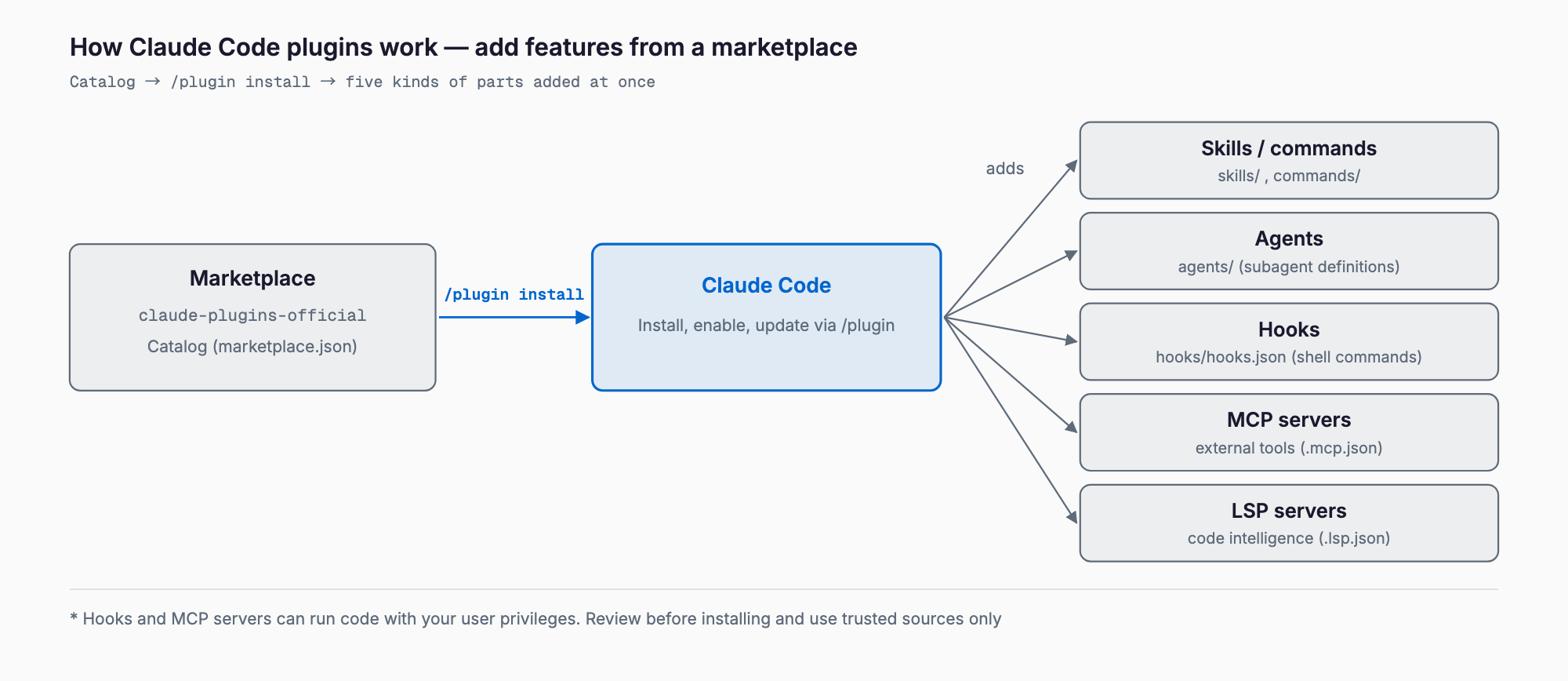
You search plugins listed in a catalog (marketplace.json) from /plugin and install them. Instead of registering MCP servers and writing hook config by hand, you get one unit to install. For how hooks and MCP work on their own, see the Claude Code Hooks guide and the Claude Code MCP integration guide.
Size, categories, and official vs. partner vs. community
Counting .claude-plugin/marketplace.json in the repository on October 19, 2026 gives 315 entries (the number changes often, so treat it as a snapshot). The breakdown is:
- Built by Anthropic (/plugins): 39 entries, such as commit-commands, code-review, feature-dev, security-guidance and the language-server plugins
- External slot inside the repo (/external_plugins): 14 entries, such as github, linear, playwright and asana
- Entries pointing to other repositories: 262, referencing each vendor's or author's GitHub repo via url or git-subdir (many pinned to a commit SHA)
By category, development leads with 123 entries, followed by productivity 69, database 39, monitoring 22, security 18, deployment 9 and design 8 (plus a few small categories and 14 entries with no category). Tool vendors such as AWS, Azure, Atlassian, Airtable and Auth0 publish plugins that connect their own services. The official docs also say most of the catalog comes from partners and other authors, with a smaller set maintained by Anthropic.
The tiers work like this. The official repository (claude-plugins-official) holds both Anthropic-built and partner-built plugins, while community submissions live in a separate repository, anthropics/claude-plugins-community (marketplace name claude-community). Anthropic does not review third-party marketplaces, so anything beyond those is at your own risk. On the web Claude Marketplace, some plugins carry an "Anthropic verified" mark.
Install and pricing
Here are the steps. Claude Code adds the official marketplace automatically the first time you start an interactive session, so registration is normally unnecessary.
# Inside a Claude Code session
/plugin install commit-commands@claude-plugins-official

# Or browse and search (Discover tab)
/plugin

# From your shell (user scope by default)
claude plugin install commit-commands@claude-plugins-official --scope project
Inside a session, /plugin install does not install immediately. It opens a details view where you review the "Will install" list (commands, agents, skills, hooks, MCP and LSP servers), then choose a scope. There are three scopes.
- User: enabled in all your projects (~/.claude/settings.json)
- Project: enabled for everyone in that repository (.claude/settings.json)
- Local: only for you, only in that repository (.claude/settings.local.json)
The only cost is your Claude Code usage. The plugin system and this directory are free, the repository is Apache-2.0, and each plugin follows its own license. Paid SaaS accounts that partner plugins connect to, and any external APIs that hooks or MCP servers call, are billed separately.
How to use it (shortest path)
- Start Claude Code, run /plugin and search the Discover tab (or run /plugin install name@claude-plugins-official)
- Read the "Will install" list in the details view, pick a scope and confirm
- Check the completion message, then type / and confirm that /plugin-name:skill-name appears (run /reload-plugins if it is pending)
- If it is not useful, disable or remove it on the Installed tab of /plugin (claude plugin disable and uninstall also work)
You manage everything on the Installed tab of /plugin. Auto-update is on by default for the official marketplace and off by default for other marketplaces, which you can toggle on the Marketplaces tab.
Sharing with a team (.claude/settings.json)
Putting config in a project's .claude/settings.json lets everyone on the repository get the same plugins. Register the marketplace with extraKnownMarketplaces and enable plugins with enabledPlugins as plugin-name@marketplace-name (simplified from the official docs).
{
  "extraKnownMarketplaces": {
    "your-marketplace": {
      "source": { "source": "github", "repo": "your-org/your-marketplace" }
    }
  },
  "enabledPlugins": {
    "code-formatter@your-marketplace": true
  }
}
Two caveats apply. A repository's extraKnownMarketplaces takes effect only after the user trusts the folder. And if a plugin points to an external repository, committing the setting does not download it: each member must run claude plugin install name@marketplace --scope project once. To enforce rules company-wide, managed settings can limit allowed marketplaces with strictKnownMarketplaces.
Building a plugin and submitting it
A minimal plugin has .claude-plugin/plugin.json (only name is required, in kebab-case) plus whichever of skills/, commands/, agents/, hooks/hooks.json and .mcp.json you need. Even plugin.json is optional; without it Claude Code picks up parts from the standard layout. Validate with claude plugin validate ./my-plugin. Names starting with claude- or anthropic- fail validation because they could pass as Anthropic's own.
To get listed in the official directory, apply through the plugin submission form that the README points to. The README requires meeting quality and security standards, but the exact review process and timeline are not published. If you only want to distribute your own plugin, no review is needed: put .claude-plugin/marketplace.json in a GitHub repository and have users run /plugin marketplace add owner/repo.
How it differs from the alternatives (Cursor plugins, claude-code-templates and more)
People often search "claude code plugins cursor plugins" together, so here is how the nearby options compare. Cursor's plugins follow Cursor's own spec (cursor/plugins): the structure looks similar, but the target editor is different.
| Option | What it is | Unit shipped | Caveats |
|---|---|---|---|
| claude-plugins-official (Claude Code official plugins) | Claude Code's default catalog with Anthropic-built and partner plugins (315 entries), installed via /plugin install | A bundle of skills, commands, agents, hooks, MCP and LSP | Listing is not a safety guarantee; hooks and MCP can run code locally |
Cursor plugins (cursor/plugins) | Cursor's plugin spec plus official plugins (about 100, MIT), with .cursor-plugin/plugin.json and a marketplace manifest | Skills, rules (.mdc) and MCP definitions | Built for Cursor; the README gives no install or publish steps, and it does not work in Claude Code |
| claude-code-templates | A community CLI that installs agents, MCP servers, hooks and more by command | Individual templates | A separate mechanism from the official directory; setup guide |
| Installing an MCP server alone | Register only an external tool with claude mcp add | One MCP server | No skills or hooks; manual setup |
| Agent Skills alone | A SKILL.md instruction file | One skill | The lightest option, but MCP and hooks are separate |
As a rule of thumb: pick an official-directory plugin when you want to connect an external SaaS or get several parts at once; use a standalone skill to add one personal procedure; use a standalone MCP server to try a single connection. There is also a vendor-neutral effort to share the plugin format across tools, Agent Plugins 1.0.
A concrete plugin you can try is the diagram skill diagram-design.
Security cautions
The official docs state plainly that a plugin can run arbitrary code with your user privileges. In particular:
- Hooks: run as shell commands with your privileges, outside Claude Code's sandbox
- MCP and LSP servers: started as local processes
- The bin/ directory: added to the Bash tool's PATH while the plugin is enabled
- Skills, commands and agents: enter Claude's context as instructions and shape its behavior
- Auto-update: for enabled marketplaces, files you reviewed can change on disk later
Before installing: (1) check the source with claude plugin marketplace list, (2) read the "Will install" list in the /plugin details, and (3) read hooks/hooks.json, .mcp.json and bin/ on GitHub. After installing, claude plugin details name lists the parts. If you stop trusting a plugin, remove it with claude plugin uninstall. Organizations can restrict allowed marketplaces in managed settings and block side-loading such as --plugin-dir with disableSideloadFlags.
FAQ
Is claude-plugins-official free?
The directory and the plugin system add no charge; you pay for Claude Code usage. The repository is Apache-2.0 and each plugin follows its own license. SaaS subscriptions that partner plugins connect to, and external API costs, may be billed separately.
Are plugins in the official marketplace safe?
There is no guarantee. The official docs say Anthropic does not control the MCP servers or files inside plugins and cannot verify that they will not change. Most entries are third-party. Review hooks and MCP definitions before installing.
Why doesn't /plugin install install right away?
Inside a session it opens a details view and installs only after you choose a scope and confirm. Running claude plugin install name@marketplace from your shell installs without that screen.
Can Cursor plugins be used in Claude Code?
Not as they are. Cursor uses .cursor-plugin/plugin.json while Claude Code uses .claude-plugin/plugin.json, and the specs differ. Parts written around common ideas, like SKILL.md skills, may be easier to port.
How do I get my plugin listed in the official directory?
Apply through the submission form in the README. The condition is meeting quality and security standards, but review details are not published. If you only need to distribute it, host a marketplace.json in your own GitHub repository.
Summary
- claude-plugins-official is Anthropic's managed official directory of Claude Code plugins (315 entries, Apache-2.0)
- Install with /plugin install name@claude-plugins-official; the only cost is Claude Code usage
- Most entries are partner-built; community submissions live in a separate claude-community marketplace
- Share with a team via extraKnownMarketplaces and enabledPlugins in .claude/settings.json
- Hooks and MCP can run code locally, so review contents first and use trusted sources only
Start with a small Anthropic-built plugin such as commit-commands to learn the flow and the details view, then move on to plugins that connect external services.
Related free tools (no sign-up, instant results)
Feel free to contact us
Contact Us