PHP Critical Unauthenticated RCE Flaws (CVE-2026-109618 / 109619)
How to Update to 8.5.12 / 8.4.27 / 8.3.36 / 8.2.35 and What to Do Right Now [Published October 21, 2026]
PHP 8.5.12/8.4.27/8.3.36/8.2.35 fix two unauthenticated RCE flaws (CVSS 9.2). mod_php is riskiest; only updating fully fixes them; 8.1 and older get no fix.
On October 21, 2026, the PHP project released fixes ahead of schedule for two critical flaws (CVE-2026-109618 / CVE-2026-109619) that can allow unauthenticated remote code execution (RCE): PHP 8.5.12 / 8.4.27 / 8.3.36 / 8.2.35. The release notes state that there are no complete mitigations and that updating is the only safe choice. Any PHP that handles web requests should be updated first.
This article is based on the official PHP advisory, the GitHub advisories, IPA, and vendor analyses as of 23:00 JST on October 21, 2026. Sources disagree on whether exploitation is under way, so each claim is attributed. Procedures come first, and where the official sources say nothing, we write "not stated officially."
What Happened: From the Leak to the Early Release
It began when the existence of the flaws leaked before the planned disclosure date. The PHP team had reserved the right to release early if details became public, and that is what happened. The timeline follows.
| Date and time (JST / UTC) | Event | |
|---|---|---|
| Oct 20, morning US Eastern (exact JST / UTC time not stated officially) | A Hacker News post said two critical PHP flaws would be disclosed on Oct 22; it was later deleted. The CVE numbers and a "CVSS 10.0" claim spread | |
| Oct 20 | Benjamin Harris of watchTowr told BleepingComputer the leak was genuine. watchTowr reproduced CVE-2026-109618 but said it would withhold technical details until a patch shipped. It reported no exploitation | |
| Oct 20 | The PHP project posted "Upcoming Critical PHP Security Release," announcing a release at 14:00 UTC (23:00 JST) on Oct 21 and reserving the right to release earlier if details leaked or active exploitation was confirmed | |
| Oct 21, 07:43 UTC (16:43 JST) | Cloudflare CTO Dane Knecht said Cloudflare was seeing early attacks and called its mitigations a stopgap | |
| Oct 21 | IPA published a preparation notice (stating it had not confirmed any exploited attacks). Six Apart (Movable Type) and PowerCMS also issued notices | |
| Oct 21 (time not stated officially) | Oct 21, afternoon onward | In Japan, several companies and services announced precautionary shutdowns or maintenance, including Uma Musume (official X account announced maintenance from around 23:00, per Dengeki Online), BASE, Cygames and CoDMON (as compiled by piyolog) |
| Oct 21, about 13:36 UTC (about 22:36 JST) | About 25 minutes ahead of schedule, the fixed versions 8.5.12 / 8.4.27 / 8.3.36 / 8.2.35 and the official advisory were published |
Note where the CVE numbers came from. The Oct 20 pre-announcement carried no CVE numbers; they circulated via CERT-EU's notice (SA2026-018) and the leak. The Oct 21 advisory confirmed CVE-2026-109618 (GHSA-w8hw-w9fx-j79w) and CVE-2026-109619 (GHSA-6wmf-4rv5-p3rp). On severity, the leak reports said "CVSS 10.0," whereas the official rating is CVSS v4.0 9.2 (Critical) for both. The original embargo date was Thursday, Oct 22 at 11:00 ET (per watchTowr's post on X).
Inside the Flaws: OOM Corruption and Stale Global State, with mod_php at Highest Risk
According to the official PHP advisory, the affected scope is "every PHP environment that processes web requests," including PHP-FPM, Apache mod_php, php-cgi, FrankenPHP, and LiteSpeed. Among them, "mod_php is the highest risk": an exploit that fires with an unauthenticated request before application code runs has been demonstrated. The two flaws compare as follows.
| Item | CVE-2026-109618 | CVE-2026-109619 |
|---|---|---|
| Name (GitHub advisory) | RCE via OOM corruption | RCE via stale global state |
| Mechanism (official advisory wording) | Out-of-memory (OOM) handling can abort PHP while internal request data is only partly initialized. Later post-request cleanup then treats the invalid data as valid | Request-owned internal state can outlive the memory that backs it. A later request handled by the same worker can use that stale state before normal initialization resets it |
| Triggers (GitHub advisory) | Ways to cause OOM include multipart requests without a usable Content-Length, unbounded headers on multipart parts, empty file controls (not counted in max_file_uploads), and nested field names | A "producer" (fatal errors such as parse/compile failures, uncaught errors, failed require, timeouts, OOM) combined with a "consumer" (INI diagnostics before request initialization such as deprecated settings or invalid values, and session upload progress handling, which needs no session_start() and is on by default). Both must hit the same worker |
| Confirmed SAPI | mod_php (the GitHub advisory reports a verified full RCE; the per-CVE breakdown is not stated officially) | mod_php and FPM (the session upload progress path is verified) |
| CVSS v4.0 | 9.2 (Critical) | 9.2 (Critical) |
| CWE | CWE-416 / 755 / 824 / 1325 / 1419 (listed jointly for both) | CWE-416 / 755 / 824 / 1325 / 1419 (listed jointly for both) |
Per the GitHub advisories, exposure by SAPI is as follows. mod_php is a confirmed RCE path, because php_value / php_flag from .htaccess and per-directory settings are applied before the request starts; a full RCE over HTTP is verified with default input and memory limits and a normal prefork setup. PHP-FPM has limited exposure because it exits child processes on startup failure, but it can be reached through OOM after a normal start. A full FPM exploit is not demonstrated, and setups where the front end passes PHP_VALUE / PHP_ADMIN_VALUE are conditionally exposed. FrankenPHP most likely calls shutdown unconditionally as mod_php does and is "probably affected," and LSAPI (LiteSpeed) is "likely but unverified." The impact is unauthenticated RCE with the web worker's privileges plus memory disclosure, and reliability depends on the build, extensions, front end, and allocator layout. The CVSS vector is CVSS:4.0/AV:N/AC:H/AT:P/PR:N/UI:N/VC:H/VI:H/VA:H: attack complexity is high and an attack requirement exists, but no privileges and no user interaction are needed.
Sources disagree on exploitation. Cloudflare's CTO said on the morning of Oct 21 (UTC) that it was seeing early attacks. IPA has not confirmed any exploited attacks, and watchTowr had observed none as of Oct 20. According to Tenable, the flaws are not in CISA's KEV catalog. Several codes claiming to be PoCs are circulating; Tenable warns it has not verified them and that unverified exploit code may contain malware, while Sansec expects mass attacks to begin within 15 minutes of release. The official PHP advisory does not mention exploitation, so an official confirmation of exploitation is "not stated officially."
Affected Versions and Support Status: No Official Fix for 8.1 and Older
According to the official PHP advisory, versions below 8.2.35, 8.3.36, 8.4.27, and 8.5.12 are affected. 8.1 and older are outside the PHP project's update scope, so no official fix is coming. Here are the branches alongside php.net's support dates (as of 2026-10-21).
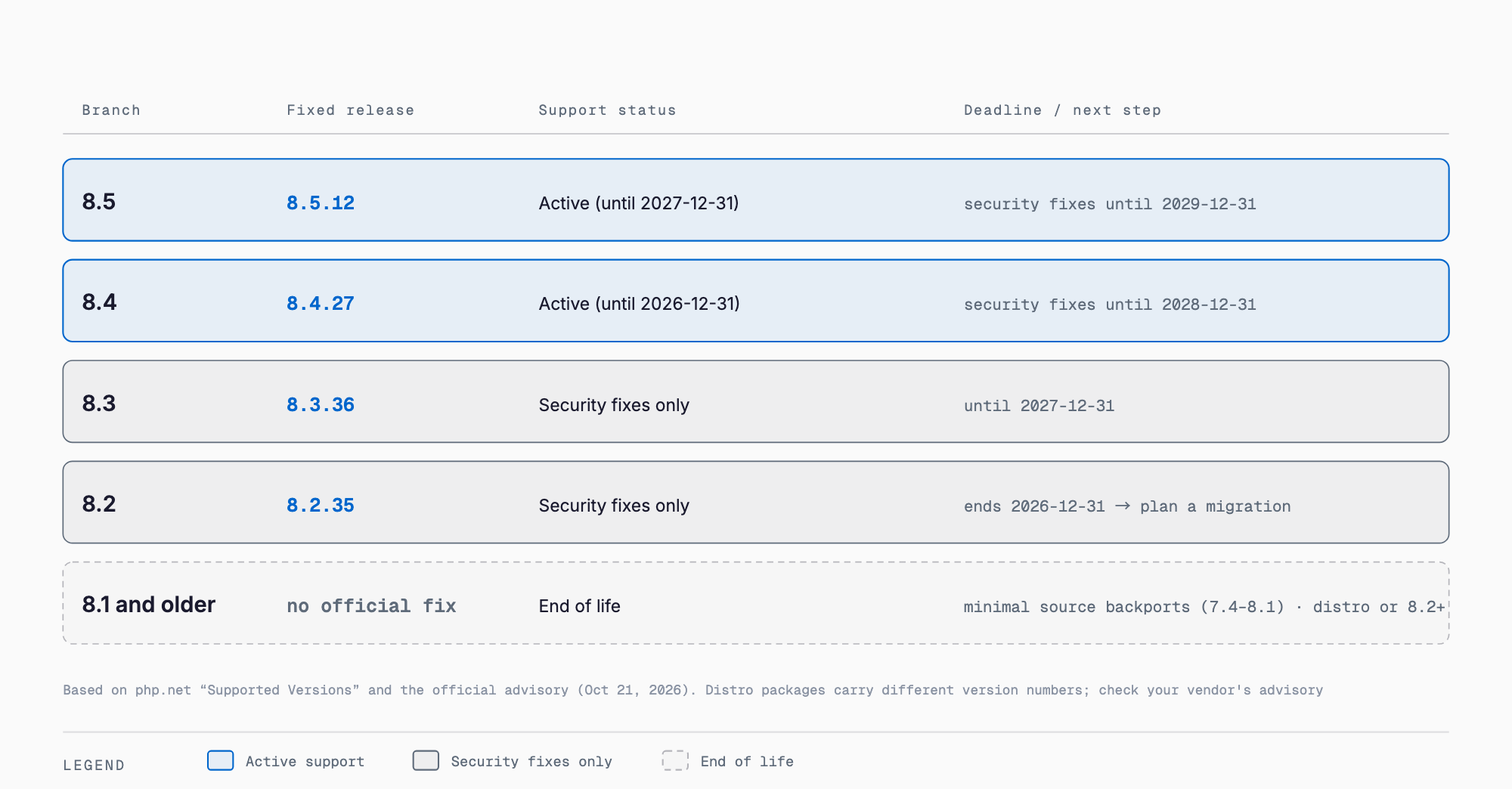
| Branch | Fixed version | Support status | Deadline |
|---|---|---|---|
| 8.5 | 8.5.12 | Active | Active support until 2027-12-31, security support until 2029-12-31 |
| 8.4 | 8.4.27 | Active | Active support until 2026-12-31, security support until 2028-12-31 |
| 8.3 | 8.3.36 | Security fixes only | Security support until 2027-12-31 (active support ended 2025-12-31) |
| 8.2 | 8.2.35 | Security fixes only | Security support ends 2026-12-31 |
| 8.1 and older (8.1 / 8.0 / 7.x / 5.x) | No official fix | EOL (ended) | Already ended |
Even on 8.1 and older, options remain. According to the official PHP advisory, some distributions and LTS vendors provide backports, so check with your vendor or move to a supported version. Given the severity, the PHP security team also provides minimal source backports for PHP 7.4 / 8.0 / 8.1 as GitHub branches (such as PHP-7.4-CVE-2026-109618-109619), aimed at people who build from source or have no LTS vendor. Linux distributions and LTS vendors received the patches in advance, so first check your vendor's update packages. Distribution package numbers differ from upstream (Ubuntu, for example, only bumps the package revision, as in 8.1.2-1ubuntu2.x), so judge by the package revision and the distribution's notice rather than the version number. For how to read distribution notices, see our Linux kernel vulnerability response summary. As of writing (22:50 JST), no Debian DSA or Ubuntu USN had been confirmed. For users of the volunteer-run Remi repository, the official advisory strongly urges switching to distribution packages or building from source, and the repository will not be updated that day. PHP 8.2 reaches EOL on December 31, 2026 and will receive no fixes after that.
Response Steps: Five Phases from Inventory to Compromise Check
Work in this order: inventory, temporary mitigation (only if you cannot update), applying the fixed version, a compromise check, and resolving EOL. Mitigations are not a substitute for the fix, so aim to get the fixed version in as soon as possible.
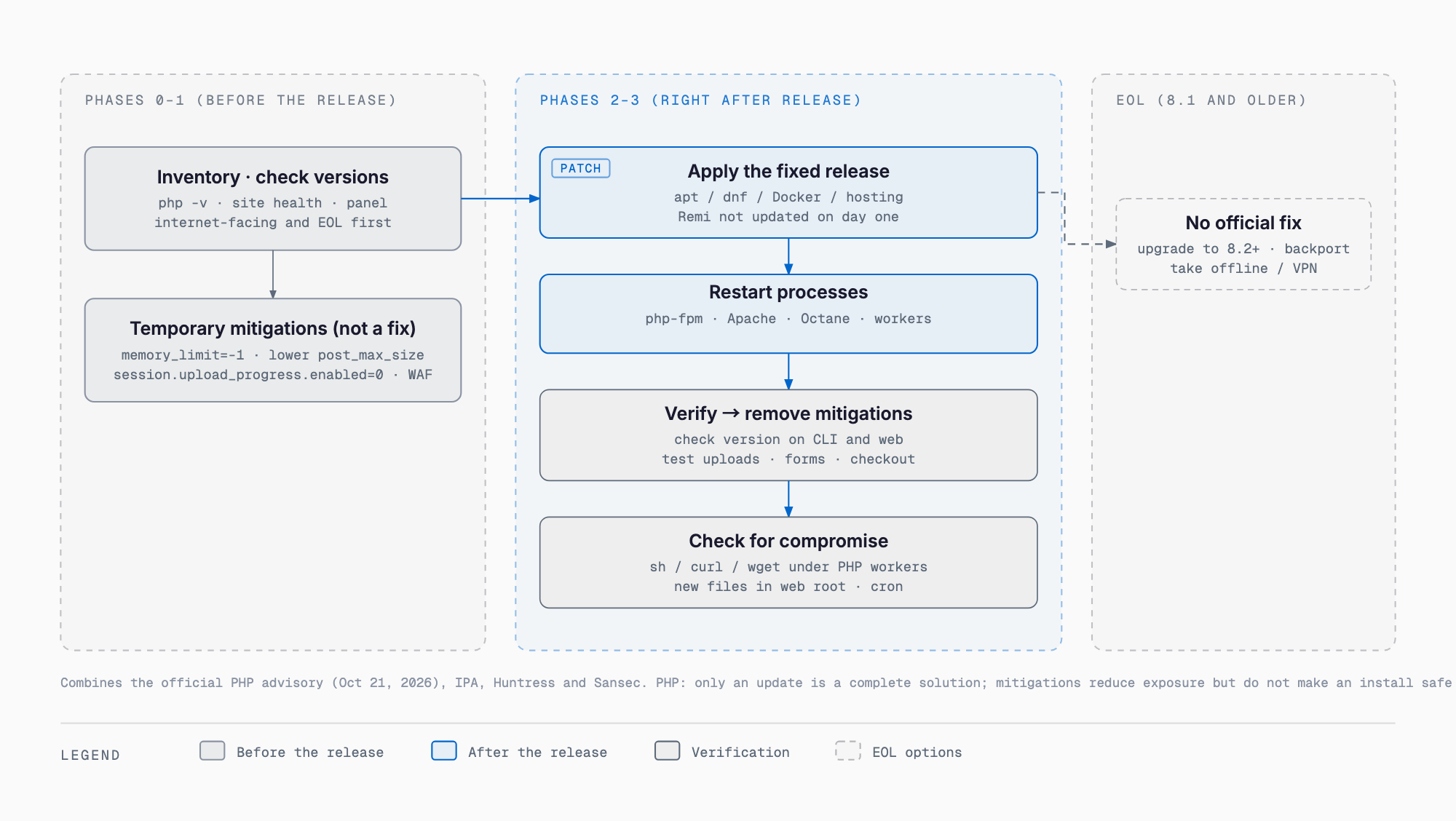
Phase 0: Inventory (right now)
- List everything that runs PHP, as far as you can (IPA). Easy to miss: WordPress on shared hosting, e-commerce, internal tools, and PHP embedded in products (Huntress)
- Four ways to check the version: php -v on the CLI; a temporary file containing phpinfo() for the web (delete it right after); in WordPress, Tools → Site Health → Info → Server; and the PHP version setting in a hosting control panel
- Prioritize internet-facing systems first (Huntress). EOL versions get special priority because attackers may exploit them quickly (IPA)
- For PHP embedded in products, IPA says to check the manual or the vendor's security information; it does not ask you to investigate every product individually
# Check the CLI PHP version (the web side may run a different version)
php -v
Phase 1: Mitigation if you cannot update right away (optional; none of these is a fix)
The official PHP advisory states that updating is the only complete fix and that the measures below reduce exposure to specific attack paths without making you safe. If you can update, skip mitigation and go to Phase 2.
| CVE | Mitigation | Where to set it | Scope and caveats |
|---|---|---|---|
| 109618 | memory_limit=-1 | php_admin_value in the FPM pool or Apache config (so the app cannot override it). Confirm no finite limit remains in the pool, directory, or app | Removes failures at the controllable PHP memory limit, but underlying allocation failures can still reach the vulnerable path |
| 109618 | Lower post_max_size | php.ini | 8M if you need no file uploads, 32M if you do. Keep upload_max_filesize below post_max_size |
| 109618 | Web server / proxy limits | Web server and proxy layer | Enforce limits on decoded request size, input field count, multipart part count, header count, and nesting depth, in a form that also works for requests without a usable Content-Length |
| 109618 | Container / cgroup memory limit | Container or cgroup | Use it as an availability boundary (a policy that kills only the affected worker is preferred). Do not substitute RLIMIT_AS / RLIMIT_DATA, which can themselves cause the vulnerable allocation failures |
| 109619 | session.upload_progress.enabled=0 | php.ini, FPM pool, server config, or anywhere applied before request parsing. Restart all workers | Blocks the confirmed session path but not other variants. Do not rely on ini_set() or the FPM .user.ini |
| 109619 | fatal_error_backtraces=0 (PHP 8.5 only) | php.ini or similar. Restart all workers | Blocks only the confirmed fatal backtrace path |
| 109619 | Remove invalid or deprecated INI settings | Configuration in general | Targets settings that are applied per request and emit diagnostics before initialization. Hiding diagnostics with error_reporting, display_errors, or @ does not help |
| 109619 | Fix fatal errors and timeouts | Application | Fix those an attacker can reach (including failures in callbacks, upload/import handling, and cleanup). The GitHub advisory also lists FPM pm.max_requests=1 if performance allows, and making sure attackers cannot reliably trigger "Maximum execution time exceeded" |
| Both | Temporarily block multipart/form-data | Web server or front end | Spread before the release and consistent with the GitHub advisory's "block at the front end if you do not use multipart." It is not the official first recommendation, and it stops file uploads and form posts. Remove it after patching |
; php.ini example (post_max_size: 8M if no uploads are needed, 32M if they are)
memory_limit = -1
post_max_size = 8M
upload_max_filesize = 2M
session.upload_progress.enabled = 0
; PHP 8.5 only
fatal_error_backtraces = 0

; FPM pool example (set so the app cannot override it)
php_admin_value[memory_limit] = -1
php_admin_flag[session.upload_progress.enabled] = off
# Temporary multipart/form-data block (tested by Sansec and Geniar; remove after patching)
map $http_content_type $block_multipart {
default 0;
"~*multipart" 1;
}
# Place the following inside the server {} that serves PHP
if ($block_multipart) {
return 403;
}
# Read-only mode (forms, logins, and payments stop working)
if ($request_method !~ ^(GET|HEAD)$) {
return 503;
}# Apache 2.4 multipart block (.htaccess also works if AllowOverride permits)
<If "req('Content-Type') =~ /multipart/i">
Require all denied
</If>As for WAFs, Cloudflare distributed emergency WAF rules including to free plans. But Cloudflare's own CTO calls them a stopgap, and Sansec and Geniar point out that unless you restrict direct access to the origin server to Cloudflare's IP ranges, attackers can bypass it. Geniar gives a custom rule example (unverified): any(lower(http.request.headers["content-type"][*])[*]) contains "multipart". According to Sansec, maintenance modes in Magento and WordPress run after PHP has parsed the request, so they do not help against this flaw.
What does not work, and what not to do
- file_uploads = Off — per Geniar, multipart bodies are still parsed, so it does not help
- Relying only on a smaller post_max_size — Geniar says a safe value is unknown; the official advisory also does not treat it as a substitute for updating
- enable_post_data_reading = Off — breaks forms (Geniar)
- Application-layer checks — CSRF and login checks run after PHP parses the body (Geniar)
- A WAF with a directly reachable origin — it can be bypassed
- Disabling only Apache's PHP handler — .php files are served as source and credentials leak. If you must stop, stop the whole web server or return 503 (Geniar)
- Settings via ini_set() or .user.ini — the official advisory says not to rely on them (use settings applied before request parsing)
- Hiding diagnostics with error_reporting or @ — does not help (official advisory)
Phase 2: Apply the fixed version (right after release)
| Environment | Steps |
|---|---|
| Debian / Ubuntu (distribution packages) | sudo apt update && sudo apt upgrade. The php8.x-* packages are updated. Confirm the target versions in the distribution's security notice |
| RHEL / AlmaLinux / Rocky | sudo dnf update php*. Remi repository users should note that no update was due on Oct 21 and switch to the standard distribution packages or build from source |
| Docker | Move official images such as php:8.x-fpm to a fixed tag, then rebuild and redeploy |
| Shared hosting / managed hosting | Check the provider's notice and switch the PHP version to a fixed one in the control panel. Some providers update everything at once |
| macOS Homebrew; Windows XAMPP / software bundling php.exe | Wait for each distributor's update, then apply it. Windows sources and binaries are also on php.net's downloads page |
| Source builds; PHP 7.4 to 8.1 | Use the source from the official downloads page. For 7.4 / 8.0 / 8.1, use the minimal backports such as PHP-7.4-CVE-2026-109618-109619, or packages from a distribution or LTS vendor |
# Debian / Ubuntu
sudo apt update && sudo apt upgrade

# RHEL / AlmaLinux / Rocky
sudo dnf update php*

# Always restart after applying (replace php8.x with your actual version)
sudo systemctl restart php8.x-fpm
sudo systemctl restart apache2
sudo systemctl restart nginx

# Verify
php -v
Always restart the processes after applying. php-fpm, Apache (mod_php), Laravel Octane, queue workers, and the like keep old code in memory (Geniar). Verify with both php -v and the web side (phpinfo or the CMS Site Health), because the CLI and the web can run different PHP builds. Afterward, remove the blocking rules and temporary settings from Phase 1, and test uploads, forms, and payments. The GitHub advisory suggests leaving session.upload_progress disabled after the update if you do not need it. Whether to revert fatal_error_backtraces (PHP 8.5) after updating is not stated officially.
Phase 3: Check for compromise (some sources say attacks were seen before the release)
- Huntress angle 1: Do PHP workers (php-fpm, php-cgi, httpd, apache2) have child processes that are shells (sh, bash, cmd.exe, powershell.exe), interpreters (python, perl), or download/network tools (curl, wget, nc, certutil.exe)?
- Huntress angle 2: Are there reverse-shell patterns (/dev/tcp/, fsockopen, mkfifo)?
- Huntress angle 3: Are there reconnaissance commands run from the web server (whoami, id, uname -a, ipconfig)?
- Huntress angle 4: Are there new files or web shells in the web root, or new cron jobs, scheduled tasks, or accounts?
- Preserve logs: if compromise is suspected, preserve the web server and PHP logs
- Isolate: isolate suspicious servers from the network (Huntress)
- On Linux without EDR, one option is to start Florian Roth's process-watcher in observation mode
Phase 4: If you keep running an EOL version
No official fix will come. Huntress and IPA list four options: upgrade to a supported branch (8.2 or later), apply a distribution backport, take the system offline, or isolate it behind a VPN or WAF. IPA asks that EOL versions be handled with special priority. 8.2 security support ends on 2026-12-31, and 8.4 active support ends the same day. Use this response to plan the move to 8.3 / 8.4 / 8.5.
What WordPress, E-Commerce, and Shared-Hosting Users Should Do
Updating WordPress core does not update PHP. Fixing PHP is server-side work. First check the PHP version under Tools → Site Health → Info → Server in the admin screen. If it is not a fixed version, read your hosting provider's notice and switch the PHP version in the control panel. Some providers update everything at once, but each provider's completion time is not stated officially. For Movable Type, Six Apart updates the cloud edition right after the fixed versions are released, so users need do nothing (including environments with auto-update disabled), while users of the software and AMI editions must update PHP themselves. In Japan, several services, including Uma Musume (official X account announced maintenance from around 23:00, per Dengeki Online), BASE, Cygames and CoDMON, shut down pre-emptively to wait for the patch (as compiled by piyolog). For e-commerce on WooCommerce or Magento, as Sansec points out, maintenance mode will not stop the attack, and a read-only mode also stops carts and payments, so prioritize updating.
For a precedent of the same kind, see our urgent explainer on the WordPress "wp2shell" unauthenticated RCE; for update-operations basics, WordPress maintenance in practice; and for how to act in the first 30 minutes, our IT emergency first-response guide.
Lessons: Don't Leave End-of-Life PHP Behind
- Keep an inventory ledger: list which PHP runs on which server and product. Whether an inventory like this one takes hours or days depends on having a ledger
- Track support deadlines: 8.2 ends on 2026-12-31. Plan the migration half a year before a deadline
- Rehearse the update procedure in staging: confirm uploads, forms, and payments work before touching production
- Make logs preservable: check how long web server and PHP logs are retained
- Set up a WAF and origin restrictions: do not only put a WAF in front; also restrict direct access to the origin
- Make vulnerability assessments routine: have outside eyes check that no forgotten PHP remains
For the overall preparation, see the SMB IT risk guide and the complete maintenance and operations guide, and for what an assessment costs, vulnerability assessment and penetration test pricing.
FAQ
How do I check whether my site is affected?
Any PHP that handles web requests is affected if its version is below 8.2.35 / 8.3.36 / 8.4.27 / 8.5.12. Check the CLI with php -v, the web with a temporary phpinfo file (delete it afterward), WordPress through Site Health in the admin screen, and shared hosting through the control panel. Distribution package numbers differ from upstream, so use the distribution's notice to judge whether a package is fixed.
Is updating WordPress enough?
No. This flaw is in PHP itself, not WordPress, and updating WordPress does not change PHP. Check the PHP version in Site Health and update it to a fixed version on the server side.
Do I need to do anything on shared hosting?
Some providers update everything at once, but each provider's completion time is not stated officially. Read your provider's notice and confirm in the control panel that the PHP version is a fixed one. If a switch is needed, do it yourself.
What should I do about 8.1 and older?
No official fix will come from the PHP project. Check backports from distributions or LTS vendors, or use the minimal source backports for 7.4 / 8.0 / 8.1 published by the PHP security team. Fundamentally, you need to move to a supported version.
Is disabling session.upload_progress enough?
It does not make you safe. According to the official PHP advisory, it blocks the confirmed session path but not other variants. Ondřej Surý called it at best a temporary and incomplete stopgap, and Joe Ferguson said INI settings "won't save you." Only updating is a complete fix.
Am I safe if I use Cloudflare?
Not necessarily. Cloudflare distributed emergency WAF rules including to free plans, but Cloudflare's own CTO calls them a stopgap. If the origin is directly reachable, attackers can bypass them, so restrict access to Cloudflare's IP ranges, and updating to a fixed version still comes first.
How can I tell whether I was already attacked?
Following Huntress, check for shells or download tools running as child processes of PHP workers, reverse-shell patterns and reconnaissance commands, and new web-root files or new cron jobs and accounts. If anything looks suspicious, isolate the server and preserve the logs.
How long can I keep using PHP 8.2?
According to php.net, 8.2 security support lasts until 2026-12-31, after which no security fixes are provided. The 8.2.35 announcement also asks users to plan a move to a supported version.
Sources
- PHP official "Security advisory: Critical remote code execution vulnerabilities, update now" (2026-10-21)
- PHP official release announcement "PHP 8.5.12 / 8.4.27 / 8.3.36 / 8.2.35 Released!" (2026-10-21)
- GitHub advisory GHSA-w8hw-w9fx-j79w (CVE-2026-109618)
- GitHub advisory GHSA-6wmf-4rv5-p3rp (CVE-2026-109619)
- Minimal source backport for PHP 7.4
- Minimal source backport for PHP 8.0
- Minimal source backport for PHP 8.1
- PHP ChangeLog 8.5.12
- PHP official "Upcoming Critical PHP Security Release" (2026-10-20)
- PHP official Supported Versions
- IPA "Please prepare in advance: planned PHP security release" (2026-10-21)
- CERT-EU "Critical Vulnerabilities in PHP" (SA2026-018)
- BleepingComputer (2026-10-20)
- Tenable "php2shell FAQ" (2026-10-21)
- Huntress "Rapid Response: php2shell"
- Sansec "Critical PHP RCE" (2026-10-21)
- Mattias Geniar "early mitigation steps" (2026-10-21)
- Six Apart "Impact on Movable Type and response" (2026-10-21)
- ITmedia NEWS (2026-10-21)
- piyolog: Summary of the two serious PHP vulnerabilities (Oct 21, 2026)
- Dengeki Online: Uma Musume and other games enter emergency maintenance from 23:00 on Oct 21 (Oct 21, 2026)
Related free tools (no sign-up, instant results)
Feel free to contact us
Contact Us