What Is oMLX? A Local LLM Inference Server for Apple Silicon
oMLX is an open-source LLM inference server built for Apple Silicon Macs, combining a tiered KV cache (RAM + SSD) with continuous batching and a menu-bar macOS app for management. As of August 2026 it sits near the top of GitHub Trending with roughly 20,000 stars. This guide covers its features, requirements, setup, and how it compares to Ollama, LM Studio, mlx-lm, and llama.cpp.
oMLX (GitHub: jundot/omlx) is an open-source (Apache 2.0) LLM inference server built specifically for Apple Silicon Macs. In short, it is an inference server with continuous batching and SSD-backed caching that you manage entirely from the macOS menu bar — aimed at developers and small teams who want to run local LLMs, VLMs, embedding models, and rerankers together on a Mac mini or MacBook Pro. Built on top of mlx-lm, its distinguishing idea is combining concurrent request handling with a mechanism that evicts KV cache blocks to disk when memory fills up and reuses them later. As of August 2026 it sits near the top of GitHub's weekly trending list, with roughly 20,000 stars and around 1,600 new stars per week.
What oMLX Can Do
- Tiered KV cache: when the hot tier (RAM) fills up, blocks are automatically evicted to a cold tier (SSD) and restored from disk instead of being recomputed on the next request with the same prefix
- Continuous batching: uses mlx-lm's BatchGenerator to process multiple requests efficiently at once, with separately configurable batch sizes for prefill and completion
- Multiple models loaded at once: LLMs, VLMs, embedding models, and rerankers can coexist on the same server, with both LRU-based automatic eviction and manual control
- VLM/OCR support: supports vision-language and OCR models that accept multiple image inputs
- Admin dashboard (web UI): server monitoring, model management, chat, and one-click benchmarking (measuring prefill/PP and text generation/TG tokens/sec)
- Native macOS app: a SwiftUI menu-bar app with auto-updates and persisted statistics, letting you download models and manage the service without opening a terminal
- OpenAI-compatible API: /v1/chat/completions, /v1/completions, an Anthropic-compatible /v1/messages, /v1/embeddings, /v1/rerank, and /v1/models
- Tool/function calling: with JSON schema validation
System Requirements and Supported Models
| Item | Details |
|---|---|
| OS | macOS 15.0 (Sequoia) or later |
| Hardware | Apple Silicon Mac (M1/M2/M3/M4/M5) |
| Python | 3.11–3.13 |
| LLM | Any model supported by mlx-lm |
| VLM | Qwen3.5, GLM-4V, Pixtral, and other mlx-vlm models |
| OCR | DeepSeek-OCR, DOTS-OCR, GLM-OCR |
| Embedding | BERT, BGE-M3, ModernBERT |
| Reranker | ModernBERT, XLM-RoBERTa |
If you want to check in advance how much memory a given model needs, the VRAM calculator tool estimates memory requirements from model size and quantization. For requirements of specific models, see our guides on Qwen3.8 27B system requirements and Ornith-1.5 system requirements.
Installation
# Option 1: Download the .dmg
# Get the latest .dmg from https://github.com/jundot/omlx/releases

# Option 2: Homebrew
brew tap jundot/omlx https://github.com/jundot/omlx
brew install jundot/omlx/omlx

# Option 3: Install from source
git clone https://github.com/jundot/omlx.git
cd omlx
pip install -e .
Getting Started — the Shortest Path
If you installed via Homebrew or the .dmg, you just launch the server from the menu-bar app and pull a model through the dashboard UI. The terminal flow is the same three steps: start the server, download a model, then send a request to the OpenAI-compatible API. Once running, the dashboard (web UI) also lets you check model status and run benchmarks.
# Request against the OpenAI-compatible endpoint
curl http://localhost:8000/v1/chat/completions \
  -H "Content-Type: application/json" \
  -d '{
    "model": "<downloaded-model-name>",
    "messages": [
      {"role": "user", "content": "Hello"}
    ]
  }'

# List currently loaded models
curl http://localhost:8000/v1/models
How Tiered KV Cache and Continuous Batching Work
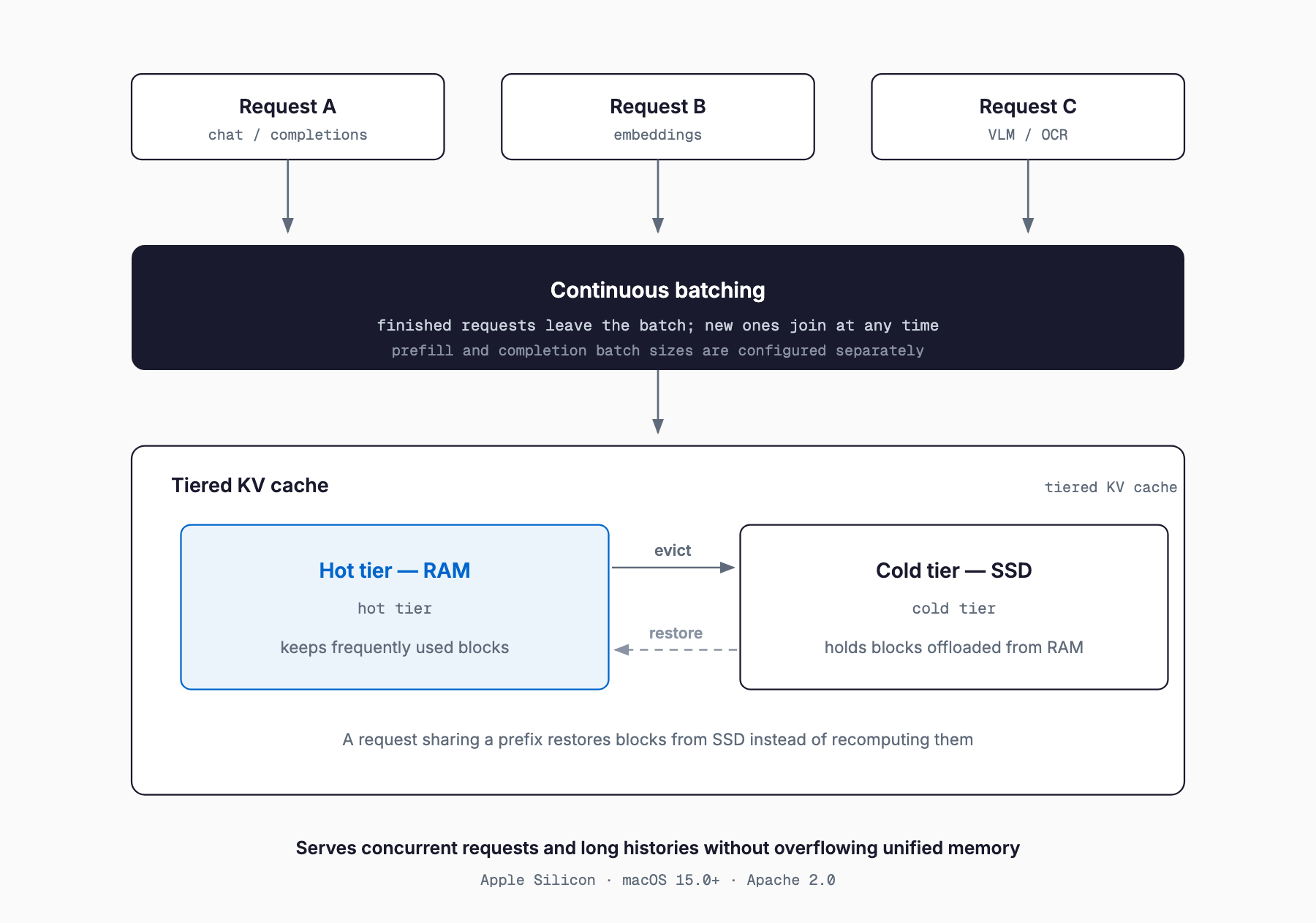
During LLM inference, keeping the Key/Value tensors (the KV cache) for previous input and generated tokens in memory lets a later request with the same prefix skip recomputation. But the KV cache consumes a lot of memory, so as the number of concurrent requests or context length grows, RAM runs out and the server typically has to discard older cache entries and redo the prefill from scratch. oMLX's tiered KV cache avoids that discard by adding a cold tier on SSD. When the hot tier (RAM) fills up, the least-used blocks are moved to SSD, and when a request with the same prefix arrives again, those blocks are restored from disk instead of being recomputed from zero. This makes it easier to run a cache larger than physical memory in multi-user or multi-session settings where the same system prompt or a long shared context gets reused repeatedly.
Continuous batching groups multiple inference requests into a single batch, but lets finished requests drop out of the batch as soon as they complete while new requests join in at any time — unlike processing each request strictly one after another. This tends to keep the GPU (GPU/ANE on Apple Silicon) more consistently utilized and improves throughput when there is concurrent traffic. oMLX implements this via mlx-lm's BatchGenerator, and lets you configure batch sizes separately for prefill (processing input tokens) and completion (processing generated tokens), so you can tune for workloads dominated by long inputs versus long generations. Note that the official README does not publish concrete throughput numbers — you're expected to measure them yourself using the dashboard's benchmark feature, which reports prefill (PP) and text generation (TG) tokens/sec.
How It Compares to Ollama, LM Studio, mlx-lm, and llama.cpp
There are already several established options for running LLMs locally — Ollama, LM Studio, plain mlx-lm, and llama.cpp. Before looking at where oMLX differentiates itself, it helps to place each of these. Our comparison of local LLM inference engines covers the broader landscape and is worth reading alongside this section. The table below summarizes generally known characteristics of each tool; exact behavior can vary by version and configuration.
| Aspect | oMLX | Ollama | LM Studio | mlx-lm (plain) | llama.cpp |
|---|---|---|---|---|---|
| Supported platforms | Apple Silicon only | macOS/Linux/Windows | macOS/Linux/Windows | Apple Silicon only | macOS/Linux/Windows (CPU and various GPUs) |
| Backend | MLX | Mostly llama.cpp-based | Selectable — llama.cpp/MLX and others | MLX | Custom implementation (GGUF) |
| Continuous batching | Yes, with separate prefill/completion sizing | Limited, version-dependent | Generally not a core feature | Not built in as a standard feature | Supported in server mode (llama-server) |
| KV cache eviction to disk | Built in as tiered KV cache | Generally not supported | Generally not supported | Not supported | Not supported (prompt caching to file is possible) |
| Embedding/reranker coexistence | LLM, VLM, embedding, and reranker can be loaded on the same server at once | Typically run as separate model instances | Typically run as separate model instances | Purpose-built for inference only | Purpose-built for inference only |
| GUI | Native macOS app plus web dashboard | Mostly CLI (separate GUI options exist) | Native GUI app | CLI only | Mostly CLI (a simple web server UI is available) |
| API compatibility | OpenAI-compatible plus Anthropic-compatible (/v1/messages) | OpenAI-compatible API | OpenAI-compatible API | Custom CLI / lightweight server | OpenAI-compatible server mode available |
| License | Apache 2.0 | MIT | Proprietary (free to use) | Apache-2.0-family (MLX) | MIT |
Good Fit vs. Poor Fit
- Good fit: keeping an Apple Silicon Mac or Mac mini running continuously as a local inference server
- Good fit: serving multiple concurrent users or sessions, where continuous batching and cache reuse meaningfully raise throughput
- Good fit: running embedding and reranker models alongside LLMs to consolidate a RAG-style setup on a single Mac
- Good fit: teams with members less comfortable in a terminal, who want to manage models through a GUI (menu-bar app and dashboard)
- Poor fit: deploying on Linux/Windows servers or cloud GPUs (Apple Silicon only, so it's simply out of scope)
- Poor fit: large-scale distributed inference across multiple GPUs/nodes (oMLX is designed for a single Mac)
- Poor fit: lightweight use cases where you just want to quickly try one model locally, since tiered caching and continuous batching add little benefit there
Frequently Asked Questions
Does oMLX work on Intel Macs or Windows?
No. oMLX is built specifically for Apple Silicon Macs (M1–M5) running macOS 15.0 (Sequoia) or later; Intel Macs, Linux, and Windows are not supported.
Is it faster than Ollama or LM Studio?
The official README doesn't publish concrete throughput numbers, so a simple speed comparison isn't possible from the documentation alone. oMLX's dashboard includes a benchmark feature that measures prefill (PP) and text generation (TG) tokens/sec, so it's best to measure both under conditions close to your actual workload.
Can I use my existing GGUF models as-is?
oMLX is built around MLX-format models — it uses whatever mlx-lm supports, along with mlx-vlm-family VLMs and the supported OCR, embedding, and reranker models. If you specifically need to run GGUF models as-is, an llama.cpp-based tool is a better fit.
Can it be used commercially?
oMLX itself is released under the Apache 2.0 license, which permits commercial use within its terms. However, you should check the license terms of any individual model you plan to use separately.
Does the tiered KV cache wear out my SSD faster?
Since evicting KV cache blocks to SSD involves both writes and reads, environments with frequent, heavy cache churn will see increased SSD write volume — that's worth keeping in mind. No quantitative figures are published officially, so for long-term use it's worth measuring write volume under your own usage pattern.
Summary
In exchange for being limited to Apple Silicon Macs, oMLX bundles a tiered KV cache with SSD eviction, continuous batching, simultaneous multi-model loading, and menu-bar-app management into a single open-source inference server. Where Ollama, LM Studio, mlx-lm, and llama.cpp each have their own strengths, oMLX is designed around the specific need of efficiently serving multiple models and concurrent requests from a single Mac. If you're evaluating it, start by checking the requirements and supported models, then use the dashboard's benchmark feature to measure actual throughput for your own workload before deciding.
Related free tools (no sign-up, instant results)
Feel free to contact us
Contact Us