What Is Hallmark? A Design Skill That Keeps Coding Agents From Making AI-Looking UI
Usage, Install, and How It Differs from Impeccable (2026)
Hallmark is Together AI's MIT-licensed design skill that keeps Claude Code, Codex and Cursor from producing generic AI-looking UI. Install, usage, fifty themes, and how it differs from Impeccable. Updated Nov 2026.
Hallmark is a design agent skill that keeps Claude Code, Codex, Cursor and OpenCode from producing UI that looks obviously AI-made. Published by Together AI under the MIT license, it is free. It enforces a fixed set of quality rules, offers three themes from a catalog of fifty, and checks the result in a real browser. It suits people who build landing pages or web UIs with a coding agent and keep getting generic-looking output. Because it emits self-contained HTML and CSS, it fits new pages better than work inside a large existing design system.
The repository was created on April 27, 2026 and launched publicly in May 2026. As of November 2, 2026 it has about 45,000 stars and ranks first on GitHub's weekly trending list (+11,566 stars this week). The 2.0.0 release version was merged on October 22, 2026, and the theme catalog grew to fifty on October 27. This article draws on primary sources such as the GitHub README to cover installation, usage, differences from Impeccable and others, and caveats. Anything the maintainers have not stated is treated as unpublished.
What Hallmark Is
Hallmark is a skill for coding agents: a bundle of instructions centered on SKILL.md plus helper scripts. The official description is a design skill that refuses to look AI-generated. Rather than fixing every design decision, it locks down a minimum set of rules (the Floor) and leaves the rest to theme selection and the job of the page. The maintainer is Hassan El Mghari (GitHub: Nutlope) of Together AI, and the README lists Impeccable, frontend-design, taste-skill and others as inspirations.
| Item | Details |
|---|---|
| Publisher | Together AI (GitHub: Nutlope/hallmark, site: usehallmark.com) |
| License | MIT |
| Supported agents | Claude Code, Codex CLI, Cursor, OpenCode (the --agent option also accepts github-copilot) |
| Requirements | Node.js 18+. Browser checks need Chrome and puppeteer-core (static checks do not) |
| Latest version | 2.0.0 (release version merged on October 22, 2026; no GitHub Releases published) |
| Output | A self-contained HTML and CSS file per page; design decisions are recorded in the first CSS comment |
What It Can Do
| Feature | Details |
|---|---|
| Three gate tiers | Floor (never ships: contrast, focus, reduced motion, invented facts, broken phone layout), Reflex (the model's default habits; can be overruled with a recorded reason), Finish (craft details; never blocks release) |
| Fifty themes | A catalog of "materials" combining paper, type, color, surfaces, components and texture; three fitting options are offered for each prompt |
| Built from the job | Structure follows what the visitor came to do (a booking page puts the booking action where that category expects it) |
| Your real product | Captures screenshots from a URL, a dev server or an app |
| 755 photographs | Openly licensed photos from Wikimedia Commons (CC0, public domain, CC BY, CC BY-SA), credited on the page; Unsplash, Pexels and Pixabay are excluded |
| Redesign and audit | redesign keeps content and wiring while changing the design; audit produces a report only |
| Browser lint | Detects machine-made "tells" in a real browser, such as a small label above every heading, tracked-capital labels, or a sign-up form at the end of every page |
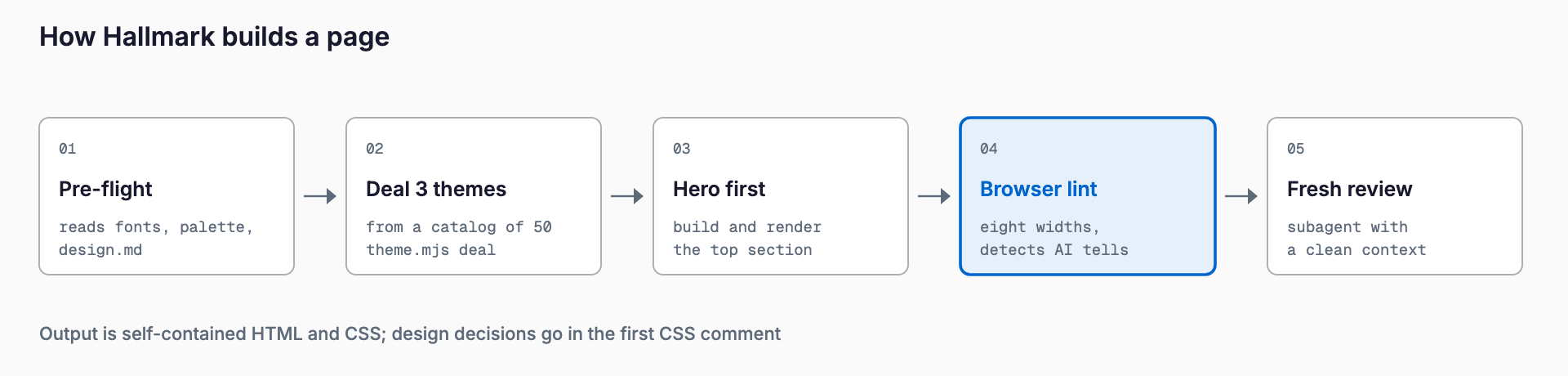
Work proceeds in four steps. (1) Pre-flight: it reads the project's fonts, palette, framework and any locked design.md, and asks once for material such as photos and real numbers; nothing is invented. (2) Deal: theme.mjs deal offers three fitting themes, and draw sets the layout from the page's job. (3) Hero first: the hero is built alone, rendered and reviewed before the rest. (4) Lint & review: sloplint.mjs --render checks eight widths, then a fresh-context subagent reviews the result. For a redesign, sloplint --before records every link, field, handler and heading beforehand, and sloplint --kept fails the run if any of them is missing afterward, so redesigning does not silently drop functionality.
Installation and Pricing
The standard route is npx skills add, and Claude Code can also install it as a plugin. Browser checks require puppeteer-core and Chrome.
# Install for all projects (omit -g for the current project only)
npx skills add nutlope/hallmark -g

# Pick an agent (codex / opencode / cursor / github-copilot also work)
npx skills add nutlope/hallmark -g --agent claude-code

# As a Claude Code plugin (invoked as /hallmark:hallmark)
/plugin marketplace add nutlope/hallmark
/plugin install hallmark@hallmark

# For browser-based checks (Chrome is also required)
npm i -g puppeteer-core
Claude Code keeps the skill in ~/.claude/skills/hallmark and Codex CLI in ~/.agents/skills/hallmark; Cursor and OpenCode find these copies. If you clone the repository, node skills/hallmark/scripts/install.mjs also installs it. The skill itself is free (MIT); model usage by the agent you run is billed separately. Typical token consumption has not been published.
Quick Start
1. Install the skill and start your agent
2. Type /hallmark followed by the page you want, in plain language ($hallmark in Codex CLI)
3. Answer the pre-flight questions about photos and real numbers (say so if you have none)
4. Pick one of the three themes offered; the hero is built first, so confirm the direction before continuing
5. Read the lint results and review, and request fixes if needed
# Claude Code / Cursor / OpenCode
/hallmark Build a booking page for a dental clinic

# Codex CLI
$hallmark Build a booking page for a dental clinic

# Rework an existing page (keeps content and wiring, changes the design system and layout)
/hallmark redesign ./index.html

# Diagnosis only (report only, no files changed)
/hallmark audit ./index.html
You can add natural-language modifiers to the prompt. "keep the layout" restyles while preserving the layout, "polish" fixes only the machine-made tells, and "custom" drops the theme catalog and works from the prompt alone (same rules). Saying "use hallmark to build ..." also invokes it. Running scripts/install-hook.mjs adds a hook to Claude Code that checks the Floor on every edit.
Differences from Impeccable, taste-skill and frontend-design
| Tool | Publisher / License | Approach | Main commands | Best for |
|---|---|---|---|---|
| Hallmark | Together AI (Nutlope) / MIT | A build pipeline combining fixed quality rules (Floor), fifty themes, browser lint and a subagent review | /hallmark, redesign, audit | Building new landing pages and web UIs while avoiding the generic AI look |
| Impeccable | pbakaus (Paul Bakaus) / Apache-2.0 | Gives coding agents a design vocabulary: a set of 24 commands to adjust and polish existing UI | /impeccable init, bolder, quieter, critique, audit, polish, etc. | Steering, reviewing and finishing existing UI |
| taste-skill | Leonxlnx | Skills that guide agents toward better art direction and visual checks (see the official README for details) | See the official README | Raising the visual direction of agent output |
| frontend-design | Included in Anthropic's official skills repo (anthropics/skills) | A frontend design skill (described only generally here) | See the official repository | Getting polished frontend output from Claude with little setup |
As a rule of thumb: if you are building a new page from scratch and want lint gates to remove machine-made tells, Hallmark fits. If you want to steer an existing UI by making it bolder, quieter or more polished through a command vocabulary, Impeccable fits. They overlap in places but can be combined. Hallmark's own README lists Impeccable and frontend-design among its inspirations, so they are better thought of as tools sharing ideas than as strict rivals; trying them side by side is reasonable.
Caveats and Poor Fits
- Output is self-contained HTML/CSS, so fitting it into an existing component system (React, Next.js and the like) takes manual work
- Browser checks need Chrome and puppeteer-core; without them only static checks run and coverage is narrower
- Some photos are CC BY or CC BY-SA and require attribution. Hallmark credits them on the page, so keep the credits in place
- It does not replace a designer's brand decisions; judgments about tone and brand direction remain with people
- Model usage is billed separately, and hero building, linting and review involve several rounds of interaction
- It moves fast. Major updates kept landing through October 2026, so check the repository for current behavior before adopting it
For other examples of agent skills, see our articles on the Cloudflare security-audit-skill and the diagram-design skill. For Claude Code itself, see the Claude Code Complete Guide.
FAQ
Is Hallmark free?
The skill itself is free under the MIT license. Model usage for the coding agent you run it with is billed separately.
Can I use it outside Claude Code?
Yes. The README targets Claude Code, Codex, Cursor and OpenCode, and the --agent option also accepts github-copilot. Invoke it with $hallmark in Codex CLI and /hallmark in Cursor and OpenCode.
Can I use it on an existing site?
Yes. /hallmark redesign <path> keeps content and wiring while changing the design system and layout, and /hallmark audit <path> only produces a report. Redesign compares links, fields, handlers and headings before and after. Because the output is self-contained HTML/CSS, bringing it back into a large component architecture is separate work.
Does it work for Japanese-language sites?
You can write prompts in Japanese since the agent interprets them, but the maintainers do not state official support for Japanese sites. Theme fonts and typography are designed by the project, so check the actual rendering of Japanese text (fonts, line spacing, character spacing) yourself.
Can I use it together with Impeccable?
We found no statement prohibiting it. A reasonable split is Hallmark for new pages and Impeccable's commands for adjusting and finishing existing UI. Overlapping instructions can make output less predictable, so try them one at a time first.
References
Feel free to contact us
Contact Us