What Is Llmspeed? Feel Local LLM Speed Before You Buy
How the Estimates Work, and How It Differs from whichllm, llmfit and LapTime
Llmspeed is a free, MIT-licensed web tool that streams local LLM answers at estimated tok/s and TTFT for a GPU or Mac. How it works, accuracy per Hacker News, vs whichllm, llmfit, LapTime. Updated Oct 2026.
Llmspeed (llmspeed.dev) is a free, open-source (MIT License) web tool where you pick a GPU or Mac and a model, then watch a local LLM answer stream at the estimated speed, including the wait before the first token. It lets you feel how many tokens per second a machine would give you before you buy it.
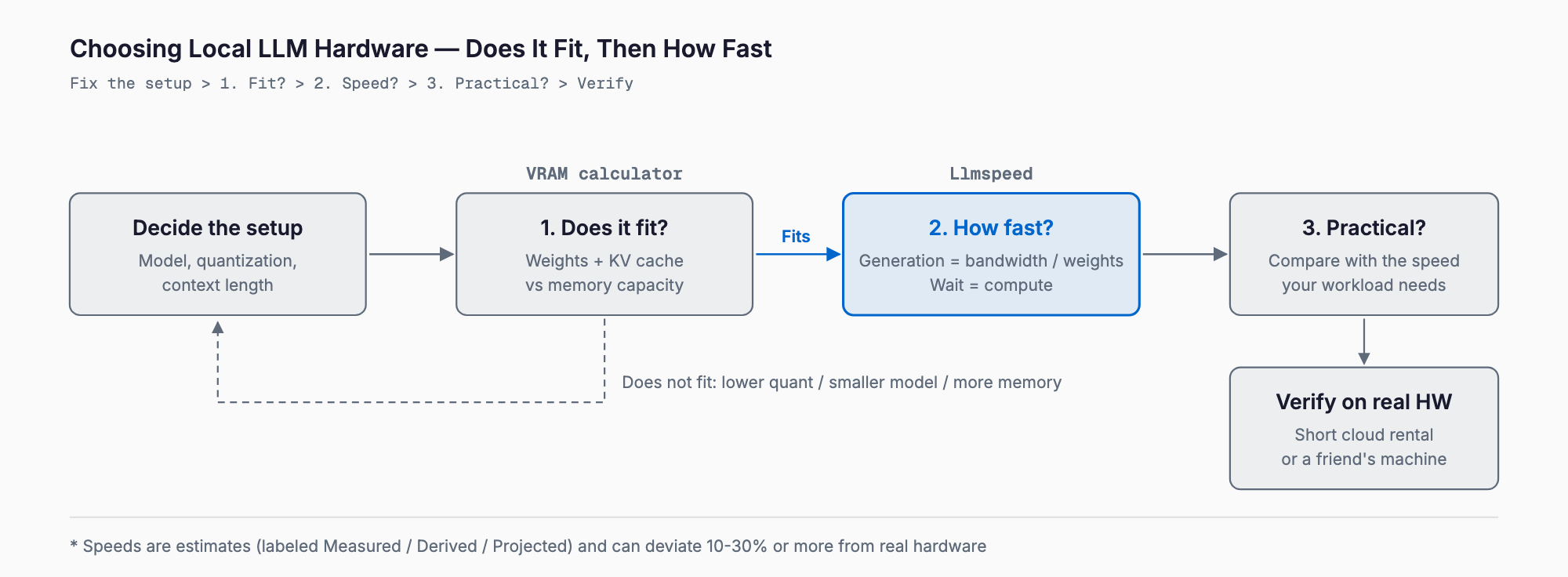
In short, Llmspeed answers "how fast," not "does it fit." Check fit first with our VRAM calculator (model × quantization × context length to required VRAM), then use Llmspeed to see the speed of the setups that fit. Treat the numbers as estimates: Hacker News commenters reported that some figures are too optimistic and others too pessimistic. It is a tool for narrowing candidates, not for making the final purchase decision.
What Llmspeed can do
It was posted as a Show HN on October 17, 2026 and drew wide attention (321 points and 86 comments at the time of writing). Based on the README and the site, as of October 19, 2026, it offers the following.
- Streaming playback: text streams at the predicted tokens/sec, after a time-to-first-token (TTFT) estimate based on prompt length
- Race mode: run two setups side by side (the README's example pits an RTX 5090 against a Mac Studio)
- Memory fit: for each quantization it shows whether the model fits, needs partial offload to system RAM, or will not run
- Coverage: per the README, 30 GPUs, Macs and CPUs × 15 popular models, across CUDA, Metal, ROCm, Vulkan and CPU backends
- Shareable links: share any setup or race as a URL
The site lists NVIDIA GPUs from the RTX 3060 to the RTX 5090, AMD GPUs, Apple Silicon Macs, Strix Halo and DGX Spark systems, a CPU-only build, and cloud H100 and H200. Models include Qwen, Gemma 4, GPT-OSS, DeepSeek V4, GLM-5.3, Llama 3.1 8B and Nemotron 3.5. The README does not give a complete device-by-device list.
How to use it, and what it costs
- Open llmspeed.dev in a browser (nothing to install)
- Pick a device (GPU or Mac) and a model
- Adjust quantization and prompt length, then play it to feel the speed and the wait
- To compare, put two setups side by side in race mode and share the URL
Neither the README nor the site mentions pricing or sign-up. The source is on GitHub under the MIT license. It is built as a static site (Vite, Preact, TypeScript, served from GitHub Pages), and the predictions live in generated data at data/app-data.json. Note that github.com/albinstman/llmspeed now redirects to github.com/nicorobinreal/llmspeed (checked October 19, 2026).
How the speed is estimated: memory bandwidth and model size
Local LLM speed splits into two phases. Generation (decode) produces the answer one token at a time; prompt processing (prefill) reads the input. Each is limited by a different resource.
Generation reads the model weights from memory for every token, so memory bandwidth usually sets the ceiling. As a general rule of thumb:
max generation speed (tok/s) ≈ memory bandwidth (GB/s) ÷ weights read per token (GB)For example, a device with 100 GB/s of bandwidth running a model that reads 10 GB of weights per token tops out near 10 tok/s (illustrative numbers). Quantizing the weights to half the size halves what is read, so the ceiling roughly doubles. Real speed lands below this, depending on implementation efficiency and context length.
Mixture-of-Experts (MoE) models use only some experts per token, so what is read is the active parameters, not the total. That is why some very large models are fast. Memory capacity, however, must still hold the total parameters, which is exactly why "does it fit" and "how fast" are separate questions.
Prompt processing can be parallelized, so it is limited by compute (FP16 TFLOPS and the like) rather than bandwidth. The wait after pasting a long document (TTFT) is governed by this. The README likewise describes generation as bandwidth-bound and prompt processing as compute-bound.
Longer contexts also add KV-cache reads, which slow generation and consume memory. See KV cache and context length VRAM for the math. Llmspeed combines these principles with efficiency coefficients fitted to measured benchmarks and a slowdown as context grows.
Confidence labels on each estimate
A distinctive feature is that each number carries a label for how well it is backed. According to the README, every estimate is one of three kinds.
- Measured: benchmarked on that exact hardware, model and quantization
- Derived: interpolated from measured benchmarks of similar setups
- Projected: calculated from specs, for example for announced but unreleased hardware
When no benchmark exists, it falls back to the principles above (bandwidth and compute). For partial offload it uses a hybrid model: the GPU-resident share is read at GPU bandwidth and the spilled share at an effective system-RAM bandwidth. For the fit check it treats about 75% of unified memory on Macs and about 93% of VRAM on discrete GPUs as usable. Measured data comes from r/LocalLLaMA, localscore.ai, llama.cpp discussions and others.
Accuracy limits: what Hacker News said
The README itself says drivers, engine versions, flash attention, power limits and thermals can shift real results by 10-30%, and that only single devices are simulated (no multi-GPU yet). Hacker News commenters raised the same points concretely. These are self-reported by commenters, and we have not reproduced them.
- Mismatches with real hardware: an M2 Ultra 128GB said to run almost twice as fast as the M3 Ultra 512GB figure shown, a 4-bit 27B-class model on an RTX 5090 running faster than shown, and an RTX 4090 with speculative decoding (a draft model) reaching several times the displayed speed. One commenter said a peak figure "feels kinda optimistic"
- Settings not modeled: speculative decoding, KV-cache quantization, parallel inference, and context length
- Requests: multi-GPU (such as 2x 4090), PCIe/NVLink, GPU search, more AMD and Qualcomm devices, and prefill performance (some argued it matters more than output speed for agentic coding)
- Real-world caveats: practical agentic workloads often use 60k-140k-token prompts, which can halve or cut decode throughput to a third versus short-prompt benchmarks; and the model assumes a single chat, so parallel use lowers performance
- Alternative: many suggested renting a cloud GPU for a few minutes to test on real hardware
Others praised being able to see, before spending thousands, how much a quantization change moves tokens per second, without downloading every model. In short, it is valued as a way to grasp relative differences and orders of magnitude between setups, not absolute numbers.
How it differs from similar tools
Several tools have related goals. Their inputs and outputs differ, so they can be combined.
| Tool | Form | What it answers | How it treats speed | Notes |
|---|---|---|---|---|
| Llmspeed | Website (static, MIT) | How fast will answers stream on the setup I pick | Playback of tok/s and TTFT, with Measured / Derived / Projected labels | 30 devices × 15 models, single device, estimates can be off by 10-30% |
| whichllm | CLI (MIT) | Which model runs and performs best on my machine (or a chosen GPU) | Estimates generation speed from memory bandwidth, ranked together with benchmark scores | --gpu "RTX 4090" simulates a GPU you do not own; focus is model choice |
| llmfit | TUI / CLI / web (MIT) | Which models fit my hardware, with fit, speed and quality scores | Bandwidth model calibrated by measurements; llmfit bench measures real speed | Starts from detecting your own hardware |
| LapTime | Browser simulator (Hugging Face Space) | Prefill, TTFT and generation speed across hardware and model pairs | Separates benchmark-backed rows, modeled estimates and community references | Coverage depends on the data in the site |
| VRAM calculator (ours) | Web (free, no sign-up) | Required VRAM and which GPUs / Macs can run a model × quantization × context length | Not covered (fit only) | Does not output speed |
whichllm and llmfit focus on picking models for the machine you have; LapTime and Llmspeed focus on comparing speed across machines before you buy. Llmspeed's own angle is the feel of the playback. Our VRAM calculator outputs required memory rather than speed, so it complements Llmspeed: ours for fit, Llmspeed for speed.
A practical order before you buy
- 1. Check fit: use the VRAM calculator for your model, quantization and needed context length (weights plus KV cache). Model-specific articles such as the Gemma 4 requirements table help too
- 2. Check speed: compare tok/s and TTFT of the setups that fit in Llmspeed. If you are considering Apple Silicon, remember that MLX-based engines such as oMLX can change results
- 3. Verify on real hardware: because engines differ, see the inference engine comparison and, if possible, measure on a short cloud rental or a friend's machine
Things to keep in mind
- The display assumes a short prompt in a single chat; long agentic or parallel workloads will be slower in practice
- Projected values (unreleased hardware) will be replaced as measurements arrive; prefer Measured values when deciding
- Models and GPUs can be requested via GitHub issues, and you can contribute your own llama-bench results by pull request to benchmarks/submissions.csv
- Software optimizations move numbers quickly; HN reports included examples faster than the estimate on newer engines
FAQ
Is Llmspeed free?
Neither the README nor the site mentions pricing, and the source is released under the MIT License. It is a static site you open in a browser, with nothing to install (as of October 19, 2026).
How accurate are the speeds?
The README says real results can shift by 10-30% depending on drivers, engine versions, flash attention, power limits and thermals. On Hacker News, reports of real hardware running faster than shown stood out. Use it to narrow candidates, then verify on real hardware or a short cloud rental.
How is the speed estimated?
Per the README, setups without a benchmark are estimated from first principles: generation from memory bandwidth and prompt processing from compute (FP16 TFLOPS), corrected with coefficients fitted to measurements and a slowdown as context grows. MoE models are treated as reading only their active parameters.
How is it different from the VRAM calculator?
The VRAM calculator takes model, quantization and context length and tells you the memory required, so you know whether it fits. Llmspeed shows how fast a setup that fits will run. Narrow candidates with the VRAM calculator first, then compare speed in Llmspeed.
Can it simulate multiple GPUs?
No. The README says only single devices are supported for now; tensor-split and layer-split multi-GPU setups are not simulated. Many Hacker News commenters asked for it.
How is it different from whichllm and llmfit?
whichllm and llmfit are mainly CLIs that detect your machine and recommend models that run on it (both MIT). Llmspeed is a website for comparing the speed of setups, including hardware you do not own, through playback. Their goals differ, so you can use them together.
Summary
- Llmspeed is a free, MIT-licensed web tool that streams answers at estimated tok/s and TTFT for the GPU or Mac and model you pick
- The principles: generation is memory-bandwidth-bound, prompt processing is compute-bound, MoE reads active parameters; fit is a separate question
- Numbers are estimates, labeled Measured / Derived / Projected; reports of deviations beyond 10-30% exist
- Division of labor: fit = VRAM calculator, speed = Llmspeed, final check = real hardware or a short cloud rental
Hardware is a big purchase. Check fit first, then get a feel for the speed, and finally confirm on real hardware to reduce regret.
Related free tools (no sign-up, instant results)
Feel free to contact us
Contact Us