MCPJam Inspector: Test, Debug and Eval MCP Servers
Fast
MCPJam Inspector is an Apache 2.0 OSS platform to test, debug and eval MCP servers, via hosted app, npx, desktop, or Docker, vs. the official MCP Inspector.
MCPJam Inspector is an open-source testing and evaluation platform for Model Context Protocol (MCP) servers, covering testing, debugging and evals in one tool. Published on GitHub (MCPJam/inspector), it positions itself as an upgrade over the official MCP Inspector, claiming coverage across 16 client configurations and 170-plus models for testing tools, prompts, resources and authorization.
This article is a snapshot as of September 18, 2026, when the tool went viral on Hacker News. Open-source projects move fast, so check the official repository and docs for the latest feature set and supported versions.
Anyone building an MCP server ends up repeating the same checks: are the tool definitions correct, does the OAuth authorization flow behave as specified, and does the server still work under a newer protocol version. MCPJam Inspector lets you run these checks through both a chat-style playground and a CLI. For protocol-level changes themselves, see MCP 2026-07-28 spec release.
What it does: core features
MCPJam Inspector's core features fall into four groups: an interactive Playground, an authorization debugger, manual testing, and automated evals with CI integration.
| Feature | Description |
|---|---|
| Playground | Chat across multiple client configurations while inspecting the full JSON-RPC message trace |
| Guided OAuth debugger | Covers protocol versions 03-26 / 06-18 / 11-25 / 2026-07-28 (Latest), including DCR, pre-registration and CIMD |
| Manual testing | Call tools, resources and prompts individually to check behavior |
| Evals | Define cases with expected tool calls, expected output and deterministic checks, run across Claude, GPT, Gemini or a custom provider |
| CI integration | Wire evals and conformance checks into GitHub Actions and similar as a PR gate |
| SDK | Programmatic access to Inspector's capabilities |
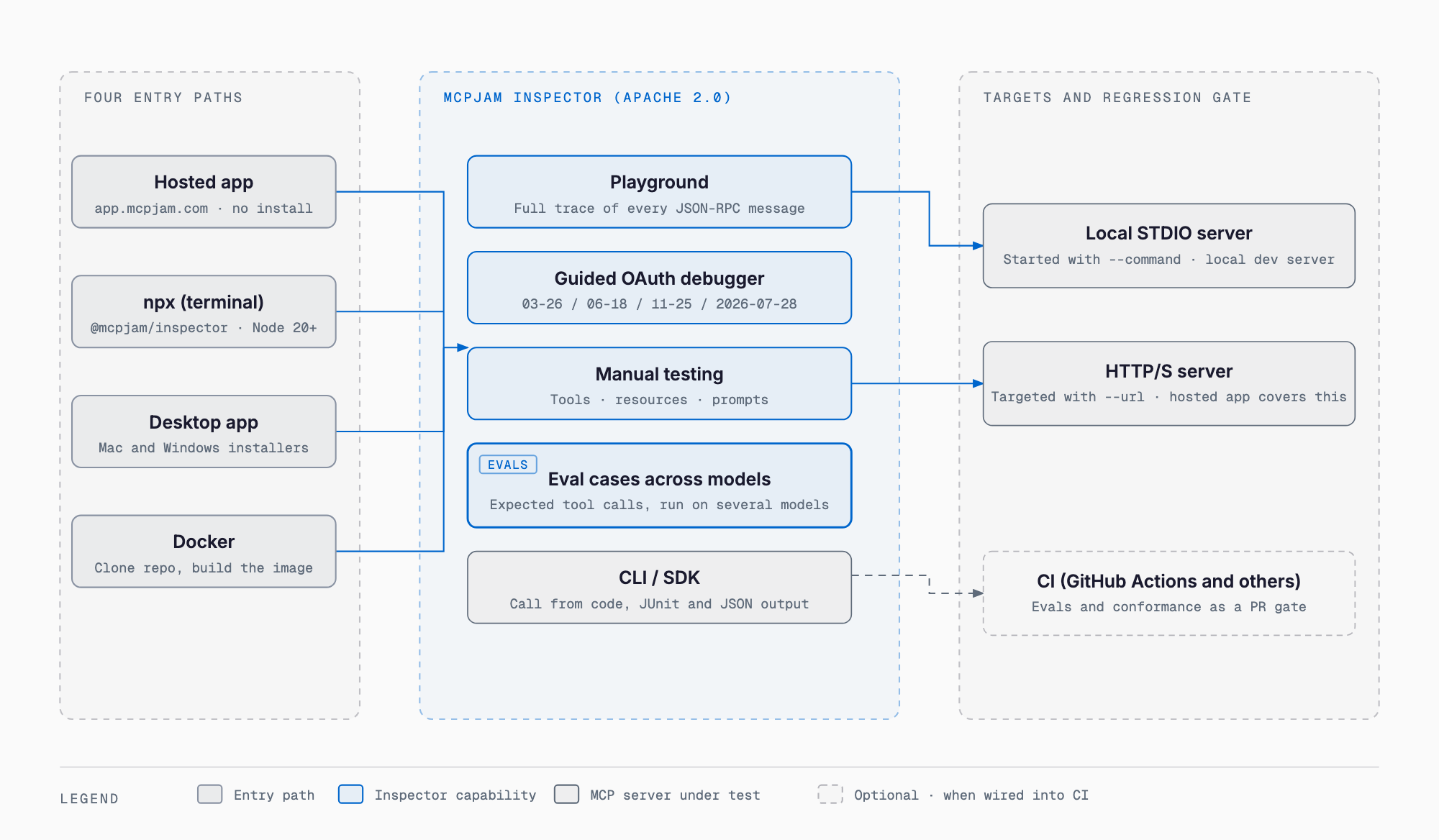
How to use it: hosted app and npx for the fastest start
The quickest way to try it is the hosted app, which needs no installation. If your MCP server is exposed over HTTPS, you can connect straight from a browser.
https://app.mcpjam.comTo test a local STDIO server, or any HTTP server, the terminal version is the better fit. It requires Node.js 20 or later and starts immediately with one command.
npx @mcpjam/inspector@latestFor CI pipelines, use the CLI (@mcpjam/cli). It checks connectivity, OAuth, spec conformance and tool execution, outputting JUnit or JSON, and can test both STDIO (--command) and HTTP (--url) local servers. For how this fits into an existing CI workflow, see the Claude Code MCP integration guide.
npm i -g @mcpjam/cliFour ways to install: pick what fits your setup
MCPJam Inspector is free to use under its license (the Inspector, CLI and SDK are Apache License 2.0 open source). Which install path to pick depends on your use case.
| Method | Best for | Requirement |
|---|---|---|
| Hosted app (app.mcpjam.com) | Trying it instantly, testing HTTPS servers | No install, browser only |
| npx (terminal version) | Testing local STDIO servers too | Node.js 20 or later |
| Desktop app | Daily use with a GUI (Mac/Windows) | Installer from GitHub Releases |
| Docker | Integrating into a container environment | Clone the repo and build the image |
For Docker, clone the repository, build the image, and run it bound to a local port.
docker build -t mcpjam/mcp-inspector:local -f mcpjam-inspector/Dockerfile .
docker run -p 127.0.0.1:6274:6274 mcpjam/mcp-inspector:local
How it differs from the official MCP Inspector
The official MCP Inspector, maintained by the MCP protocol team at Anthropic, is known as the standard tool for connectivity checks and manual testing of a server. MCPJam Inspector builds on that idea but aims further, toward a full testing-and-evaluation platform that adds evals, an OAuth debugger and CI integration.
| Aspect | Official MCP Inspector | MCPJam Inspector |
|---|---|---|
| Positioning | Official connectivity check and manual test tool | Testing and evaluation platform for server developers |
| OAuth debugging | Basic authorization checks | Guided OAuth debugger across multiple protocol versions |
| Evals | Not supported | Define and run eval cases across multiple models |
| CI integration | Limited | Wireable into GitHub Actions and similar as a PR gate |
| Install paths | Mainly CLI launch | Hosted app, npx, desktop app or Docker |
Who it fits, and who it doesn't
- Good fit: thoroughly testing your own MCP server's tools, prompts and resources by hand
- Good fit: debugging an OAuth authorization flow across multiple protocol versions
- Good fit: wiring MCP server regression tests into a CI PR gate
- Good fit: continuously evaluating tool-call quality across multiple models with evals
- Not a fit: if you don't yet understand the MCP concept itself (learn the basics of MCP first)
- Not a fit: a tiny, one-off check with no server-side changes, where the official MCP Inspector may already be enough
Is MCPJam Inspector free to use?
The Inspector, CLI and SDK are open source under Apache License 2.0 and free to start using. Team or hosted features are on a paid plan whose details you should check on the official pricing page.
How is it different from the official MCP Inspector?
The official MCP Inspector is a connectivity-check and manual-test tool from the protocol side, while MCPJam Inspector adds evals, a guided OAuth debugger and CI integration on top, positioning it as a broader testing and evaluation platform.
Can I try it without installing anything?
Yes. If your MCP server is exposed over HTTPS, you can connect from the hosted app (app.mcpjam.com) directly in a browser, with no installation needed.
Can it test a local STDIO server?
Yes. The terminal version launched via npx, and the CLI, can both test local servers over STDIO (--command) and HTTP (--url).
What are the requirements to run it?
The npx terminal version requires Node.js 20 or later. The desktop app is distributed via GitHub Releases as a Mac (.dmg) or Windows (.exe) installer.
Can it be wired into CI/CD?
Yes. The CLI (@mcpjam/cli) outputs connectivity, OAuth, spec conformance and tool execution results as JUnit or JSON, so it can be wired into GitHub Actions and similar as a PR gate.
Takeaway
MCPJam Inspector consolidates the day-to-day question of whether your MCP server actually works into a single open-source platform: interactive testing, authorization debugging, automated evals and CI integration. Start with the hosted app or npx to get a feel for it, then move to the CLI and evals once you're ready to wire it into CI. For staying on top of ongoing spec changes, see the MCP official roadmap 2026-08 as well.
Related free tools (no sign-up, instant results)
Feel free to contact us
Contact Us