Meta Muse App Explained
iPhone/Android vs Mac, Pricing, What It Can (and Can't) Do [Sep 2026]
Meta's Muse personal AI agent explained: new Mac app vs iPhone/Android, pricing (free tier, Power $20, Max $100), Secure VM approvals, and US-only rollout.
Muse, Meta's personal AI agent, doesn't just answer questions — it does the work for you. Launched on September 8, 2026, it sends emails, books travel, fills out forms, monitors prices, negotiates, and turns long-term goals into action plans it tracks over time.
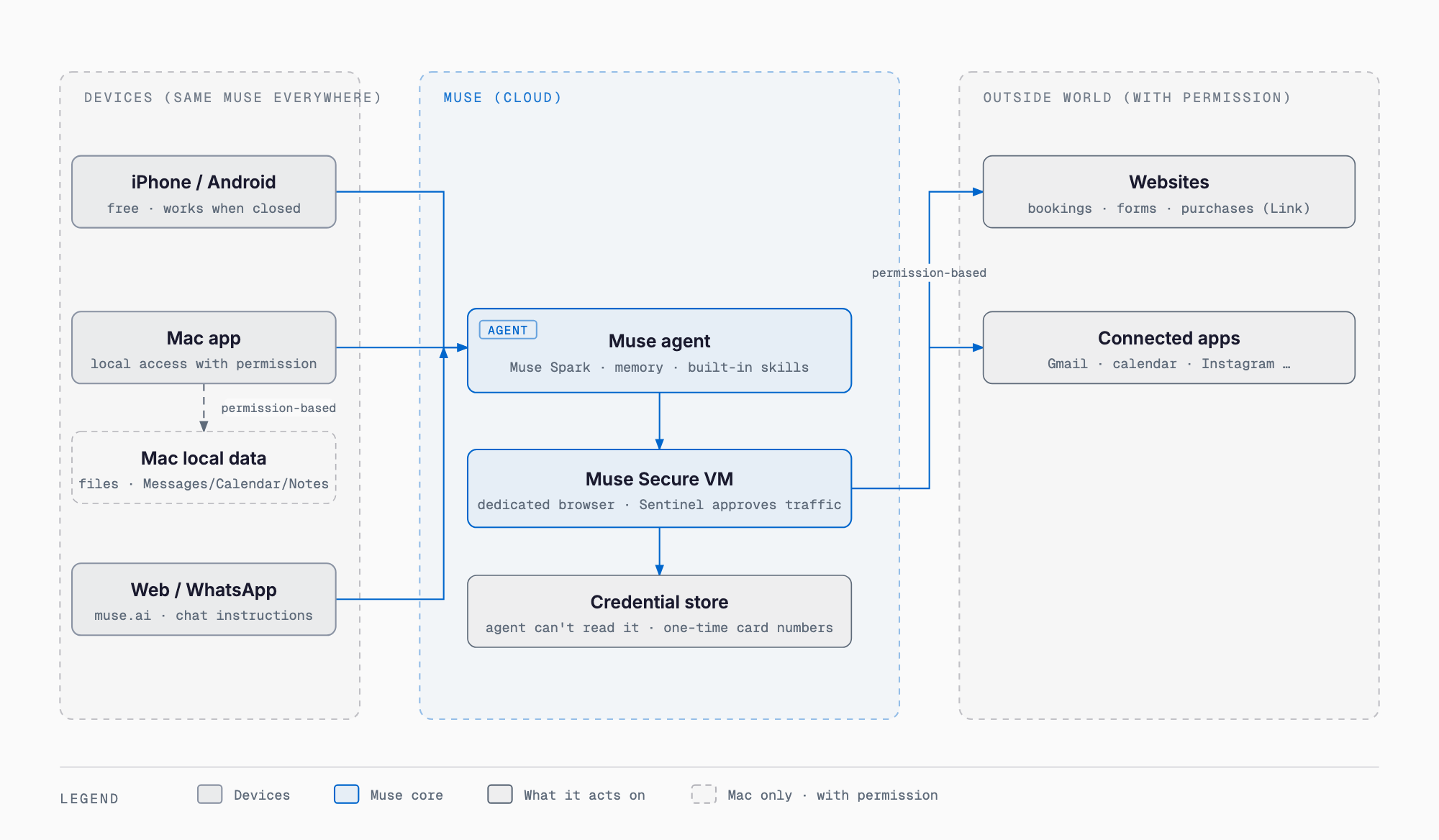
The mobile apps (iPhone/Android) are built around working on the go, notifications, and giving instructions from inside WhatsApp, while the Mac app, added on September 17, 2026, adds access to local files, apps, and Messages/Calendar/Notes — that's the biggest difference between the two. Availability is currently US-only (Meta says wider rollout is planned).
What Is Muse — An Agent That Finishes Work, Not Just a Chatbot
At Muse's core is Muse Spark, which Meta describes as "the most capable model we've built for real-world agentic work." A user sends a request from any device — iPhone, Android, Mac, the web (muse.ai), or WhatsApp — and Muse (Muse Spark plus memory and built-in "skills" that handle things like podcast creation, image generation, and web browsing with no installation needed) plans the task, then, when needed, acts through a browser and connectors running inside a Secure VM to reach external websites and connected apps. Meta also says that "if a tool Muse needs doesn't exist, Muse will build it" — the design goes beyond a single reply to continuously tracking and monitoring a goal over time.
| Type | What it does | Example |
|---|---|---|
| Chatbot | Answers questions in conversation | Answering "What's the weather tomorrow?" |
| Assistant | Helps operate a device or app (e.g. Meta AI for Mac) | Invoked with a hotkey, reads the screen and responds |
| Agent (Muse) | Breaks a request into a plan, asks for approval, executes tasks, and keeps monitoring | Sending an email, booking travel, watching prices and notifying |
What the Mobile App (iPhone/Android) Can Do
| Area | Examples |
|---|---|
| Personal productivity | Resolving schedule conflicts, booking, reminders, follow-ups |
| Saving money | Tracking spending, auditing subscriptions, suggesting cancellations of unneeded charges (confirmed before acting) |
| Health and fitness | Suggesting workout/meal plans, monitoring sleep |
| Shopping | Comparing prices, price-drop alerts, purchases with approval |
| App integrations | Connecting with email, calendar, Instagram, Facebook, health, and financial apps |
| Handing off tasks | Selling a car, negotiating rates, planning and booking travel |
| Always on | Keeps monitoring, following up, and notifying even when the app is closed |
| User control | Approvals, activity log, revoking connectors |
| Item | iPhone | Android |
|---|---|---|
| OS requirement | iOS 18.0 or later | Not stated officially |
| Size | 116.3MB | Not stated officially |
| Age rating | 18+ | Teen |
| Rating | 4.9 (13,000+ ratings) | 4.9 (5,400+ ratings) |
| Update/version | Version 7.1 (as of 2026-09-18) | Updated 2026-09-17 |
| Other | English + 38 languages | 100,000+ downloads, #2 free app in Productivity, offers in-app purchases |
According to the official FAQ, Muse keeps working in the background even when the app is closed (for example, watching the daily weather and notifying you if it will rain), and always asks for confirmation before important actions. Because you can also direct it from inside WhatsApp, you can add or adjust tasks just by replying to a notification.
What the Mac App Can Do — Files, Apps, Messages/Calendar/Notes
When the Mac app launched, Mark Zuckerberg posted, "Muse for Mac is out today! It works across apps, files, calendar, notes, and messages on your computer. You control what it can access" (as reported by 9to5Mac). Meta's official download page similarly describes it as organizing files, filling out forms, and pulling information from Messages, Calendar, and Notes — "all with your permission." It's distributed not through the Mac App Store but as a direct DMG download (Muse-1.0.dmg, about 34MB; the distribution server's last-modified date is 2026-09-17). The required macOS version and chip are not stated on the official download page. For reference, Meta's separate "Meta AI for Mac" app, released August 19, 2026, required Apple Silicon and macOS 15 or later plus Screen Recording and Accessibility permissions (as reported by 9to5Mac); it's reasonable to assume Muse for Mac has similar requirements, but that's an inference, not a confirmed fact.
| Item | Meta AI for Mac | Muse for Mac |
|---|---|---|
| Positioning | Assistant | Personal AI agent |
| Main interaction | Invoked with Option+Space, voice input via long-press Fn, reads the screen and responds | Organizes files, fills out forms, runs cross-app tasks |
| Release date | 2026-08-19 | 2026-09-17 |
| Permissions | Screen Recording and Accessibility (Apple Silicon + macOS 15 or later) | Not stated officially (likely similar, unconfirmed) |
Every Important Action Needs Approval — Secure VM and Payment Protection
Muse's execution flow runs in order: it receives a request, builds a plan, carries it out using built-in skills or a browser, pauses before important actions — sending a message, making a purchase, sharing information with a connected app — to ask "allow once / always allow / deny," carries out approved actions, logs everything in an activity log, and keeps going in the background.
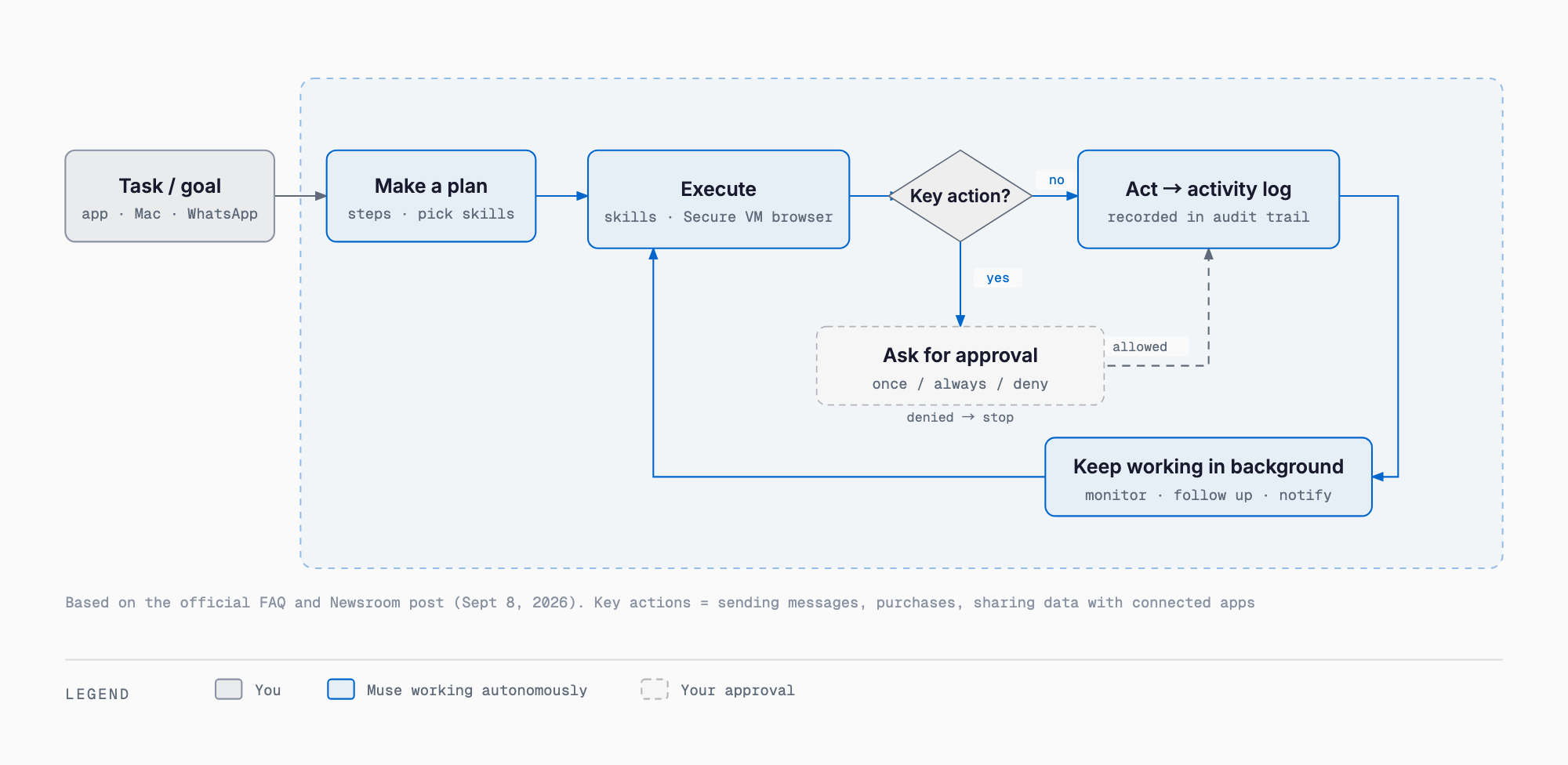
- Muse Secure VM: runs a modern browser inside a dedicated, persistent virtual machine to handle bookings, form filling, and customer service interactions
- Sentinel: a separate agent that approves internet access
- Credential store: login details are kept in "a secure credential store the agent can't read" (1Password integration coming soon)
- One-time cards: shopping generates a one-time card number, so neither the merchant nor the agent ever sees the real card
- Purchase protection: eligible purchases are covered by Stripe Link's purchase protection (Meta says this is a first for an AI agent); Shop Pay support is coming soon
- No ad sharing: conversations are not shared with Meta's advertising systems
- Future Confidential VM: planned end-to-end encrypted processing that Meta says "even Meta can't access"
Pricing — Free Tier, Power at $20, Max at $100
| Plan | Monthly price | Weekly limit | Notes |
|---|---|---|---|
| Free | $0 | Not stated officially | Upgrade or wait for the weekly reset once you hit the limit |
| Power | $20 | 500M Muse tokens/week | Same features as other plans; usage is the only difference |
| Max | $100 | 3B Muse tokens/week | Same features as other plans; usage is the only difference |
Signing up requires being 18 or older (or the age of majority where you live), and you can subscribe from the mobile app or muse.ai; plans renew automatically each month. Meta's help center doesn't state a specific token figure for the free tier — reporting has put it at around 1 million input tokens per week, but treat that number as unconfirmed.
Mobile vs. Mac: When to Use Which
| Aspect | Mobile | Mac |
|---|---|---|
| Primary use | Progressing tasks on the go, notifications, instructions via WhatsApp | Working with local files, apps, and browser tabs |
| Access scope | Mainly connected apps (email, calendar, Instagram, etc.) | Also reaches local info like Messages, Calendar, Notes (with permission) |
| Distribution | App Store / Google Play | Direct DMG download (outside the Mac App Store) |
| Continuity | Shares the same Muse and carries work across devices (official: "Your Muse keeps the thread across every device") | Same |
Notes for Readers in Japan
Muse's availability was US-only at launch; Meta says it plans to expand but hasn't stated when it might reach Japan. The App Store lists "English + 38 languages," but that refers to display language — how well Muse actually handles tasks in Japanese remains unconfirmed.
The App Store's privacy section discloses a broad range of data "linked to you," including health and fitness, purchases, financial info, location, contacts, user content, browsing history, identifiers, usage data, and diagnostics. Meta itself also warns that "Muse can be inaccurate or take unexpected actions, so review and intervene." Note that this is separate from Muse Glimmer, the open-weight 30B model Meta released on August 10, 2026 for local, always-on agents — there's no official statement that the Muse app itself runs on a local model (see Muse Glimmer 30B requirements at a glance). Reporting has also noted that giving the agent a name and avatar to treat as a "companion" is a design choice it shares with xAI's Grok Bot. For details on the Muse Spark model itself, see Muse Spark 1.3 explained.
FAQ
Can Muse be used from Japan?
As of September 18, 2026, Muse is available only in the US. Meta says it plans to expand availability, but hasn't officially stated when Japan might be included.
How much can I do on the free tier?
The free tier lets you run tasks, but once you hit the weekly usage limit you need to upgrade or wait for the weekly reset. Meta's help center doesn't publish a specific token figure for the free tier.
Are the Mac and iPhone apps the same account?
Meta describes staying "connected to your Muse on every device," letting you check on mobile-started work from your Mac or give instructions via WhatsApp. Work carries over across devices under the same account.
Will it make purchases on its own?
According to the official FAQ, Muse always asks for confirmation before purchases, sending messages, or sharing information with connected apps, letting you choose "allow once / always allow / deny." Purchases use one-time card numbers, and eligible ones are also covered by Stripe Link's purchase protection.
How is it different from the Meta AI app?
"Meta AI for Mac," released August 19, 2026, is an assistant that reads your screen and responds. "Muse for Mac," released September 17, 2026, is an agent that organizes files and runs tasks across apps — a different app with a different purpose.
Does it run locally, on-device?
The Muse app itself is described as running on Muse Spark (in the cloud) plus a Secure VM, with no official statement that it runs on a local model. Muse Glimmer, a separate open-weight 30B model Meta released, is built for local, always-on agents, and is a different product from the Muse app.
Summary
Muse represents a shift from AI that answers to AI that acts: the mobile app moves tasks forward on the go, and the Mac app, added September 17, 2026, extends that reach into local files, apps, and Messages/Calendar/Notes. Pausing for approval before every important action, backed by the Secure VM and one-time card numbers, is what sets it apart from a plain chatbot.
But availability is still US-only, and plenty of details — the Mac app's OS and chip requirements, the exact token limit on the free tier — aren't officially documented yet. Whether it's usable from Japan, and how well it handles Japanese-language tasks, are both things to confirm as more information comes out.
Primary Sources
Feel free to contact us
Contact Us