Pi (pi.dev) Explained: The Minimal Open-Source Agent Harness That Reached 1.0
Codemode and MCP, Pi Durable, How to Use It, and Conditions for Running It Safely [Earendil]
Pi (pi.dev) is an MIT terminal agent harness, 1.0 on 2026-10-01, with MCP via Codemode and Pi Durable. No popups or sandbox, so a container is recommended.
Pi (pi.dev) is a minimal, extension-first open-source AI agent harness (a coding agent) that runs in your terminal. It was created by Mario Zechner and is now developed and operated by Earendil Inc. The license is MIT. It reached 1.0 on October 1, 2026, and the latest release is 1.1.0, published on October 7, 2026. Beyond built-in tools for reading and writing code and running shell commands, you extend it with extensions, skills, prompt templates, and themes, and you can use MCP through Codemode.
This article is based on the official website, the official documentation, Earendil's announcements, and measured values from GitHub, npm, and Hacker News as of October 13, 2026. Where the official sources are silent, we write 'not stated officially.' We do not compare performance with other coding agents.
What Is Pi? 'There Are Many Agent Harnesses, but This One Is Yours'
The tagline on the official website is 'There are many agent harnesses but this one is yours,' and it describes Pi as a 'minimal agent harness' that adapts to your workflows rather than the other way around. The official documentation describes Pi as an extensible AI agent that works from your terminal. The basics are as follows.
| Item | Details |
|---|---|
| Name | Pi (pi.dev) |
| Type | A minimal, extension-first open-source AI agent harness (coding agent) that runs in the terminal |
| Author | Mario Zechner (known as the author of libGDX, per press coverage) |
| Developed and operated by | Earendil Inc. (GitHub organization earendil-works, npm scope @earendil-works). The website credits 'Earendil Inc. & Contributors.' The pi.dev domain was donated by exe.dev |
| License | MIT (both the code and Pi Durable, as stated in Earendil's 1.0 announcement) |
| Price | No pricing is stated on the website or in the announcements (the software is MIT-licensed; model usage is paid to each provider) |
| Latest version | 1.1.0 (2026-10-07, npm latest) |
| Supported OS | macOS / Linux (installer, Nix), native Windows (dedicated guide), Android via Termux |
| Requirements | Node.js 22.19 or later (the installer sets it up if needed) |
| GitHub stars | About 114,500 (about 14,600 forks, as of 2026-10-13, measured via the GitHub API). Repository created 2025-08-09 |
| Usage scale | Earendil's 1.0 announcement says hundreds of thousands of people use Pi every week |
| Related projects | OpenClaw, Flue Framework, Pi Durable, pi-chat |
Earendil's April announcement calls Pi 'the minimal agent within OpenClaw,' and the GitHub README says 'See OpenClaw for a real-world integration.' For OpenClaw, see What Is OpenClaw; for the Astro team's Flue Framework adopting Pi as its harness layer, see the Flue Framework article. The Hacker News thread for 'Pi 1.0' had 1,688 points and 609 comments, and the 'Pi Durable' thread had 512 points and 75 comments (as of 2026-10-13, measured via the Algolia API).
How Pi Works: A Minimal Core Plus Whatever You Add
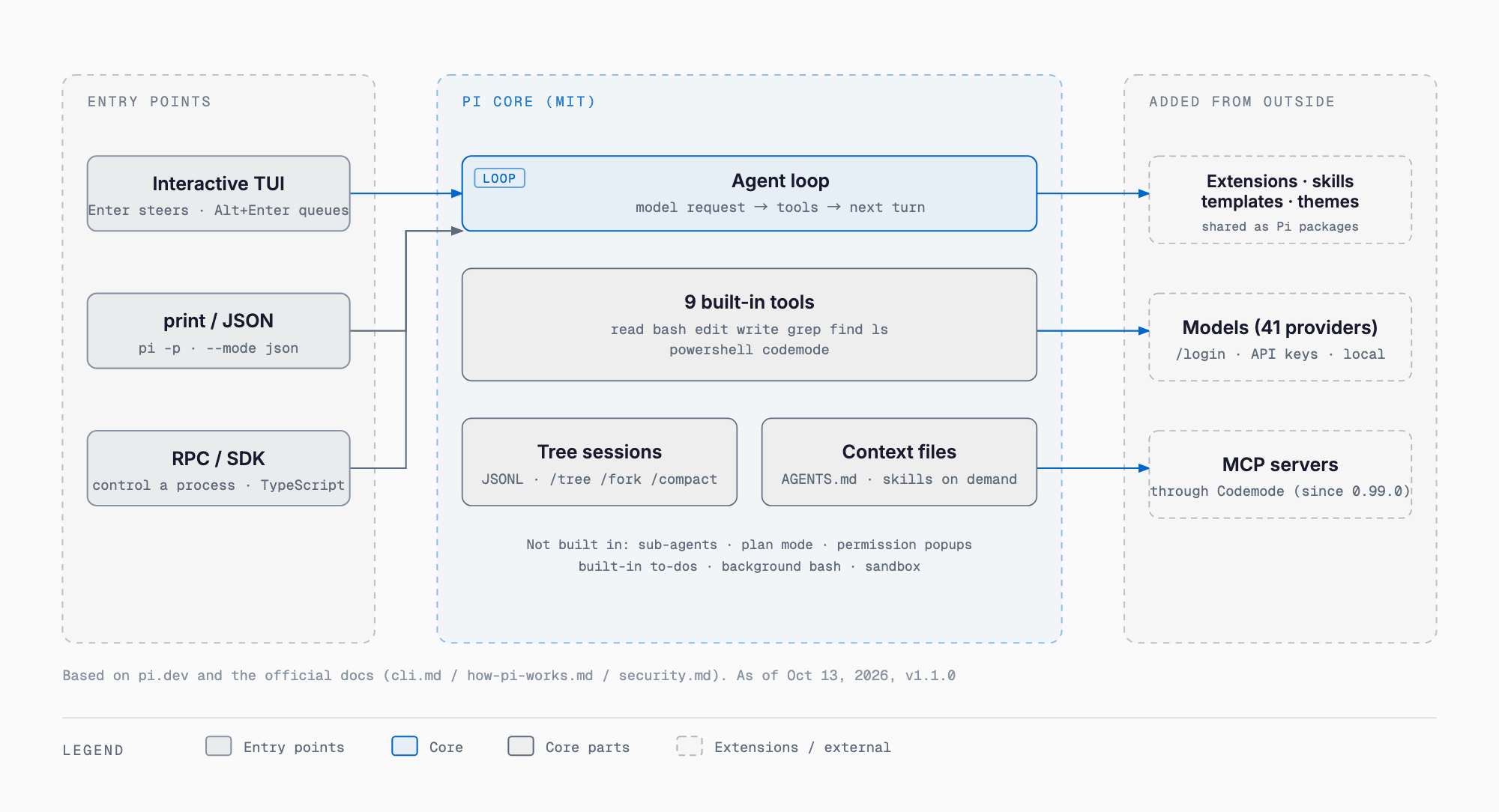
Pi runs a standard agent loop: the model calls built-in tools and produces its next response from the results. Sessions are stored as a tree (JSONL), and you can move between branches with /tree. AGENTS.md (and SYSTEM.md) files placed in a folder are loaded as context files. When a conversation grows long, /compact compresses it by inserting a summary entry, while the original record stays in the tree. According to the official cli.md, the built-in tools are the following nine.
| Tool | Role |
|---|---|
| read | Read text files and supported images |
| bash | Run shell commands |
| powershell | Run PowerShell commands on Windows |
| edit | Exact string replacement in existing files |
| write | Create or overwrite files |
| grep | Search file contents |
| find | Find paths by glob pattern |
| ls | List directories |
| codemode | Run JavaScript that calls other tools (in parallel if needed). Only the script's output reaches the model |
The official website explicitly lists five things Pi does not include: sub-agents, plan mode, permission popups, built-in to-dos, and background bash. The stated approach is to build them with extensions or install a package. There are five run modes: the interactive TUI, print mode (pi -p), a JSON event stream (--mode json), RPC (controlling a separate process over stdin/stdout), and a TypeScript SDK.
Customization: Extensions, Skills, Prompt Templates, and Themes as Pi Packages
| Purpose | What to use |
|---|---|
| Instructions that stay with a folder | AGENTS.md (context files; SYSTEM.md too) |
| Reusable prompts invoked from the / menu | Prompt templates (Markdown) |
| Task-specific instructions and helper files | Skills (loaded on demand) |
| Executable tools, commands, and event handlers | Extensions (TypeScript) |
| Terminal UI components | TUI / themes |
| Unsupported model services | Custom providers (models.json or an extension) |
| Distributing several resources together | Pi packages (shared via npm or git) |
Settings, credentials, sessions, and installed packages are stored in ~/.pi/agent/. Session commands include /fork, /clone, /resume, /export (HTML or JSONL), /share (a viewing link via GitHub gist), and /session (files, token usage, and cost). For input, Enter is steering (it shapes the next response after the current response and tool calls finish), Alt+Enter is a follow-up (sent after the current task completes), and Escape stops the run. !cmd runs a shell command and includes its output in the conversation, while !!cmd does not send the output to the model. @ searches for files.
Codemode and MCP: Reversing the 'No MCP' Stance
Pi used to state explicitly on its website that it did not support MCP. It reversed that stance and shipped Codemode and MCP in v0.99.0 on September 29, 2026. Earendil's blog post of the same day, 'You Said No MCP!,' gives three reasons: today's MCP is not the MCP of the past; the changes it needed (making Jev easier to use, a sandboxed interpreter) are useful beyond MCP; and it needed metadata to load tools lazily or make them Codemode-only. Version 1.0.1 added a per-project .pi/mcp.json, and 1.0.4 added --no-mcp. For MCP developments, see the MCP roadmap article.
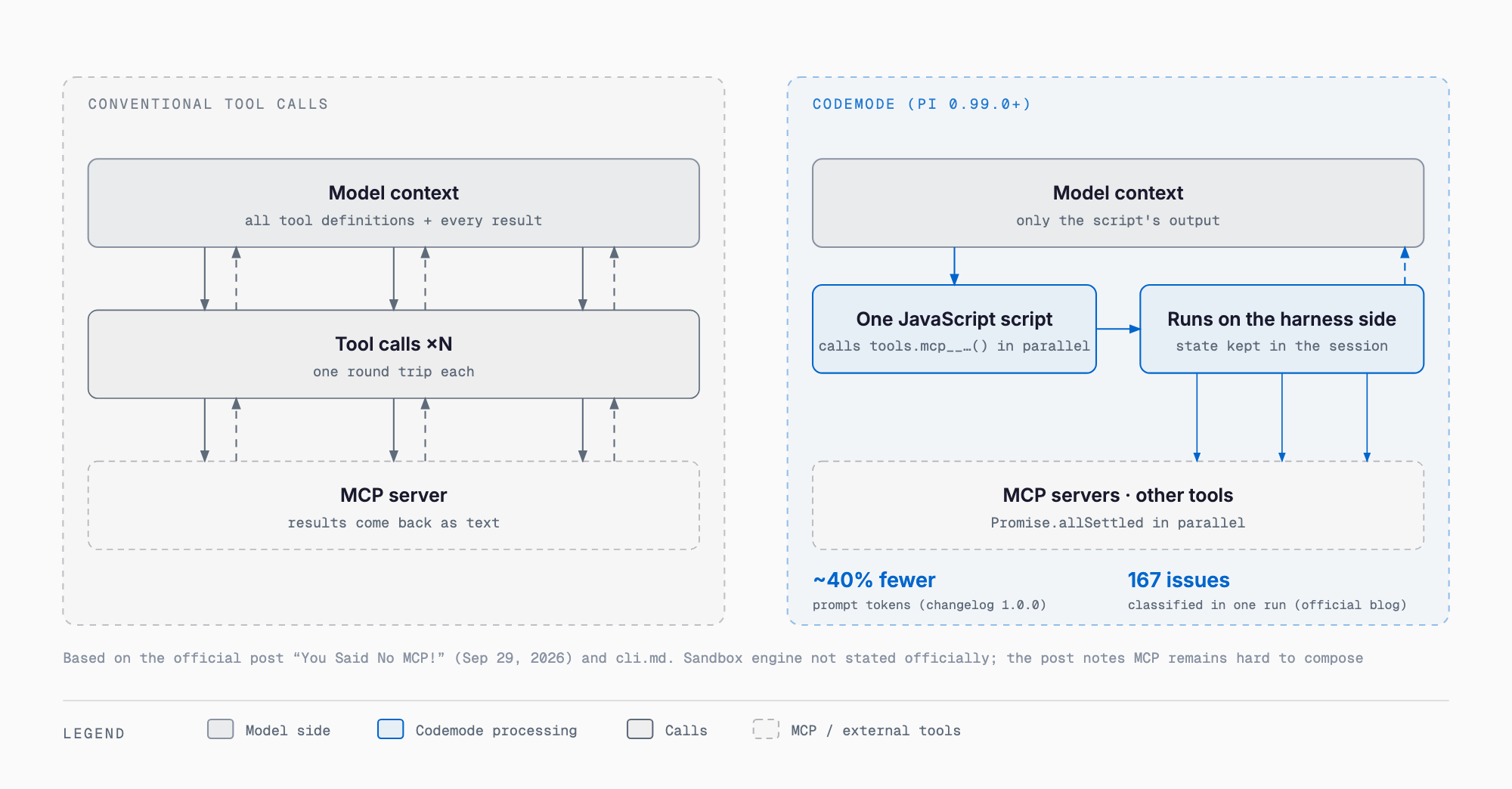
Codemode works like this: the model writes JavaScript that calls tools (for example, tools.mcp__linear__list_issues(...)), and the harness executes it. The official cli.md explains that it can call other tools in parallel, for example with Promise.allSettled, and that only the script's output reaches the model. State is kept in the session record rather than the filesystem, and Codemode loads automatically once MCP is configured. Changelog 1.0.0 states that the prompt tokens used by Codemode dropped by about 40%. The official blog's example loops over 167 open issues, classifies the comments with Jev, and returns only a summary without wasting any context (classification result: none 156, mild 11, high 0). The blog notes, however, that this example is a summarized reproduction rather than a measured value.
- Official caveat 1: MCP is still hard to compose, and Codemode does not fully solve that
- Official caveat 2: the current situation, where many MCP servers pour tools into the context and return text, needs to improve
- Official caveat 3: the 167-issue example is a summarized reproduction, not a measured value
- The implementation of the Codemode sandbox (such as QuickJS) is not stated officially
What Landed in Pi 1.0 and 1.1
| Version | Date | Main changes |
|---|---|---|
| 0.99.0 | 2026-09-29 | Shipped Codemode and MCP. Also added the system theme (now the default), Sign in with ChatGPT, virtual models, and classifier models |
| 0.99.1 | 2026-09-29 | Added GPT-6.1 Sol and made it the default OpenAI Codex model |
| 1.0.0 | 2026-10-01 | About 40% fewer prompt tokens for Codemode, image generation in Codemode, Radius sign-in via /login, stronger MCP OAuth, expanded virtual models, deferred tool loading, cache warming for Anthropic models, mid-conversation system message updates, a new TUI theme, and fullscreen mode as the default |
| 1.0.1 | 2026-10-03 | Nix flake, per-project .pi/mcp.json, CIMD client registration for MCP OAuth, pi.registerToolRenderer() |
| 1.0.2 | 2026-10-04 | samplingParamsByThinkingLevel in models.json (per-thinking-level sampling on OpenAI-compatible APIs) |
| 1.0.3 | 2026-10-05 | Azure provider renamed from "azure-openai-responses" to "azure" (breaking change; config keys need updating), Azure Foundry Chat Completions added |
| 1.0.4 | 2026-10-05 | * patterns for --tools / --exclude-tools, --no-mcp to turn off MCP for one run |
| 1.1.0 | 2026-10-07 | Program status reporting, Claude Haiku 5.5 added, GPT-6 Luna as a classifier, and +name / -name for --tools |
Fullscreen mode became the default in 1.0.0. To return to the traditional scrollback display, set tuiMode to "regular" in the settings. The Azure provider rename in 1.0.3 is a breaking change, so if you use Azure, update your config keys as described in the official Changelog. Program status reporting in 1.1.0 displays working / blocked / done / failed states in supported terminals.
Models and Providers: 41 Providers, 1,551 Models, Local Models Too
The official website says '15+ providers (Anthropic, OpenAI, Google, Azure, Bedrock, Mistral, Groq, Ollama, OpenRouter, and more) and hundreds of models.' The actual count on the official model catalog page was 41 providers and 1,551 models (as of 2026-10-13; examples of the breakdown: openrouter 392, amazon-bedrock 193, opencode 83, huggingface 78, azure 45, openai 44, mistral 40, github-copilot 35, anthropic 17). The ways to connect are as follows.
| Connection method | Details |
|---|---|
| Subscription | Pick a provider with /login, sign in, and the credentials are saved in auth.json. The Changelog mentions Sign in with ChatGPT (0.99.0), Radius sign-in (1.0.0), and a GitHub Copilot provider |
| API key | Save an API key with /login (auth.json). Priority order: --api-key, auth.json, apiKey in models.json, then environment variables and cloud credentials |
| Environment variables | Credentials can also be given through environment variables (suited to CI) |
| llama.cpp | Connects directly to the router. Managed with /llama, and GGUF files are detected automatically |
| OpenAI-compatible servers such as Ollama, LM Studio, vLLM, SGLang | Register them in models.json as OpenAI-compatible endpoints (the Ollama example uses baseUrl http://localhost:11434/v1) |
| Custom providers | Add unsupported services through models.json or an extension |
Switch models with /model, and save one as the default with Ctrl+S. /thinking changes the thinking level and Ctrl+P cycles through models. You can change models in the middle of a session and check the per-model cost with /session. For the differences among inference servers such as llama.cpp, Ollama, and vLLM, see our local LLM inference engine comparison.
Install and First Steps
The installation methods in the official Quickstart are as follows. First, the installer for macOS and Linux.
```bash
curl -fsSL https://pi.dev/install.sh | sh
```
To install with npm, use the following command (Node.js 22.19 or later is required).
```bash
npm install -g --ignore-scripts @earendil-works/pi-coding-agent
```
On Windows PowerShell, run powershell -c "irm https://pi.dev/install.ps1 | iex". Nix users can install with nix profile add github:earendil-works/pi/stable (built from source, for Linux and macOS on ARM64 and x86-64). Node.js 22.19 or later is required, and the installer sets up Node.js if needed. On first run, start pi in your working folder, sign in to a provider with /login, and choose a model with /model. Next time, pi --continue resumes where you left off. Update with pi update (with Nix, nix profile upgrade pi). The npm latest tag is 1.1.0, and the legacy-node20 tag points to 0.74.2.
Running It Safely: No Permission Popups, No Sandbox
According to the official security.md, Pi has neither permission popups nor a built-in sandbox. Pi runs with the permissions of the account that launched it and does not ask for approval on each tool call. security.md states explicitly that watching the transcript, project trust, and reviewing changes are not security boundaries. The key points are as follows.
| Item | How Pi behaves | Mitigation |
|---|---|---|
| Approval | Does not ask for approval on each tool call | Do not rely on approval; isolate on the execution-environment side |
| Sandbox | None built in | Run the whole thing inside a container, VM, or sandbox (security.md calls this usually the most practical and strongest option) |
| Project trust | Only controls whether a folder's settings and resources (extensions, skills, MCP servers) are loaded at startup; it does not limit the scope of tool calls. Context files such as AGENTS.md are loaded even if untrusted (unless context loading is disabled) | Treat instructions inside a folder as untrusted input even when you do not trust it |
| Outside the working folder | The working folder does not restrict access to other paths | Give the isolated environment only the files and services the task needs |
| Child processes | Extensions, package installers, language servers, and similar child processes run with the same permissions | Choose which extensions and packages to install, and run them inside the isolated environment |
| Credentials | Can be reached by Pi if they live inside its environment | Keep them outside Pi's environment. If unavoidable, use short-lived, least-privilege credentials |
| Session sharing | Sessions may retain sensitive data | Review the contents before export or share |
security.md also recommends limiting the environment to the files and services the task needs and cutting off the network when it is not needed. The GitHub README lists three isolation patterns: the Gondolin extension (pi and credentials stay on the host while the built-in tools and ! commands go to a local Linux micro VM), plain Docker, and OpenShell (a policy-controlled sandbox). For general precautions when letting an agent touch your PC, our OpenClaw security article is also a useful reference.
Pi Durable: An Experimental Substrate for Long-Running Agents That Resume After Crashes
Earendil's announcement describes Pi Durable as an experimental framework for building long-running, durable, and malleable agents. It is not a replacement for the Pi coding agent but a framework for building any agent application, coding agents included. Terminal Pi is run by one person in one terminal, and if the process dies it must be restarted by hand. Durable aims to run anywhere, be reached from different touchpoints, handle very long conversations, survive failures, and let several people steer the same agent.
- How it works: each step of execution is a 'task,' and a checkpoint is saved before moving on. After a crash, a new process opens the same storage and resumes unfinished tasks from the last checkpoint. Submissions with a requestId are exactly-once
- Storage: memory, SQLite, and JSONL (with conformance tests and benchmarks), behind a small interface that can also be implemented on KV stores or Postgres. The README recommends SQLite for long-running use because memory-only history grows without bound
- Runtimes: any JavaScript runtime (Node; Bun and Cloudflare Durable Objects via small adapters). The SQLite and JSONL cores do not depend on the Node API
- Example uses: a threaded Slack-like channel, a GitHub triage bot, a vacation planner, and a small coding agent (the Slack and GitHub triage bots are marked 'coming soon')
- Status: explicitly experimental, and the API may change
```bash
npm install @earendil-works/pi-durable @earendil-works/pi-ai @earendil-works/chord
```
The monorepo packages are @earendil-works/chord (a host runtime for hot-reloadable plugins), pi-telemetry, pi-ai (a unified multi-provider LLM API), pi-durable, pi-agent-core, pi-coding-agent (the CLI), and pi-tui. Chat automation such as Slack is handled in a separate repository, earendil-works/pi-chat.
About Earendil: Acquiring Pi and Mario Zechner Joining
According to Earendil's announcement, Earendil Inc. is a Public Benefit Corporation founded in 2025 by Armin Ronacher and Colin Daymond Hanna, with the stated aim of building software and open protocols that bridge division and ignorance and strengthen human agency. On April 8, 2026, Earendil announced the acquisition of the Pi open-source project, and Mario Zechner became a major stakeholder and team member at Earendil at the same time. The announcement names Accel (Daniel Levine), Balderton (Daniel Waterhouse), and founders of n8n, OpenClaw, Revolut, Sentry, and Slack among its early backers (amounts undisclosed). Its products are Pi, Radius, and Lefos (an agent you converse with by email); details of Radius are not stated officially, although you can sign in to Radius from Pi's /login.
| Date | Event |
|---|---|
| 2025-08-09 | GitHub repository created (initially under the author's personal badlogic account; the npm package was @mariozechner/pi-coding-agent, now marked deprecated; last updated 2026-05-07) |
| 2026-04-08 | Earendil announces the acquisition of the Pi open-source project; Mario Zechner becomes a major stakeholder and team member. Lefos (public alpha) is announced the same day |
| 2026-05-07 | New npm scope @earendil-works/pi-coding-agent created |
| 2026-09-29 | v0.99.0 ships Codemode and MCP; the blog post 'You Said No MCP!' is published |
| 2026-10-01 | Pi 1.0.0 released; Pi Durable (experimental) announced at the same time |
| 2026-10-03 to 05 | 1.0.1 to 1.0.4 (Nix flake, per-project .pi/mcp.json, --no-mcp, and more) |
| 2026-10-07 | v1.1.0 (latest, npm latest) |
| 2026-10-09 | Earendil blog 'There are many themes, but this one is yours' (explaining the system theme) |
Who It Suits
| Suits | Does not suit |
|---|---|
| You work mostly in the terminal and want to write and grow extensions (TypeScript) around your own workflow | You want an approval dialog on every tool call (Pi has no permission popups) |
| You can run it isolated in a container or VM | You cannot provide an isolated environment and want to run it directly where credentials live |
| You want to switch models per task, and use local models | You want sub-agents, plan mode, and to-dos out of the box (they require extensions or packages) |
| You want a base for your own agent application (Pi Durable is experimental) | You require a Japanese UI (not stated officially), or you assume a paid plan or support contract (pricing and paid plans are not stated officially) |
To see how Pi is positioned relative to other coding agents, check each vendor's official site and each article. For example, our article on the Claude Code extension-install CLI is a useful reference, and for MCP's future see the MCP roadmap and the article on the MCP spec revision. This article does not cite other vendors' figures.
FAQ
Is Pi free to use?
The code is MIT-licensed, and neither the website nor Earendil's announcements mention any pricing. The software itself is free to use, but you pay each provider for model usage. Paid plans are not stated officially.
Can it replace Claude Code or Codex?
We do not cite comparison figures. As a difference in design philosophy, Pi is minimal and assumes you add features through extensions and packages, and it has no permission popups, so it does not ask for approval on each tool call. Check each vendor's official site for how other tools differ.
Does it support MCP?
Yes. MCP shipped together with Codemode in v0.99.0 on 2026-09-29. Codemode loads automatically once MCP is configured, 1.0.1 added a per-project .pi/mcp.json, and 1.0.4 added --no-mcp. The official blog also says MCP is still hard to compose and Codemode does not fully solve that.
Does it work with local LLMs?
Yes. llama.cpp connects directly to the router, and Ollama, LM Studio, vLLM, and SGLang are registered in models.json as OpenAI-compatible endpoints. The Ollama example uses baseUrl http://localhost:11434/v1.
Does it run on Windows?
Yes. Native Windows is supported with a dedicated guide. Install by running powershell -c "irm https://pi.dev/install.ps1 | iex" in PowerShell. The built-in tools also include powershell.
Is it safe?
According to the official security.md, Pi has neither permission popups nor a built-in sandbox, and it runs with the permissions of the launching account. Isolating the whole thing in a container, VM, or sandbox and keeping credentials outside Pi's environment is the recommendation.
What is Pi Durable for?
It is an experimental framework for building agent applications that run for a long time and can resume from a checkpoint after a crash. Examples include a Slack-like channel and a GitHub triage bot, and the API is explicitly subject to change.
Sources
- Official website
- Official documentation
- Official documentation: Security
- Official documentation: Models
- Official documentation: Quickstart
- Official Changelog
- Official model catalog
- GitHub: earendil-works/pi
- npm: @earendil-works/pi-coding-agent
- Earendil: Pi 1.0 (2026-10-01)
- Earendil: Pi Durable (2026-10-01)
- Earendil: You Said No MCP! (2026-09-29)
- Earendil: Announcing Pi & Lefos (2026-04-08)
- Hacker News: Pi 1.0 thread
Feel free to contact us
Contact Us