What Is REA (Reverse Engineer Anything)? Using the MCP Tool
to Analyze Binaries and Apps with Coding Agents, and Legal Cautions
REA lets coding agents like Claude Code and Codex analyze binaries, Electron apps and APKs via MCP/CLI (MIT). Install, engines, tool comparison, legal cautions.
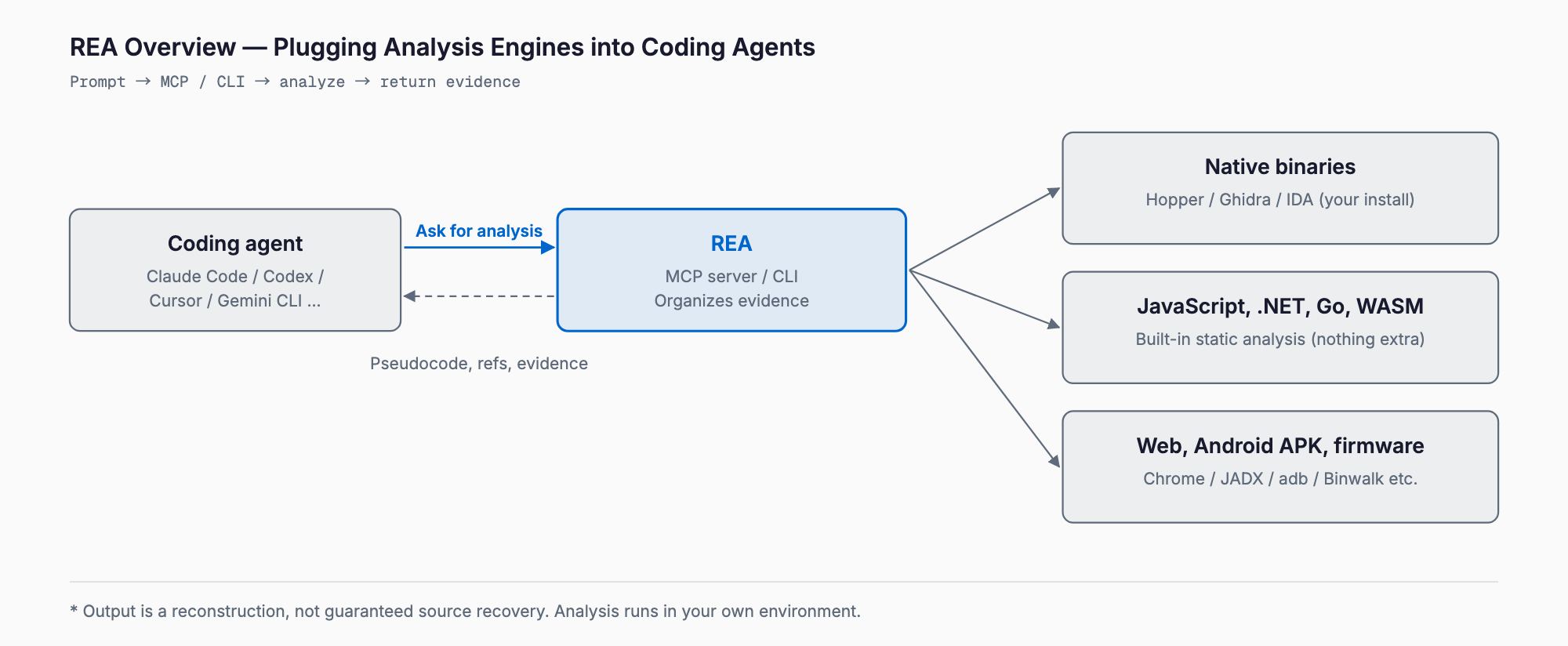
REA (Reverse Engineer Anything) is an open-source (MIT License) MCP server and CLI that gives coding agents such as Claude Code and Codex the ability to investigate software without source code. It targets native binaries, JavaScript/Electron apps, .NET assemblies, websites, Android APKs and firmware, and returns analysis-engine output in a form the agent can read. It entered GitHub Trending around October 8, 2026 and hit #1 daily on October 12.
In short, REA is not a magic tool that completes reverse engineering on its own. It is a bridge between agents and existing analysis tools such as Hopper, Ghidra and IDA. What you get is a reconstruction based on evidence like pseudocode and cross-references, and source recovery is not guaranteed. REA itself has no separate API fee; you pay for the model your agent uses, plus licenses if you use commercial analysis tools.
Use it only on targets where rights and purpose are clear: your own products and apps, your own legacy systems whose source is lost, vulnerability assessments and malware analysis. The legal and ethical points are covered in a dedicated section below.
What REA can do
According to the README, REA handles the following per target (as of October 2026).
- Native binaries: pseudocode, assembly, strings, symbols, references (requires Hopper, Ghidra or IDA)
- JavaScript/Electron: modules, imports, source maps, IPC, native add-ons (needs only Node.js and npm; the app is read statically, not run)
- .NET assemblies: metadata, CIL, native dependencies (static only, nothing extra)
- Websites: structure, scripts, network, screenshots (uses a Chrome-family browser)
- Android APKs: manifest, classes, decompiled methods (needs headless JADX and a JDK)
- Firmware: region splitting and extraction (Binwalk or Unblob on Linux)
- Others: Go binaries, WASM, EVM bytecode, HAR and mitmproxy captures, process behavior observation
Some features, such as pwntools-based analysis and mitmdump capture, are Linux-only. Check the README table for target and host combinations.
Installation (current method)
Install instructions conflict across sources. The current method, confirmed in the GitHub README and docs/installation.md, uses the npm package "rea-agents" (latest was 6.4.0 as of October 11, 2026). Older articles and the separate npm package "@morluto/rea" (0.2.1, from the Hopper-only days) do not reflect the current method. Requirements are Node.js 22.19+, 24.11+ or 26+, and npm.
# Register with your agent (configures the MCP server and workflow instructions; changes are shown for approval)
npx rea-agents setup

# For regular CLI use
npm install --global rea-agents
rea --help

# Update / remove
rea update
rea uninstall
Setup shows proposed changes for approval and keeps backups of your existing config. Restart your agent afterward. For manual registration, add this to your MCP config (a pinned version is assumed).
{
  "mcpServers": {
    "rea": {
      "command": "npx",
      "args": ["-y", "rea-agents@6.4.0", "mcp"]
    }
  }
}
The main branch can contain unreleased changes, so features in the README may be missing from the published version. Check it with npm view rea-agents dist-tags.latest.
Quick start
After setup, just tell your usual agent to analyze something with REA. Start with a safe target you own, such as your own Electron app. JavaScript/Electron analysis also runs directly from the CLI with no extra software.
npx -y rea-agents@latest analyze-javascript-application /absolute/path/to/app --jsonPrompts work best when they state the goal and scope. A few examples:
- "Analyze /path/to/MyApp.asar and list the IPC channels it exposes, with their callers, as a table."
- "For our legacy in-house executable, find the functions that read the config file and which fields they read, then write a spec memo."
- "For this APK of our own app, list the declared permissions and the classes that make network calls."
The agent calls REA's tools and answers from the evidence. The results are a reconstruction that includes inference, not the original code, so verify important conclusions against primary sources such as specifications, vendor documents and real behavior.
Supported agents and analysis engines
Setup supports more than a dozen agents, including Claude Code, Claude Desktop, Codex, Cursor, Gemini CLI, Windsurf, GitHub Copilot CLI, VS Code and Grok Build (selected with --client). Any agent that supports local MCP servers can use it via manual registration. For how MCP works and how to test servers, see our MCPJam Inspector guide; for combining multiple agents, the Docker Agent guide; and for setting up your agent environment, the Claude Code Templates guide.
- Hopper / Ghidra / IDA: the core of native analysis. Setup can install Hopper with approval; Ghidra and IDA use existing installs. Ghidra also covers 16-bit DOS analysis, but Windows support is experimental
- JEB: connects to a JEB client you start yourself
- Built-in static analysis: JavaScript, .NET and more, with nothing extra to install
- Large binaries: raise startup deadlines with environment variables such as REA_GHIDRA_STARTUP_TIMEOUT_MS
Commercial tools (IDA Pro, Hopper, JEB) may be used only by people who obtained them legally and are authorized to use them. REA provides no licenses or keys.
How it differs from existing tools
REA is not an analysis engine itself; it is a layer that makes analysis engines easier to use from agents. Ghidra, IDA, Hopper and radare2 each have their own MCP integration projects, so the differences look like this.
| Tool | Role | Strength | Caveat |
|---|---|---|---|
| REA | MCP/CLI unifying several engines and targets | Handles native, JS, .NET, APK and web through one workflow and organizes evidence | Deep native analysis needs Hopper/Ghidra/IDA; output is reconstruction |
| Ghidra (+GhidraMCP) | Open-source analysis suite released by the NSA; MCP is a separate community plugin | Free, powerful disassembly and decompilation | Centered on operations inside Ghidra and on binaries |
| IDA Pro (+IDA MCP) | Commercial industry-standard disassembler; MCP is a separate community plugin | Accuracy and plugin ecosystem; Hex-Rays decompiler | Paid license required |
| Hopper | Commercial disassembler for macOS/Linux | Lightweight UI, good for Mac binaries | Architecture and feature coverage differ from Ghidra/IDA |
| radare2 (+r2mcp) | Open-source analysis framework with MCP integration | CLI-first and easy to automate | Steep learning curve |
If you already master one analysis tool, that tool's MCP integration may be enough. REA fits when you want one entry point for the agent to investigate not just binaries but also Electron JavaScript, APKs and websites. These MCP projects update quickly, so check each repository when you adopt one.
Legal and ethical considerations
Whether reverse engineering is lawful depends on purpose and target. What follows is general information, not legal advice; consult a lawyer or other specialist for your case.
Legitimate uses
- Analyzing apps and products your company owns (quality checks, bug investigation)
- Ensuring interoperability with other systems (confirming integration specs)
- Vulnerability assessments and security audits (within an authorized scope)
- Malware analysis
- Recovering specifications of legacy systems whose source is lost (when you hold the rights)
What to avoid or check
- EULA prohibitions: many software licenses forbid reverse engineering by contract. Even where the law allows it, you may face breach-of-contract claims, so always read the terms of the target software
- Copyright law: how far analysis and copying of programs is permitted depends on purpose and manner. In Japan, provisions such as Article 30-4 (use for information analysis) and Article 47-3 (reproduction by the owner of a program copy) can be relevant, but their application depends on the facts, so do not assume; confirm with a specialist
- Trade secrets and unfair competition law: acquiring, using or disclosing another company's secrets obtained through analysis can be a problem
- Violating other services' terms: analyzing websites or apps, or hammering APIs, may breach terms of use or unauthorized-access laws
- Reimplementing results: pulling decompiled output almost verbatim into your product carries a high copyright-infringement risk. Use analysis to understand specifications and write your own implementation
- Internal approval: for business use, get target, purpose and handling of outputs approved internally (legal and IT)
REA's own README states that cracked copies, stolen keys and license bypasses are not authorized. Using it to circumvent copy protection or license checks, or to cheat in games, is not acceptable, and this article does not cover such methods.
Safety and information handling when adopting it
- Run in isolation: static JavaScript and .NET analysis does not run the target, but process-behavior observation (runtime capture) executes it with your permissions. Handle unknown binaries inside a dedicated VM or sandbox
- Confidential data: REA analyzes locally, but results go to the agent and fall under the model provider's data policy. Check beforehand whether confidential binaries or results may be sent to a cloud model; local models are an option
- Restrict permissions: set the agent's approvals (file writes, command execution) strictly and use a separate working directory for analysis
- Pin versions: for manual registration, pin a version such as rea-agents@6.4.0 and review changes on update
- Keep evidence: record target version, date and commands alongside results so they can be verified later
FAQ
Does REA cost anything?
REA itself is MIT-licensed open source with no separate API fee. Costs come from the model your agent uses and from licenses if you use commercial analysis tools such as IDA Pro or Hopper. Ghidra is free.
Why do install instructions differ between articles?
There used to be a separate Hopper-only package (@morluto/rea), and some articles still reflect it. The GitHub README and docs/installation.md currently point to npx rea-agents setup (latest was 6.4.0 as of October 11, 2026).
Can I use it without installing an analysis tool?
Static analysis of JavaScript/Electron and .NET works with nothing extra. Deep native binary analysis needs Hopper, Ghidra or IDA.
Can it fully recover the original source code?
No. You get a reconstruction based on pseudocode and references; variable names, comments and design intent are often lost. Verify important conclusions against primary sources.
Is it OK to analyze other companies' apps or software?
Licenses often prohibit it, and copyright and trade-secret issues can arise. Avoid analyzing third-party products without permission, and consult a specialist beforehand if you must.
Is it safe to analyze highly confidential binaries?
REA analyzes locally, but results are sent to your agent's model provider. For confidential material, check the data policy or consider a local model.
Summary
- REA is an MIT-licensed MCP server and CLI that gives coding agents reverse-engineering capabilities
- The current install is npx rea-agents setup (latest 6.4.0; Node.js 22.19+ etc.)
- Native analysis requires Hopper, Ghidra or IDA; static JavaScript and .NET analysis needs nothing extra
- Results are a reconstruction, not guaranteed source recovery
- Limit use to targets with clear rights and purpose, such as your own assets, authorized assessments and interoperability, and check EULAs and copyright law first
- Handle unknown binaries in a VM, and check the model provider's policy before sending confidential material
Start with an app you built yourself, confirm the workflow and output quality, then decide the scope for business use.
Related free tools (no sign-up, instant results)
Feel free to contact us
Contact Us