What Is Strata? Run Qwen3.8 Flash Next (125B) on an RTX 4090
Requirements and Setup
Strata is an MIT-licensed engine running Qwen3.8-Flash-Next (125B MoE) on a 12GB gaming PC: 94 tokens/s on an RTX 5070. Oct 2026 specs and setup.
Strata (GitHub: Niko1221/Strata) is an MIT-licensed open-source inference engine that runs Qwen3.8-Flash-Next, a 125-billion-parameter MoE model, on a gaming PC with 12GB or more of VRAM (RTX 20/30/40/50 or Radeon RX 7000/9000). According to the official README, you need 32GB+ of RAM (64GB recommended for every model size), about 80GB of free SSD space, and Windows 10/11 or Linux. It lists 94 tokens/s generation on an RTX 5070 (12GB) with the Q2_0 quant. In October 2026 it hit the Hacker News front page with 600+ points (634 points, 296 comments), and the repo passed 11,000 stars (as of October 5, 2026).
This guide draws on the official README, release notes and the HN thread: how Strata works, a hardware requirements table, speed by GPU, install steps for Windows and Linux, the browser UI, API and coding agents like Claude Code, how it differs from DwarfStar (ds4), llama.cpp and Ollama, and the caveats. The model itself is covered in our Qwen3.8-Flash-Next requirements guide.
What Strata is — a tiered-placement engine for a 125B MoE on a home PC
Strata aims to take a large MoE model, which would normally need hundreds of GB of memory, to usable speed on an ordinary gaming PC. The README stresses that it is free and open source and that nothing leaves your PC. The target model is Qwen3.8-Flash-Next (125B MoE), and the engine is built on llama.cpp / ggml components, as the README credits.
The core idea is to give each part of the PC a job. Per the README, all 24,576 experts (the MoE sub-networks) live in system RAM, the frequently used ones sit in GPU VRAM, the CPU computes the remaining experts at the same time, and lookup tables are stored on the SSD. Because an MoE only uses a few experts per token, hot experts in VRAM plus the full set in RAM can be fast enough without fitting everything on the GPU.
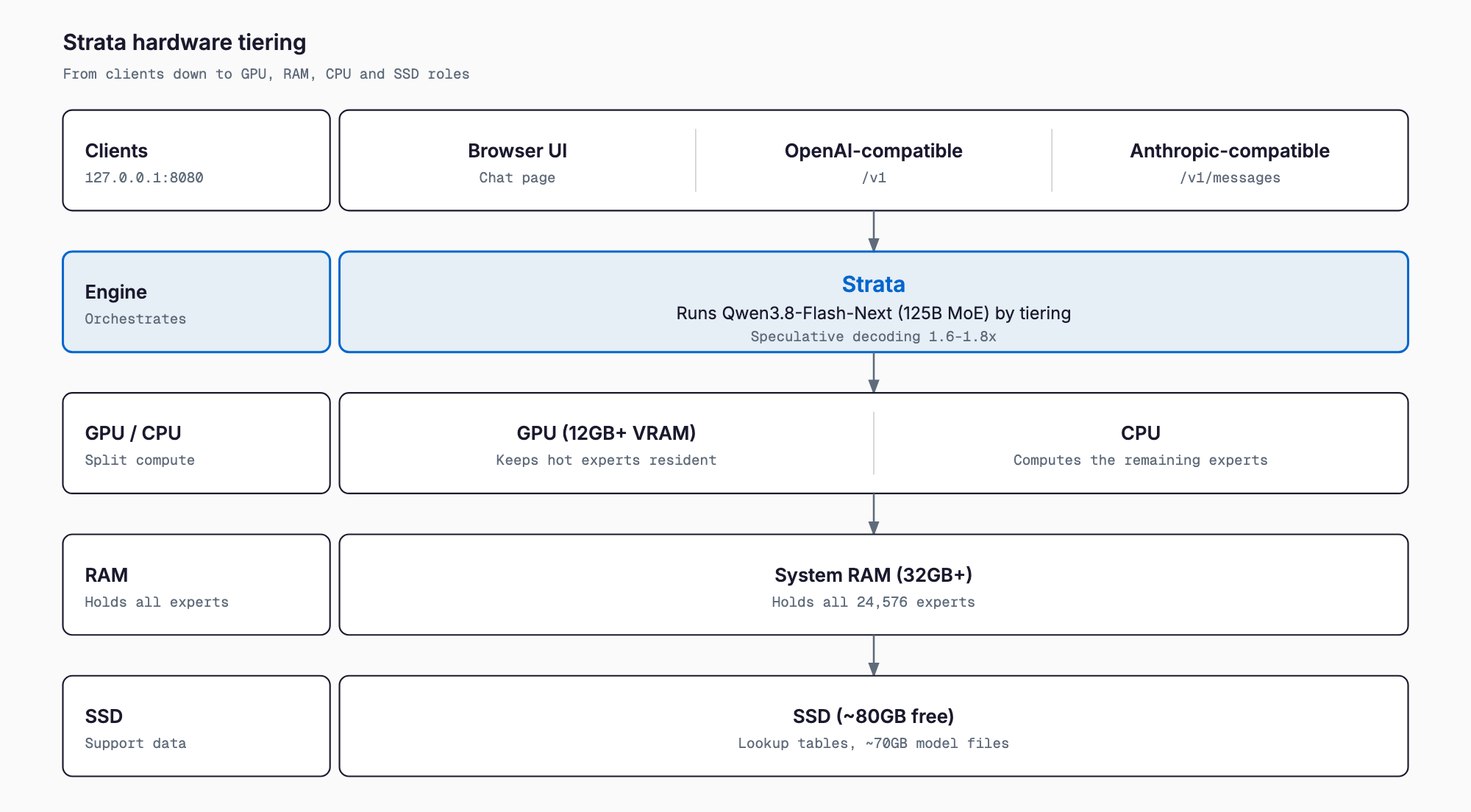
Strata also uses speculative decoding for a 1.6-1.8x speedup. As the README puts it, a small helper guesses the next few words and the big model checks them all at once. Rejected guesses are discarded, so only tokens that pass the big model's verification are kept.
Requirements table — which model for your RAM and VRAM
The README recommends a model by installed RAM. The GPU floor is 12GB of VRAM, and the RAM floor is 32GB.
| System RAM | Recommended model | README note |
|---|---|---|
| 32GB | Coder | Code-focused, half the experts removed; the option for 32GB |
| 48GB | IQ2_XS or Q2_0 | The fastest 2-bit class |
| 64GB | IQ3_S | Best quality of the standard builds (slowest) |
| 96GB+ | IQ3_S or Unsloth UD-IQ4_XS | Largest compressed builds; UD-IQ4_XS is ~4-bit, ~94GB download |
Other requirements:
- GPU: NVIDIA GeForce RTX 20/30/40/50 or AMD Radeon RX 7000/9000 (12GB+ VRAM for both)
- RAM: 32GB minimum, 64GB recommended for all model sizes
- Storage: about 80GB free (SSD preferred for faster startup)
- OS: Windows 10/11 or Linux with current GPU drivers
- Model download: about 70GB (varies by model)
Experimental support is listed for Tesla P40/V100, GTX 10 series, Radeon VII/MI50, Intel Arc (Linux) and older CPUs without AVX2, expanded in v0.1.39 (October 4, 2026); stability is not guaranteed. To estimate memory for your own setup, try the VRAM calculator.
Speed by GPU — 94 tokens/s on an RTX 5070, 60 on an RX 9070 XT
The README publishes measurements for two systems. Write is generation speed; read is prompt-processing speed.
| System | Model | Write | Read |
|---|---|---|---|
| RTX 5070 (12GB) + Ryzen 5 7600 | Q2_0 | 94 tokens/s | 2,650 tokens/s |
| Same | IQ2_XS | 79 tokens/s | 2,090 tokens/s |
| Same | IQ3_XXS | 62 tokens/s | 1,750 tokens/s |
| Same | IQ3_S | 53 tokens/s | 1,620 tokens/s |
| Same | Coder | 55 tokens/s | 2,180 tokens/s |
| RX 9070 XT (16GB) + Ryzen 9 3900X | Q2_0 | 60 tokens/s | 1,160 tokens/s |
| Same | IQ2_XS | 52 tokens/s | 1,110 tokens/s |
| Same | Coder | 44 tokens/s | 1,420 tokens/s |
The README also expects roughly 100-140 tokens/s on an RTX 3090 (24GB). The "100 tokens/s on an RTX 4090" figure comes from the HN thread title. In the comments, users reported 124 tokens/s on an RTX 4090 with 128GB DDR5 and a Ryzen 7950X3D, 30 tokens/s on an RTX 3080 with 48GB RAM and a Ryzen 3600X, 25 tokens/s on a 64GB Mac with no dedicated GPU (3-bit quant), and 33 tokens/s on an RTX 2060 (8GB) with Q2_0. These are self-reported, not independently verified.
| GPU | Source | Generation speed |
|---|---|---|
| RTX 5070 (12GB) | README measurement | 53-94 tokens/s (varies by model) |
| RX 9070 XT (16GB) | README measurement | 44-60 tokens/s |
| RTX 3090 (24GB) | README expectation | ~100-140 tokens/s |
| RTX 4090 (24GB) | HN title and comments | ~100-124 tokens/s (self-reported) |
| RTX 3080 | HN comment | ~30 tokens/s (48GB RAM, self-reported) |
Installation — START-HERE.bat on Windows, setup.sh on Linux
Download and extract the repo, then run the setup script. The installer detects your GPU and memory, asks for model size, context length and image support, downloads the model (about 70GB) and starts the engine. Downloads are resumable, and later launches start right away without downloading again.
- Windows: extract the repository ZIP and double-click START-HERE.bat
- Linux: run ./setup.sh in the Strata directory
git clone https://github.com/Niko1221/Strata.git
cd Strata
./setup.sh   # on Windows, double-click START-HERE.bat
Image input is enabled by answering yes to the "Images?" prompt during setup. On AMD with Windows, image processing is not supported yet (the README says it "can't yet"); on AMD with Linux, images are processed on the CPU.
Using it — browser UI, API and coding agents
Once running, a chat UI opens at http://127.0.0.1:8080. It offers adjustable thinking levels (off/low/medium/high), image input and long context; per the README, about 30K tokens are read in roughly a minute. Add --host 0.0.0.0 with an API key to reach it from other devices on your network.
| Client | Endpoint | Use |
|---|---|---|
| Browser UI | http://127.0.0.1:8080 | Chat |
| OpenAI-compatible API | http://127.0.0.1:8080/v1 | Apps and OpenAI-compatible coding tools |
| Anthropic-compatible API | http://127.0.0.1:8080/v1/messages | Claude Code and similar |
| Responses API | /v1/responses | Codex CLI |
To connect Claude Code, set the environment variable ANTHROPIC_BASE_URL to http://127.0.0.1:8080. For OpenAI-compatible tools, use http://127.0.0.1:8080/v1 as the base URL; Codex CLI uses the OpenAI Responses API (/v1/responses). A key and model name are required by the clients but can be any value, per the README.
export ANTHROPIC_BASE_URL=http://127.0.0.1:8080
export ANTHROPIC_API_KEY=dummy   # any value
claude
In v0.1.39 you can set "parallel": N in the config to serve several conversations at once, which helps when running multiple agents.
How it differs — DwarfStar (ds4), llama.cpp, Ollama and ktransformers
Strata is a model-focused engine, in the same spirit as DwarfStar, which we cover in a separate article. Columns other than Strata reflect official docs and general characteristics, and each tool's support changes over time.
| Tool | Target models | Typical hardware | Trait | License |
|---|---|---|---|---|
| Strata | Mainly Qwen3.8-Flash-Next (125B MoE) | Gaming PC, 12GB+ VRAM, 32GB+ RAM | GPU/RAM/CPU/SSD tiering plus speculative decoding; one-click setup | MIT |
| DwarfStar (ds4) | A few: DeepSeek V4 family, GLM 5.x, Qwen3.8 Flash Next | 96-128GB Mac, DGX Spark, multi-CUDA | Project-provided GGUFs only; built-in coding agent | MIT |
| llama.cpp | Many GGUF models | CPU, GPU and Mac | General-purpose and stable; supports offloading MoE experts to CPU | MIT |
| Ollama | Many models | Personal PCs and Macs | Easy install and model management; llama.cpp-based | MIT |
| ktransformers | Large MoE models | GPU plus large RAM | Specialized in CPU/GPU hybrid MoE execution | Apache-2.0 |
On HN, several commenters said llama.cpp prioritizes stability across many systems, while model-specific engines like Strata are much faster on the same hardware. If you want to swap among many models, a general tool like Ollama fits better; Strata is for running this one model fast.
Caveats — quantization quality, first launch, licensing
- Quantization quality: the 2-bit builds (Q2_0, IQ2_XS) are fast but prone to quality loss. HN had both warnings that 2-bit can degrade broadly ("4-bit is the floor") and reports of practical coding results with IQ3_XXS. We could not find accuracy benchmarks published by the Strata project.
- First-launch load: per the README, the PC may freeze for 1-3 minutes while the model loads. If RAM runs short, disk thrashing makes it extremely slow; close other apps or pick a smaller model.
- Setup safety: some HN commenters likened following AI-style setup instructions and running scripts to "piping to bash". Read the script before you run it.
- Two licenses: Strata is MIT, but the model and components carry their own terms. Qwen3.8-Flash-Next uses the Qwen Community License 1.0, not Apache-2.0; see the model guide for commercial-use conditions.
- Fast-moving: v0.1.39 shipped October 4, 2026 and the version is still 0.1.x, so specs and recommended settings change often.
FAQ
Does Strata really run on an RTX 4090?
Yes. The README's supported GPUs are RTX 20/30/40/50 series with 12GB+ VRAM, which includes the 4090. The "100 tokens/s" is the HN thread title, and one HN commenter reported 124 tokens/s on an RTX 4090 with 128GB DDR5. The README's own measurements are on an RTX 5070 and an RX 9070 XT.
How much RAM and VRAM do I need?
Per the README: 12GB+ VRAM, 32GB+ RAM (64GB recommended for all sizes) and about 80GB of free storage. With 32GB RAM use Coder, 48GB IQ2_XS or Q2_0, 64GB IQ3_S, and 96GB+ up to UD-IQ4_XS.
Can I use it with Claude Code?
Yes. It exposes an Anthropic-compatible API (http://127.0.0.1:8080/v1/messages); set ANTHROPIC_BASE_URL to http://127.0.0.1:8080. The key and model name can be anything. A local quantized model is not guaranteed to match the accuracy of the latest cloud models, though.
Is it free for commercial use?
Strata itself is MIT-licensed, including commercial use. The model, Qwen3.8-Flash-Next, is under the separate Qwen Community License 1.0, so check its terms.
Does it replace Ollama or LM Studio?
No, it complements them. Strata is mainly an engine to run Qwen3.8-Flash-Next fast; for trying many models, Ollama or LM Studio is a better fit.
Does it work with AMD GPUs?
Yes, on RX 7000/9000 series cards with 12GB+ VRAM, and since v0.1.34 on Windows as well. Image input is not yet supported on AMD with Windows, and AMD with Linux processes images on the CPU.
Summary
Strata splits Qwen3.8-Flash-Next (125B MoE) across the machine: hot experts on the GPU, all experts in RAM, remaining compute on the CPU, lookup tables on the SSD, plus speculative decoding for 1.6-1.8x. The result is an MIT-licensed tool that targets usable speed on a gaming PC with 12GB of VRAM and 32GB of RAM. The README measures up to 94 tokens/s on an RTX 5070 and 60 on an RX 9070 XT; setup is one run of START-HERE.bat or setup.sh, and it connects straight to a browser UI, OpenAI/Anthropic-compatible APIs and coding agents such as Claude Code. Watch for 2-bit quantization quality, first-launch load and the 0.1.x maturity. A safe start is the model that matches your RAM: Coder at 32GB, IQ3_S at 64GB.
Related free tools (no sign-up, instant results)
Feel free to contact us
Contact Us