Tester Army's e2e
Natural-Language E2E Testing with Record and Replay, vs Playwright
Tester Army's e2e explained: open-source E2E testing where an AI agent acts once, then replays without model calls. Setup, CI, mobile, vs Playwright. Oct 2026.
Tester Army's e2e (github.com/tester-army/e2e) is an open-source end-to-end testing framework for web and mobile apps. You write a goal in natural language, such as "upgrade the workspace to the Pro plan", and an AI agent drives the real app. You verify the result with ordinary locators and assertions. It is Apache-2.0 licensed, still pre-1.0, and gained about 6,400 stars on GitHub's weekly trending list in the second week of October 2026, with roughly 9,000 stars in total.
Because "e2e" is also a generic term, this article writes "Tester Army's e2e" throughout.
What Tester Army's e2e can do
- Natural-language steps: write a goal with agent.act('…') and the agent looks at the screen and operates the app. agent.assert, agent.waitFor and agent.extract judge or read the screen
- Mixed with normal tests: locators such as screen.getByRole(...) and expect live in the same test. A test with no agent steps uses no model at all
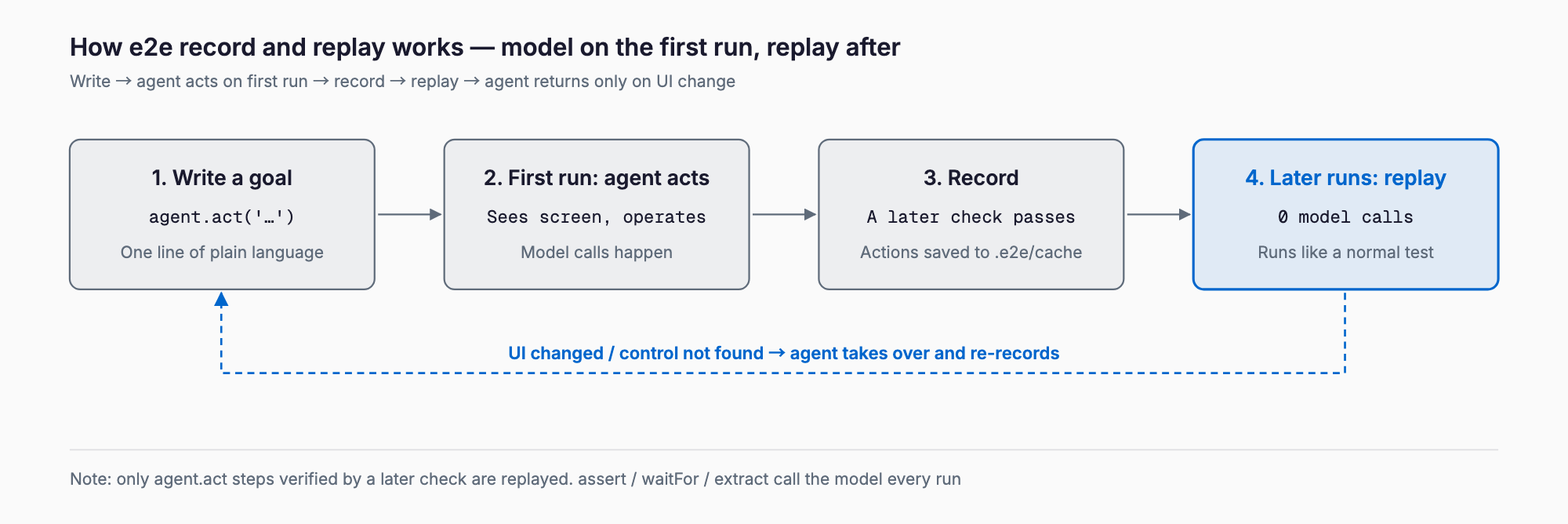
- Record and replay: actions from an agent.act step that a later check verified are recorded, then replayed on later runs with no model calls. The agent returns only when the app changes
- Web: the engine is Playwright (Chromium, Firefox, WebKit)
- Mobile: drives iOS simulators and Android emulators through agent-device
- Bring your own model: a subscription, an API key or a local model. Claude subscriptions are not supported, so Claude works only through an API provider
- Add-ons: a GitHub PR comment reporter (@e2e-dev/github), hosted browsers (such as Kernel) and hosted simulators (EAS Simulators)
How the agent and record-and-replay work
The key design choice in e2e is to use the AI once and record the result, instead of running it on every execution. The diagram shows the flow.
Install
Run this in your app's directory. The wizard asks for an engine (web or mobile) and a model (subscription, provider or none), writes a config and an example test, and adds dependencies. It keeps existing files.
npx e2e init        # npm
pnpm dlx e2e init   # pnpm
bunx e2e init       # bun
The docs require Node.js 24.8 or newer (22.22.3 or newer on Node.js 22). On Windows, run it inside WSL.
Quickstart: run your first test
init generates e2e.config.ts and tests/example.e2e.ts. The config looks like this (the web example from the official quickstart).
// e2e.config.ts
import type { E2EConfig } from 'e2e';
import { web } from '@e2e-dev/web';
import { gateway } from 'ai';

export default {
  agents: { default: { model: gateway('openai/gpt-6-luna-fast') } },
  targets: [{ engine: web(), app: { url: 'http://localhost:3000' } }],
} satisfies E2EConfig;
The generated example test makes no model calls, so it runs without an API key. Start your dev server at http://localhost:3000 and run it. A test that uses the agent follows the form shown in the README.
// tests/checkout.e2e.ts
import { test, expect } from 'e2e';

test('a member upgrades to Pro', async ({ app, agent, screen }) => {
  await app.open('/settings/billing');

  await agent.act('upgrade the workspace to the Pro plan');
  await agent.assert('the invoice preview shows a prorated amount');

  await expect(screen.getByRole('status')).toContainText('Pro');
});
npx e2e run # all tests
npx e2e run tests/agent.e2e.ts # one file
npx e2e run --headed # show the browser
npx e2e run --no-cache # ignore recordings, let the agent act
npx e2e run --shard 2/3 --reporter list,junit # for CIAgent steps need a model in the config; there is no default. You can choose a gateway (Vercel AI Gateway, OpenRouter), a provider API key, or a local or self-hosted server, and the docs advise a model that supports tool calls and images. For a subscription, sign in with npx e2e login <provider> (for example openai or github-copilot).
CI and GitHub Actions
Any CI service that can run Node works. The official GitHub Actions example runs on pull requests and pushes to main, installs Chromium, runs npx e2e run with the list and junit reporters, and uploads reports and artifacts even on failure. The model key (for example AI_GATEWAY_API_KEY) comes from repository secrets. @e2e-dev/github posts one pull request comment per run and updates it on reruns. Fork pull requests get a read-only token, so no comment is posted there.
For mobile, the docs show a two-job setup: iOS on a macOS runner (build with xcodebuild, run in a simulator) and Android on Ubuntu (KVM enabled, run in an emulator).
Record and replay, and why model cost stays low
The biggest worry with AI-driven testing is spending tokens on every run. e2e records the actions of each agent.act step that a later check verified as JSON files in .e2e/cache/, then replays them next time. A replayed step makes no model call and costs no tokens. In the official example, the first run used 3 model calls and the second used none.
- Only verified agent.act steps are replayed. With the built-in agent, agent.assert, agent.waitFor and agent.extract call the model every run
- What causes a cache miss: a change to the test name, target name, instruction, params, agent config or app identity. Values that change each run (timestamps, fresh emails) miss unless wrapped in unique(). Changing the model does not miss
- If replay fails, the agent takes over, and an entry whose verification fails is deleted
- Handling recordings: e2e init adds .e2e/cache/ to .gitignore. You can commit it to share recordings, but typed values are stored as typed, so review them. Secrets are stored by name only
- Use --strict-cache in CI: a stale recording otherwise makes the agent take over silently and bill every run; the docs recommend failing stale steps with REPLAY_STALE
Mobile support
The mobile engine (@e2e-dev/mobile) drives iOS simulators and Android emulators. You need Xcode with a simulator runtime for iOS, or the Android SDK with an emulator for Android. npx agent-device doctor checks the toolchain. Each target names one platform and points at a build artifact (.app or .apk).
// e2e.config.ts (mobile)
import type { E2EConfig } from 'e2e';
import { mobile } from '@e2e-dev/mobile';

export default {
  targets: [
    {
      name: 'ios',
      engine: mobile({ platform: 'ios' }),
      app: { bundleId: 'com.example.app', appPath: './build/MyApp.app' },
    },
    {
      name: 'android',
      engine: mobile({ platform: 'android' }),
      app: { bundleId: 'com.example.app', appPath: './build/app-debug.apk' },
    },
  ],
  workers: 1,
} satisfies E2EConfig;
The official example projects cover Vite, Next.js, Astro, Expo, SwiftUI, Jetpack Compose, Kotlin Multiplatform and Flutter. For the wider picture of mobile QA, see Mobile app testing and quality assurance. Note that simulator-only controls, such as switching appearance or network, do not work on physical phones.
How it differs from Playwright, Cypress, Maestro, Stagehand and Browser Use
e2e is less a replacement for Playwright than a Playwright-based runner that lets an agent write only the fragile interactions. The table compares the main tools. The Playwright and e2e rows follow the official docs. The Cypress, Maestro, Stagehand and Browser Use rows are general characterizations, so check each project's current docs before deciding.
| Tool | How you write tests | AI/LLM dependence | Mobile | Cost | Stability / flake handling | Best for |
|---|---|---|---|---|---|---|
| Tester Army's e2e | TypeScript; natural-language steps plus locators | Optional (agent steps only; no model if unused) | iOS/Android simulators and emulators | OSS (Apache-2.0); model cost on first run and re-recording only | Records and replays verified actions; agent takes over when the UI changes | Frequently changing flows across web and mobile with one framework |
| Playwright Test | Code (TypeScript etc.); locator-centric | None | Mainly web (mobile via emulation) | OSS; no model cost | Auto-waiting and traces; fix by hand when UI changes | Fast, strict regression tests on stable screens |
| Cypress | JavaScript/TypeScript; command chains | None | None (web only) | OSS plus paid cloud | Automatic retries; fix by hand when UI changes | Browser tests during frontend development |
| Maestro | YAML flows | Mostly none | Mainly iOS/Android | OSS plus paid cloud | Element-based, relatively stable | Simple mobile UI flows |
| Stagehand / Browser Use | Code calling AI actions such as act | Built in (an LLM drives the browser each run) | Mainly web | OSS plus model cost per run | Depends on LLM judgment; some offer caching | Browser automation, scraping, exploratory tasks |
Should you migrate from Playwright or use both?
In practice, running both beats a full migration. The official migration guide also recommends running e2e side by side with Playwright in one project and moving one spec at a time. @e2e-dev/web ships its own pinned playwright-core, so your @playwright/test version is untouched, and e2e picks up only tests/**/*.e2e.ts by default.
- Move the flows that break often first: wizards and checkouts where selectors break after UI changes. Stable tests can stay in Playwright
- Behavior differences: string names match the whole text and are case-sensitive, multiple matches raise LOCATOR_AMBIGUOUS, and the default test timeout is 120 seconds (Playwright: 30)
- Missing config keys: some, such as globalSetup, fullyParallel and devices, are not available yet
- It can stay deterministic: replace each page.getBy* with screen.getBy* and you get a fully deterministic test with no agent
For ideas on testing and evaluating MCP servers, see the MCPJam Inspector guide. Reading it alongside the Claude Code Templates article helps place AI-agent developer tools in context.
Things to watch before adopting
- Pre-1.0: the README says APIs and config can change between minor releases. Pin the version and keep Playwright for your most critical tests
- Telemetry: anonymous usage data (commands, engines, where runs fail) is sent. No test content, app content or credentials are sent. Disable it with npx e2e telemetry disable or E2E_TELEMETRY_DISABLED=1
- LLM non-determinism: the first run depends on model judgment. Recording improves repeatability, but assert and similar steps call the model every time, so judgments can still vary
- Secrets in prompts: the runner redacts registered secrets from model input, but values you write directly into an instruction or param are stored in the recording as typed. Never put production credentials there
- Committed caches: review changed recordings in the pull request. Use --strict-cache in CI to avoid silent cost growth
- Replay scope: unverified steps are not recorded, so always put a check after an agent.act
Frequently asked questions
Is Tester Army's e2e free?
The framework is open source under Apache-2.0 and free. If you use agent steps, you pay separately for the model you bring (API usage or a subscription). I found no published pricing for the hosted browser and simulator add-ons.
Can I run it without a model?
Yes. Tests with only locators and assertions use no model. You can also choose "None" in npx e2e init, and the example test runs without an API key.
Does it work with local models?
You can configure a local or self-hosted server. The docs recommend a model that supports tool calls and images, so small models may be less accurate at operating the app.
Can I use Claude?
Claude subscriptions are listed as unsupported. To use Claude, configure it through an API provider.
Do tests break when the UI changes?
When a recorded action no longer fits, the agent takes over from the current screen and tries to reach the goal, then re-records on success. In CI the default is to take over silently, which adds cost; --strict-cache flags stale steps as failures instead.
Can I keep my existing Playwright tests?
e2e tests use a different @e2e-dev/web API, so existing Playwright tests are not converted automatically. The two can run side by side in one project, and the docs describe moving one file at a time.
Summary
Tester Army's e2e aims to combine the ease of writing in natural language with the speed and cost of a normal test, by letting the AI act once, then recording and replaying. It handles web (Playwright) and mobile (simulators and emulators) with one style, and you choose the model. Keep in mind that it is pre-1.0 with APIs that may change, that telemetry is on by default, and that assertions call the model every run. A practical start is to run npx e2e init on one UI-fragile flow, run it next to Playwright, and measure what record and replay saves.
Related free tools (no sign-up, instant results)
Feel free to contact us
Contact Us