Holo4 Requirements
VRAM & GPU for 35B-A3B (Apache-2.0) [2026]
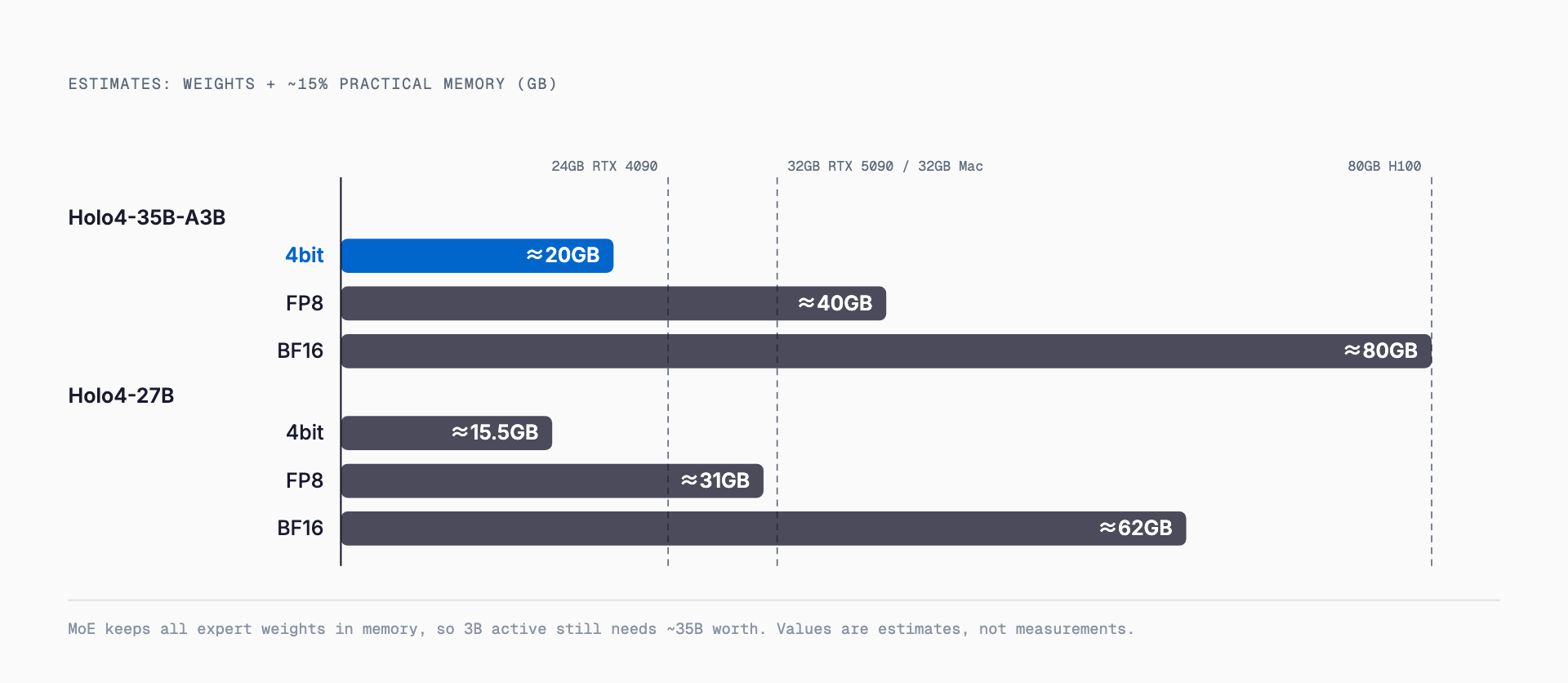
Holo4-35B-A3B (Apache-2.0) needs ~20GB at 4-bit and ~80GB in BF16 (estimates): RTX 4090/5090 or a 32GB Mac. vLLM and GGUF setup, API cost. Updated Oct 2026.
Holo4-35B-A3B is an open-weight computer-use model that reads screenshots and operates a PC, and at 4-bit quantization it needs an estimated ~20GB of memory. That puts it within reach of an RTX 4090 (24GB), an RTX 5090 (32GB), or a Mac with 32GB or more of unified memory. In BF16 it needs an estimated ~80GB, i.e. H100 80GB class hardware. H Company (France) released it on Hugging Face on September 28, 2026 under the Apache-2.0 license, which allows commercial use.
Note that H Company does not officially state VRAM or memory requirements. Every number in this article is an estimate computed as: parameters x bytes per parameter + ~15% overhead (KV cache, activations, etc.). The calculation is shown with each table. Computer-use agents run long multi-step sessions while accumulating screenshots, so leave more headroom than you would for plain text generation.
Requirements at a glance
The table below gives estimates for Holo4-35B-A3B (MoE, 35B total / ~3B active) and, for comparison, Holo4-27B (dense). "Weights only" is parameters x bytes; "Practical" adds ~15% (all estimates).
| Model | Precision | Weights only (est.) | Practical (est.) | Typical hardware |
|---|---|---|---|---|
| Holo4-35B-A3B | BF16 (2 bytes/param) | ~70GB | ~80GB | H100 80GB or multi-GPU |
| Holo4-35B-A3B | FP8 (1 byte/param) | ~35GB | ~40GB | A6000 48GB, RTX 6000 Ada 48GB |
| Holo4-35B-A3B | 4-bit (0.5 bytes/param) | ~17.5GB | ~20GB | RTX 4090 24GB, RTX 5090 32GB, 32GB Mac |
| Holo4-27B | BF16 | ~54GB | ~62GB | 80GB class or multi-GPU |
| Holo4-27B | FP8 | ~27GB | ~31GB | RTX 5090 32GB (tight), 48GB GPUs |
| Holo4-27B | 4-bit | ~13.5GB | ~15.5GB | 16GB GPU is borderline; 24GB is safer |
Real Q4 GGUF files use mixed bit widths per layer, so actual file sizes can be a few GB larger than the 4-bit row. Check the actual file size before downloading. Holding screenshots as image tokens for a long run also grows the KV cache as context increases.
If you want to check right away whether it runs on your GPU or Mac, our VRAM calculator (free, no sign-up) estimates required VRAM from the model, quantization and context length you select. Holo4 is available in the model list.
What is Holo4?
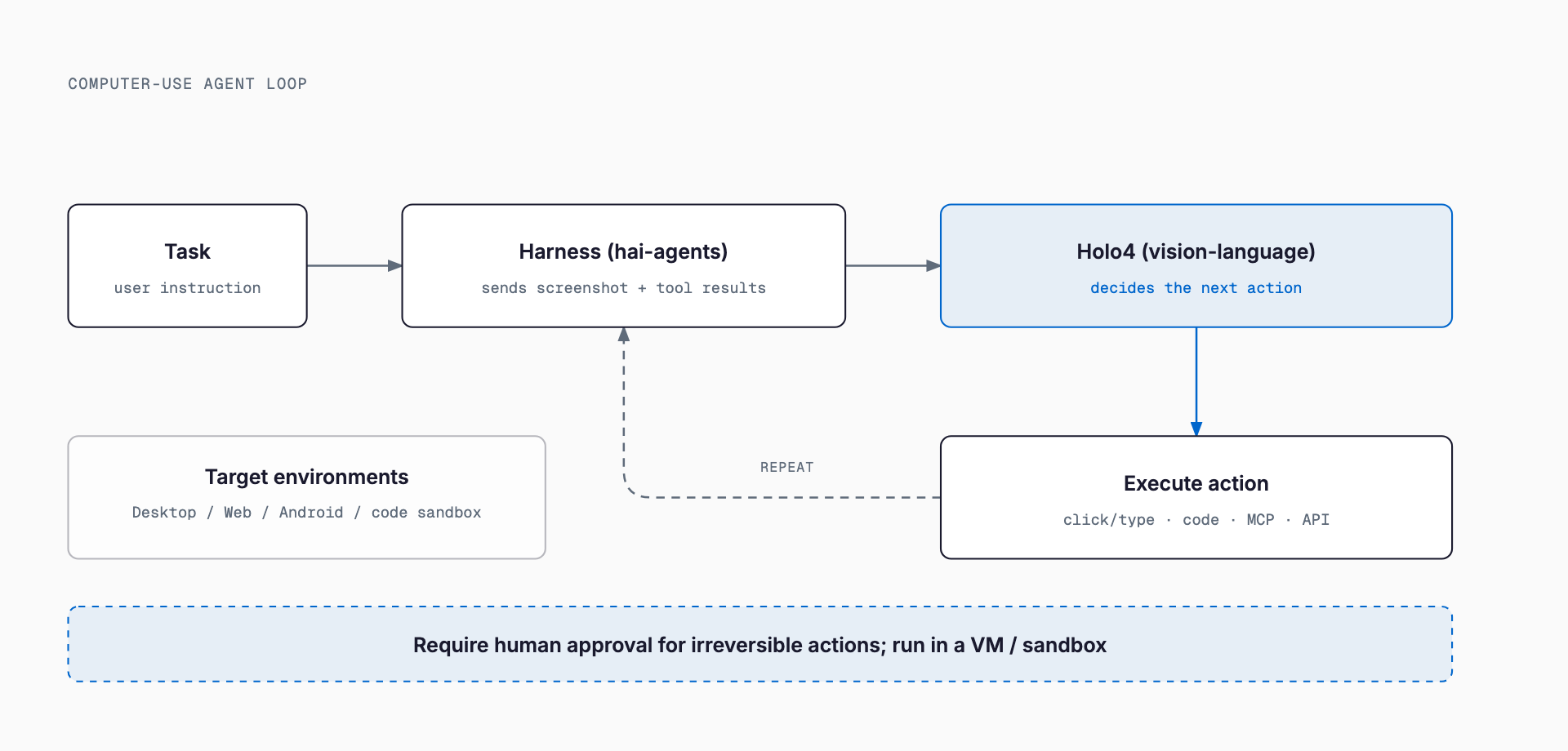
Holo4 is a family of vision-language models for computer use, released by H Company. Given screenshots as input, it outputs GUI actions such as clicks and typing, and it can also work through code, MCP and API calls. Supported environments include desktop, web, Android and code sandboxes. It is designed around H Company's own "hai-agents" harness, which feeds screenshots and tool results to the model and executes the actions it produces.
| Item | Holo4-35B-A3B | Holo4-27B |
|---|---|---|
| Architecture | MoE (35B total / ~3B active) | Dense (27B) |
| Base | Fine-tuned from Qwen/Qwen3.6-35B-A3B | Based on Qwen3.8 27B |
| License | Apache-2.0 (commercial use allowed) | CC BY-NC 4.0 (non-commercial) |
| For commercial use | Self-host directly | Via the H Models API |
| Context length | 262,144 tokens (256K) | 262,144 tokens (256K) |
| Formats | BF16 / FP8 / NVFP4 / Q4 GGUF | Same |
The key caveat is that the 27B scores higher but carries a non-commercial license (CC BY-NC 4.0). For business use, the model you can self-host is the 35B-A3B (Apache-2.0); using the 27B commercially means going through the H Models API. A third model, Holotron4-30B-A3B (Holotron4 Nano, based on NVIDIA Nemotron 3 Nano Omni), was released alongside them but is outside the scope of this article.
Benchmarks (developer-reported)
The figures below were published by the developer and we could not find third-party verification. Per-task costs are also developer-reported.
| Benchmark | Holo4-27B | Holo4-35B-A3B | Claude Opus 5.5 |
|---|---|---|---|
| OSWorld 2.0 | 61.7% ($1.22/task) | 30.9% ($0.61/task) | 81.8% |
| AutomationBench | 45.4% ($0.05/task) | 34.5% ($0.02/task) | not listed |
| OSWorld (v1) | 85.2% ($0.08/task) | not listed | not listed |
The 27B scores roughly twice as high as the 35B-A3B on OSWorld 2.0, at roughly twice the cost per task. The gap to Opus 5.5 (81.8%) on OSWorld 2.0 is large, so the 35B-A3B is best viewed as a cheap, self-hostable option rather than a top-accuracy one. Always measure the success rate on your own screens.
Why an MoE still needs memory for all 35B
The 35B-A3B activates only ~3B parameters per token, so compute per token is small and speed tends to be good even on modest GPUs. But the experts selected change from token to token, so the weights of every expert must stay resident in memory (VRAM). Required memory is set by the total parameter count (35B), while speed is set by the active count (~3B).
Quantization lowers weight precision to save memory. Relative to BF16, FP8 is about half and 4-bit about a quarter. Some quality loss can appear at 4-bit, and since computer-use depends on locating small buttons precisely, verify click accuracy on real screens. The basics of quantization are also covered in our Gemma 4 requirements guide.
GPUs, Apple Silicon and CPU offload
The table below is a guideline based on the estimates above, not measured results, so leave a margin.
| Hardware | Memory | 35B-A3B 4-bit (~20GB) | Notes |
|---|---|---|---|
| RTX 4070 Ti SUPER etc. | 16GB | Does not fit | Needs CPU offload; 27B 4-bit works |
| RTX 4090 | 24GB | Fits (little headroom) | Screenshots can squeeze the KV cache |
| RTX 5090 | 32GB | Comfortable | 27B FP8 also in range |
| A6000 / RTX 6000 Ada | 48GB | Comfortable | 35B-A3B FP8 (~40GB) fits |
| H100 | 80GB | BF16 (~80GB) is borderline | Little room for long context |
- Apple Silicon: unified memory is effectively your VRAM limit. 4-bit (~20GB) runs on 32GB, but it competes with the OS and other apps, so 48GB or more is more practical. With 64GB or more, FP8 (~40GB) comes into range.
- CPU offload: llama.cpp-style runtimes can push some layers into system RAM. Because an MoE activates few parameters, the slowdown should be smaller than for a dense 27B, but computer-use processes an image every step, so do not expect interactive speed.
- CPU only: not recommended except for batch-style work. Screenshot processing is heavy and each step takes long.
How to run it: vLLM, SGLang, GGUF and Docker
These are the launch methods from the official instructions. All expose an OpenAI-compatible API that your agent harness then calls. With vLLM:
pip install vllm
vllm serve "Hcompany/Holo4-35B-A3B"
# OpenAI-compatible API: http://localhost:8000/v1
With SGLang:
python3 -m sglang.launch_server \
  --model-path "Hcompany/Holo4-35B-A3B" \
  --host 0.0.0.0 --port 30000
Docker Model Runner starts it in one line. To load it directly with Transformers, use AutoProcessor and AutoModelForMultimodalLM with device_map="auto".
docker model run hf.co/Hcompany/Holo4-35B-A3BA Q4 GGUF is published, so llama.cpp, Ollama and LM Studio can load it. When feeding screenshots, GGUF setups may need a separate vision projector file, so check each tool's multimodal instructions. For choosing an inference engine in general, our Qwen3.8-27B requirements guide is also a useful reference.
API vs. local: cost comparison
H Company offers the "H Models API", an OpenAI-compatible endpoint (https://api.hcompany.ai/v1). Pricing is reported at $0.30 input / $2.00 output per 1M tokens (as reported by third-party coverage; confirm on the official page).
| Approach | Upfront cost | Variable cost | Best for |
|---|---|---|---|
| H Models API | None | Pay per use | Trying it out, using the 27B commercially, occasional use |
| Local (35B-A3B) | Buy a GPU or Mac | Power and upkeep | Keeping screen data in-house, running constantly at volume |
As an illustration, assume one task uses 200K input tokens and 20K output tokens: 0.2M x $0.30 + 0.02M x $2.00 = about $0.10 (a hypothetical calculation). If internal screens cannot leave your network, local is the only option; otherwise the least wasteful order is to measure success rate and token usage on the API first, then decide whether to buy hardware.
How it differs from other models
| Item | Holo4-35B-A3B | Holo4-27B | Qwen3.6-35B-A3B (base) | Claude Opus 5.5 (API) |
|---|---|---|---|---|
| Positioning | Computer-use fine-tune | Computer-use (dense) | General-purpose base | Closed API model |
| License | Apache-2.0 | CC BY-NC 4.0 | Not verified here | Commercial API |
| OSWorld 2.0 | 30.9% | 61.7% | not listed | 81.8% |
| Self-hosting | Yes | Non-commercial only | Yes (expected) | No |
Holo4-35B-A3B is a derivative of the general-purpose Qwen3.6-35B-A3B, further trained for computer use. The difference from the base is its specialization in GUI operation, but we could not verify benchmark numbers for the base model, so we do not claim a direct ranking. For using computer-use as a desktop app in the cloud, see our Manus Studio desktop app guide.
Safety notes
A computer-use model actually moves the mouse and types on the keyboard. A wrong action directly affects business data and accounts, so operational care matters far more than with ordinary chat.
- Run it in a sandbox or VM: use a disposable VM or container desktop, not a production work PC.
- Require human approval for irreversible actions: deletes, sends, purchases and transfers should be confirmed by a person first.
- Minimize privileges: use a dedicated account that can only reach the sites and files it needs.
- Do not let on-screen text give orders: text in web pages or emails (prompt injection) may steer the model, so add confirmation before important actions.
- Keep logs: save each step's screenshot and action so you can trace what happened.
Troubleshooting out-of-memory errors
- OOM at startup: drop one quantization level (BF16 -> FP8 -> 4-bit), or switch from the 35B-A3B to the 27B at 4-bit.
- OOM partway through a run: screenshot accumulation is likely growing the KV cache. Shorten the context length and discard images from old steps.
- Lower the screenshot resolution: fewer image tokens improves both memory and speed, but small text and buttons become harder to read, so verify on real screens.
- Close other GPU-using apps: browser hardware acceleration and similar can take hundreds of MB of VRAM.
- Extremely slow with CPU offload: increase the number of layers on the GPU, or add memory.
- Competing with other apps on a Mac: 4-bit is tight on 32GB; close other apps or choose a smaller configuration.
Summary
Holo4-35B-A3B is an Apache-2.0, commercially usable open-weight model for computer use. It should run in an estimated ~20GB at 4-bit (RTX 4090/5090, a Mac with 32GB or more) and ~80GB in BF16. The 27B scores higher but is non-commercial, so commercial use means the H Models API. VRAM requirements are not officially stated and every figure here is an estimate. Start with the API or a 4-bit build to measure success rate on your own screens, and run it safely in a sandbox.
FAQ
How much VRAM does Holo4-35B-A3B need?
It is not officially stated, so these are estimates. For 35B total parameters, 4-bit (0.5 bytes/param) is ~17.5GB, or ~20GB with ~15% overhead. FP8 is ~40GB and BF16 is ~80GB. Computer-use contexts grow quickly with screenshots, so leave extra headroom.
Can Holo4 be used commercially?
The 35B-A3B is Apache-2.0 and can be used commercially. The 27B is CC BY-NC 4.0 (non-commercial); commercial use goes through the H Models API. The 27B scores higher, so mind the license difference.
Will Holo4-35B-A3B run on an RTX 4090 (24GB)?
At 4-bit it is estimated at ~20GB, so it should run, but with little headroom. Holding many screenshots grows the KV cache and can squeeze memory. Shortening the context and lowering image resolution help. A 16GB GPU cannot hold it, so consider the 27B at 4-bit or CPU offload.
Can I run it with Ollama?
A Q4 GGUF is published, so llama.cpp, Ollama and LM Studio should be able to load it. Image input may require an extra projector file. The official launch methods are vLLM, SGLang, Docker Model Runner and Transformers.
How do I use a computer-use model safely?
Run it in a disposable VM or container rather than a production PC, with a minimally privileged dedicated account. Require human approval for irreversible actions such as deleting, sending or buying. Because text on web pages can mislead the model, keep step-by-step logs.
Related free tools (no sign-up, instant results)
Feel free to contact us
Contact Us