Whiteboard (YC W26): Visual Review for Claude Code & Codex
Whiteboard is an open-source desktop app by YC W26's /dev/fast that draws Claude Code and Codex changes as review diagrams, launched via Show HN in Sept 2026.
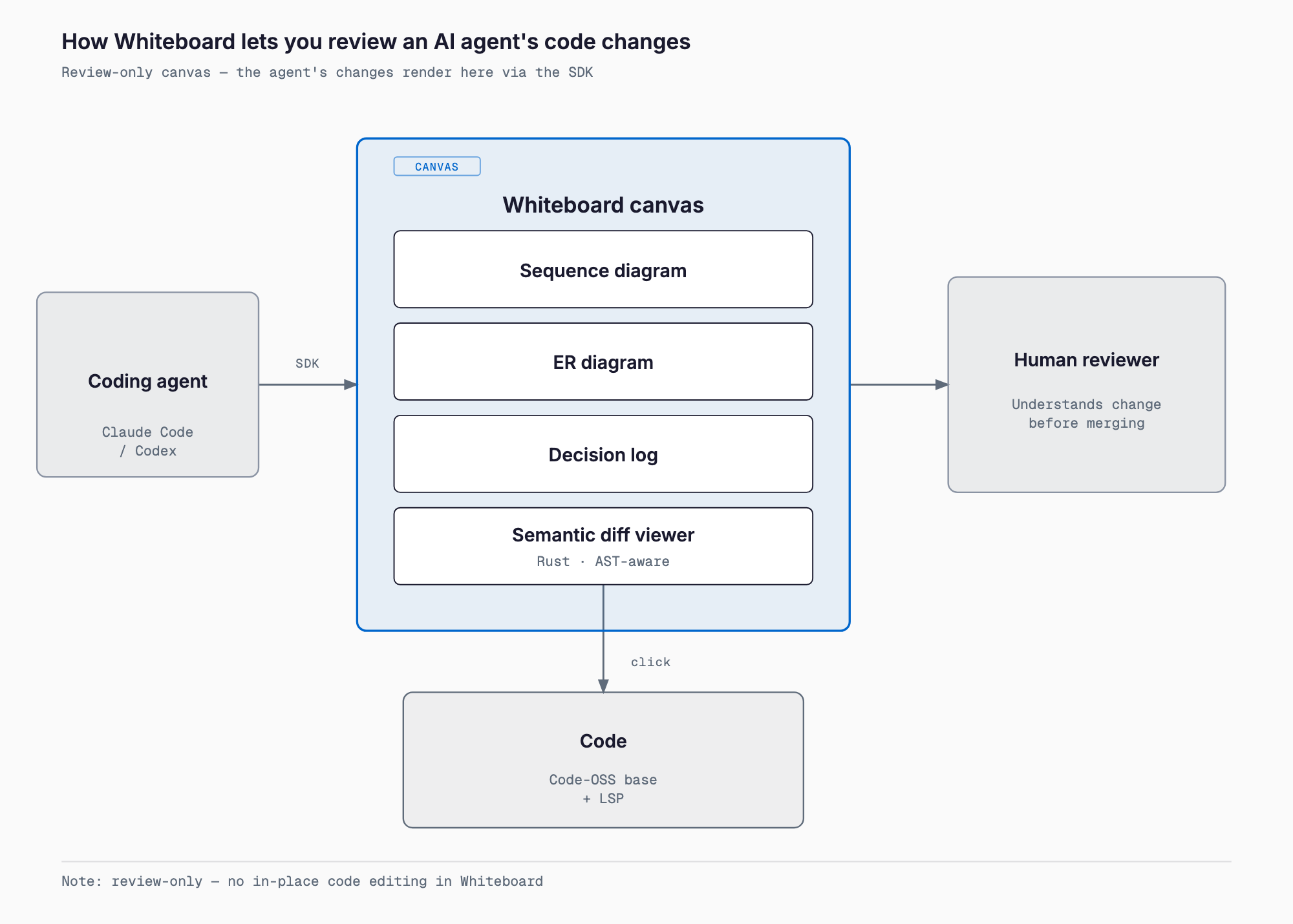
Whiteboard is an MIT-licensed open-source desktop app built by /dev/fast, a YC W26 startup. It has Claude Code, Codex, or other AI coding agents explain their own changes as sequence diagrams, entity-relationship diagrams, and decision logs, recreating the feel of a whiteboard session with the developer sitting next to you. It's aimed at developers and engineering leads reviewing PRs written by AI agents, and it launched on Show HN on September 24, 2026 as a remedy for merging code nobody fully understands, reaching roughly 313 points on Hacker News.
/dev/fast was founded by four former tech leads — Sid, Alex, Ketan, and Milan — and the project's GitHub repository, devdotfast/whiteboard, had roughly 850 stars at the time of writing. The problem it targets is what the developer community calls "cognitive debt": as AI agents write more code autonomously, developers increasingly merge PRs they don't fully understand. Whiteboard tries to pay that debt down by having the agent itself draw out the intent and structure of its own changes.
What it can do
| Feature | Description |
|---|---|
| Agent integration SDK | Connects to coding agents you already use, such as Claude Code and Codex, giving the agent an SDK to draw its work on an in-app canvas. The README recommends GPT-6 Sol and Claude Opus 5.5 as models |
| Sequence diagrams | Visualizes the flow and call relationships introduced by a change |
| Entity-relationship diagrams | Visualizes the data model and relationships between objects |
| Decision Log | Records the agent's reasoning and requirements tracing in chronological order |
| Jump-to-code | Clicking a diagram element or a quoted line from the agent's trace jumps straight to the underlying code |
| Semantic diff viewer | An AST-aware diff written in Rust; large functions are summarized as pseudocode |
| WASM plugin system | Lets you customize how diffs are rendered |
| Review sharing/export | Reviews can be exported and shared across machines (a shared review won't reflect later updates unless it's re-shared) |
| Editor foundation | Built on a vendored Code-OSS fork (the VS Code base) with about 45% of Copilot-related code removed, while keeping VS Code keybindings and LSP-based code navigation |
Whiteboard cannot edit files itself. It's purpose-built for review and design comprehension, and actual code editing is expected to happen in your regular editor or IDE.
Install, pricing, and requirements
| Item | Details |
|---|---|
| Pricing | The desktop app is free and open source |
| Supported OS | macOS is supported. Fedora Linux has a build (AppImage, AUR, and Nix are not yet available; users have requested them). Windows is not yet supported |
| License | MIT |
| Download (macOS) | install.dev.fast |
| Download (Fedora Linux) | install.dev.fast/linux |
| App size | About 736MB, criticized as large; the founders say a native rewrite is planned |
| Telemetry | Anonymous usage data only, excluding code, diffs, prompts, and model output; can be disabled |
| Team plan | A hosted web/team version with multiplayer and trajectory storage is planned; self-hosting will remain available |
How to use it
The shortest path is to download and open the app, connect your coding agent (Claude Code or Codex) from the welcome screen, and then simply ask that agent to review your branch and open the result in Whiteboard. The agent analyzes the change through the SDK and draws sequence diagrams, ER diagrams, and a decision log onto the in-app canvas. From there, a reviewer can jump from a diagram element or a quoted line in the agent's trace straight to the relevant code — surfacing the "why" behind an implementation in a way that's harder to follow in a terminal diff viewer like Hunk or a plain GitHub PR review.
How it compares to existing tools
| Tool | Form factor | Strength | Difference from Whiteboard |
|---|---|---|---|
| Whiteboard (this article) | Desktop GUI (Code-OSS fork) | Visualizes agent changes as sequence diagrams, ER diagrams, and decision logs | — |
| Hunk | Terminal diff viewer | AI-annotated text diff review, lightweight and terminal-native | Whiteboard is diagram-first; Hunk is text-diff-first. The two can coexist rather than compete |
| GitHub PR review | Web browser | Team-standard review flow, comment and approval history | Whiteboard is a local design-comprehension tool; the durable review record realistically still lives on GitHub |
| Cursor / VS Code | IDE | Actually editing code | Whiteboard is review-only with no editing, so it's used alongside an IDE, not instead of one |
| Excalidraw / tldraw | General-purpose whiteboard | Freeform manual diagramming | Whiteboard's diagrams are agent-generated automatically, removing the manual drawing step |
| Mermaid + Markdown | Diagram-as-code | Lightweight diagrams that live in Git version control | Whiteboard's strength is auto-generation and two-way jump-to-code, but if the canvas drifts from the code it risks becoming a stale second source of truth — a concern also raised on HN |
| likec4 | Architecture-diagram DSL | Generates diagrams from a structured, predefined architecture description | likec4 draws a pre-defined blueprint; Whiteboard generates a review diagram after the fact, per change |
| Diagram-generation agent skills (e.g. diagram-design) | Claude Code skill / CLI | Produces durable diagrams for articles and documentation | Whiteboard's canvas is mainly for in-the-moment review, not a saved, publishable diagram asset |
HN commenters raised several criticisms: that calling it an "IDE" is misleading when it can't edit files, that it risks becoming a second source of truth that drifts from the code, questions about why plain Markdown plus Mermaid wouldn't suffice, and suggestions that it could instead be a VS Code extension. Commenters also compared it to likec4.dev and erode.dev. In the same AI-era review and visualization space, related tools worth knowing include the AI code review agent Alibaba Open Code Review, Claude Code's diagram-design skill, and the architecture-diagram generator Archify.
Who should use it — and who shouldn't
- Good fit: engineering leads and senior engineers who let Claude Code or Codex write most of a change and want to grasp its intent quickly before merging
- Good fit: teams juggling parallel PRs from multiple agents who find plain text diffs hard to follow structurally
- Not a fit: anyone who wants to edit code while reviewing it, since Whiteboard has no editing and requires switching back to an IDE
- Not a fit: Windows-based teams, since Windows isn't supported yet
- Not a fit: teams that want to avoid the roughly 736MB app size or installing another Code-OSS fork alongside their existing editor
FAQ
Is Whiteboard free?
The desktop app is free and open source under the MIT license. A hosted web/team version with multiplayer features is planned, but self-hosting will remain available.
Can I edit code directly inside Whiteboard?
No. It's currently a review and design-comprehension tool only; actual editing happens in your regular editor or IDE.
Which AI coding agents does it work with?
It's designed to connect with agents like Claude Code and Codex, and the README recommends GPT-6 Sol and Claude Opus 5.5 as models.
Does it run on Windows?
Not yet, as of September 2026 — Windows support is promised soon. Linux currently has a Fedora build only, and users have asked for AppImage, AUR, and Nix packaging.
Summary
Whiteboard is a dedicated tool for pulling the "why" out of AI-agent-written code as diagrams, lowering the cognitive load of review. It can't edit files, and its Code-OSS-fork foundation brings a sizable install and no Windows support yet — but for teams that want to understand PRs from agents running in parallel, for example via worktrunk, through both diagrams and decision logs rather than text diffs alone, it's worth trying. Start by downloading it on macOS or Fedora Linux, connect it to your Claude Code or Codex setup, and try it on a small branch first.
Related free tools (no sign-up, instant results)
Feel free to contact us
Contact Us