MiniCPM5-2B Requirements
RAM, VRAM and GPU for Phones, Raspberry Pi and Laptops (2026)
As of Sep 7, 2026, OpenBMB's MiniCPM5-2B (2.52B dense, 131K context, Apache-2.0) needs roughly 1.5GB to 5GB of RAM/VRAM depending on quantization. Here is a GGUF size table, how to run it with Ollama and llama.cpp, and a comparison with Qwen3.5-4B.
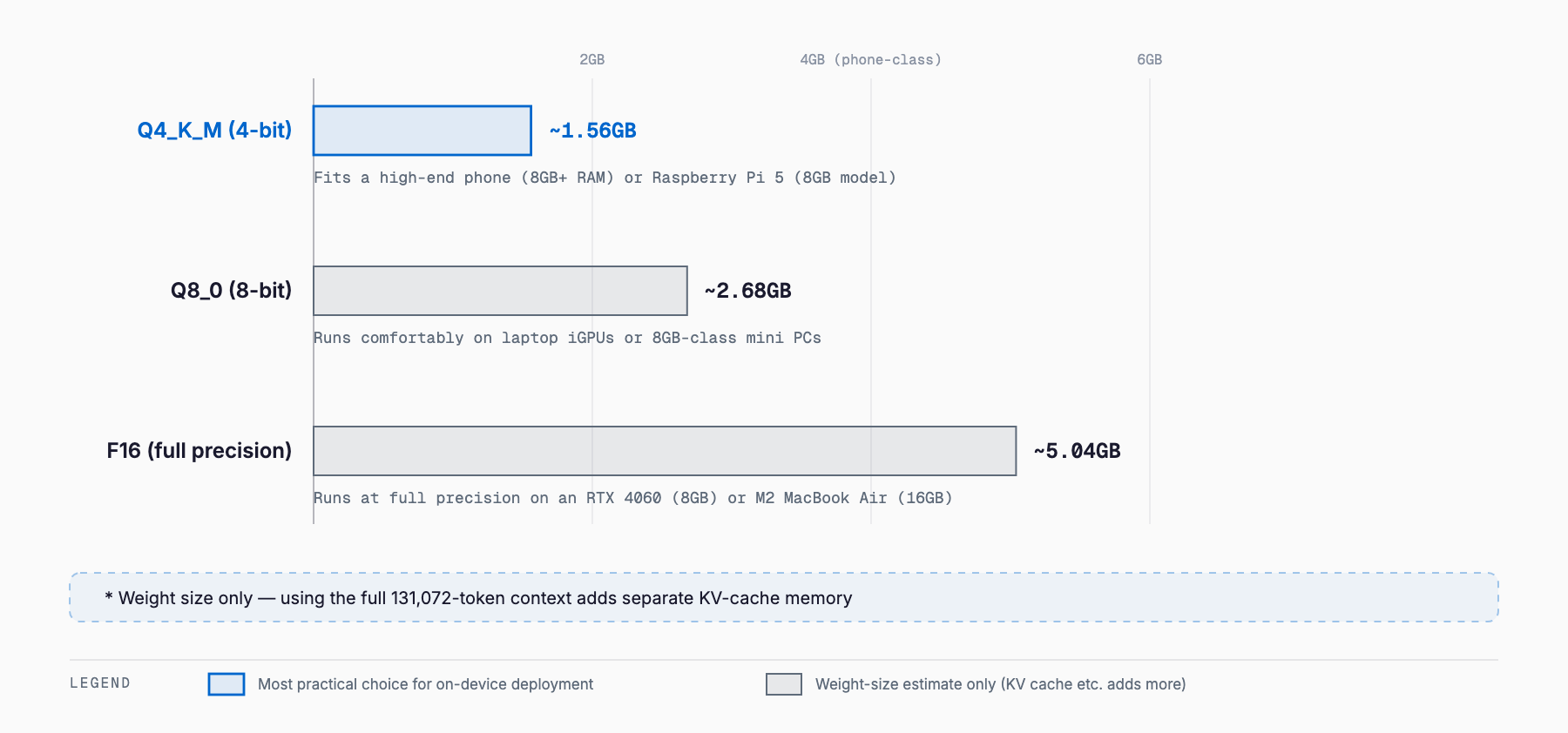
MiniCPM5-2B needs about 1.56GB at Q4_K_M, and still only ~5.04GB at F16
MiniCPM5-2B is a 2.52B-parameter dense model that OpenBMB released on September 7, 2026, built for on-device deployment. Memory needs for the official GGUF scale with quantization: about 1.56GB at Q4_K_M, 2.68GB at Q8_0, and 5.04GB even at full-precision F16 — all small enough to fit on a high-end phone or a Raspberry Pi 5. The short answer: Q4_K_M fits a high-end phone (8GB+ RAM) or a Raspberry Pi 5 (8GB model), and a laptop or mini PC has plenty of headroom even at Q8_0 or above. Below: model overview, per-quantization sizing, how to run it, and how it compares.
In October 2026 OpenBMB released the series' first MoE vision-language model. For its memory needs and setup, see MiniCPM-V 4.7 Requirements.
What is MiniCPM5-2B
MiniCPM5-2B is part of OpenBMB's MiniCPM5 series, aimed at local assistants, coding agents, tool-use workflows, and reasoning tasks where a compact model is preferred. The architecture is a standard LlamaForCausalLM (a dense Transformer, not MoE), with 2,516,756,480 total parameters (about 2.52B) and 1,981,982,720 non-embedding parameters (about 1.98B). It has 42 transformer layers with grouped-query attention (16 query heads, 2 key-value heads), and a native context length of 131,072 tokens — long for a 2B-class model. It's released under Apache-2.0, which allows commercial use with few restrictions.
| Spec | Value |
|---|---|
| Total parameters | ~2.52B (2,516,756,480) |
| Non-embedding parameters | ~1.98B (1,981,982,720) |
| Architecture | Dense (LlamaForCausalLM) |
| Layers | 42 |
| Attention | GQA (16 query heads / 2 KV heads) |
| Context length | 131,072 tokens |
| License | Apache-2.0 |
| Release date | September 7, 2026 |
| Developer | OpenBMB |
Requirements table by quantization
| Quantization | File size (official GGUF) | Typical use |
|---|---|---|
| Q2_K (community quant, reference) | ~1.04GB | Lower bound for extremely constrained memory |
| Q3_K_M (community quant, reference) | ~1.29GB | Low-memory environments |
| Q4_K_M | ~1.56GB | Main choice for phones, Raspberry Pi 5, memory-constrained setups |
| Q5_K_M (community quant, reference) | ~1.81GB | Balance of accuracy and size |
| Q6_K (community quant, reference) | ~2.07GB | Higher-accuracy middle ground |
| Q8_0 | ~2.68GB | High-accuracy runs on laptops and mini PCs |
| F16 (full precision) | ~5.04GB | Local dev/testing with no precision loss |
Q4_K_M, Q8_0 and F16 come from OpenBMB's official GGUF repo (openbmb/MiniCPM5-2B-GGUF). Q2_K, Q3_K_M, Q5_K_M and Q6_K are reference figures from a community GGUF release (DevQuasar) and are not officially guaranteed. All of these are weight-size-only estimates; running the full 131,072-token context adds separate KV-cache memory on top. To check quickly whether your own phone, PC or GPU can run it, our free VRAM calculator (no signup) lets you pick a model, quantization and context length and estimates the memory needed.
Rough fit by device
- High-end smartphone (8GB+ RAM): Q4_K_M (~1.56GB) leaves plenty of headroom after OS and app overhead. Running it through an MLC-LLM or llama.cpp-based mobile app is a practical option (actual tokens/sec vary by device and are unverified — an estimate)
- Raspberry Pi 5 (8GB model): Q4_K_M fits within memory capacity. CPU inference will be slower than on a GPU (no official figures published, so this is an estimate)
- Laptop with integrated GPU / unified memory (16GB+): Comfortable headroom even at Q8_0 (~2.68GB) or F16 (~5.04GB)
- Entry-to-mid GPU (8GB-class, e.g. RTX 4060): F16 uses roughly half the VRAM, so quantization choice barely matters
- Using the full 131,072-token context: All figures above are weight-size estimates only — longer context usage adds KV-cache memory on top
Running it with Ollama
Ollama can pull a Hugging Face GGUF repo directly. MiniCPM5-2B can be launched this way (specify Q4_K_M explicitly if you want the lightweight build, since the default tag may differ).
# Pull and run a specific GGUF from Hugging Face
ollama run hf.co/openbmb/MiniCPM5-2B-GGUF:Q4_K_M

# Or use OpenBMB's own distribution tag
ollama run openbmb/minicpm5-2b
Running it with llama.cpp
With llama.cpp, download the official GGUF and start it with llama-server. OpenBMB's model card gives this example command.
llama-server -m MiniCPM5-2B-F16.gguf -a MiniCPM5-2B --port 8080 -ngl 99 -c 8192 --jinjaRecommended sampling parameters are temperature=1.0, top_p=0.95, min_p=0.0. OpenBMB's documentation notes that llama.cpp's default min_p=0.05 can lead to repetitive output, so switching to min_p=0.0 is advised. For faster inference, OpenBMB also released a companion draft model, MiniCPM5-2B-DSpark, intended for speculative decoding alongside the main model in llama.cpp.
How it differs from existing models — comparison with Qwen3.5-4B and Gemma 4 E2B
| Model | Total parameters | Context length | License | 34-benchmark average (OpenBMB) |
|---|---|---|---|---|
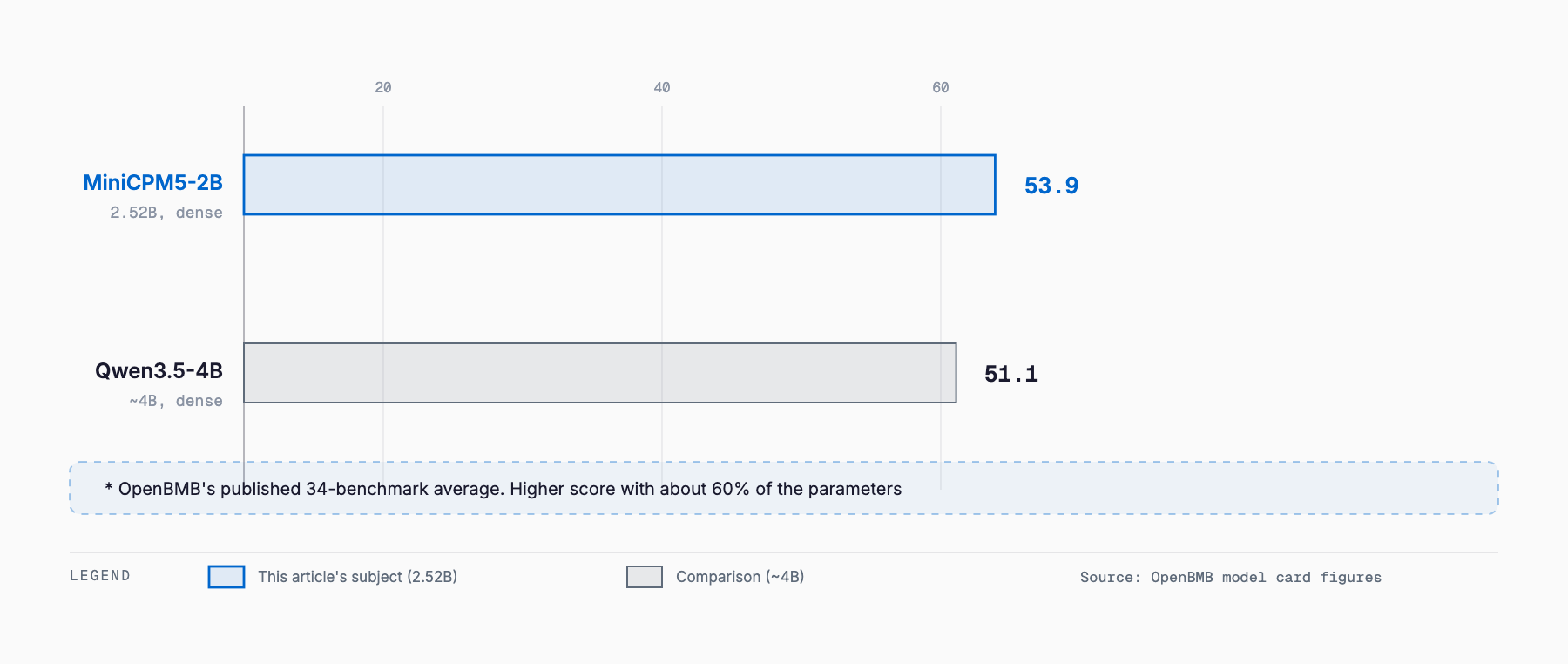
| MiniCPM5-2B | ~2.52B (dense) | 131,072 | Apache-2.0 | 53.9 |
| Qwen3.5-4B | ~4B (dense) | 262,144 (extendable to ~1,010,000) | Apache-2.0 | 51.1 |
| Gemma 4 E2B | 2B (dense, Matryoshka Transformer) | Not individually confirmed as of writing | Gemma Terms of Use | Not published (excluded from this comparison) |
On OpenBMB's published 34-benchmark average, MiniCPM5-2B (2.52B) scores 53.9 versus 51.1 for Qwen3.5-4B (~4B) — a higher average despite having about 60% of the parameter count. The gap is especially visible on long-context retrieval (AA-LCR), where MiniCPM5-2B scores 59.0% compared to OpenBMB's reported 5.3% for Qwen3.5-2B and 28.7% for Gemma-4-E2B-it. Gemma 4 E2B's own 34-benchmark average is not individually listed in OpenBMB's comparison table, so we've left it out of the table above as an unconfirmed figure. See our separate article for Gemma 4's VRAM requirements and its Matryoshka Transformer design.
Where the benchmarks stand out
- Code: 69.1 on LiveCodeBench v6
- Math: 86.5 on AIME 2026, 94.6 on MATH-500
- Tool use: 66.6 on BFCL v4, 97.1 on tau2-Bench Telecom
- Long-context retrieval: 59.0% on AA-LCR (vs. 5.3% for Qwen3.5-2B and 28.7% for Gemma-4-E2B-it, per OpenBMB)
- All figures are OpenBMB's own published numbers, not independently re-benchmarked by us
License and distribution
Both MiniCPM5-2B and its GGUF quantizations are released under Apache-2.0, which permits commercial use with few restrictions. Official distribution covers openbmb/MiniCPM5-2B (the base model) and openbmb/MiniCPM5-2B-GGUF (quantized, with Q4_K_M, Q8_0 and F16 variants); additional community quantizations (Q2_K through Q6_K) are also available on Hugging Face, for example from DevQuasar. As of September 14, 2026, a smaller sibling, MiniCPM5-1B, is also available in the same series, but this article focuses on MiniCPM5-2B.
Related Articles
- What Is Edge0-35B-A3B? — How SSD Streaming Runs a 35B MoE Model in Under 3GB of RAM
- Nex-N2.5 Requirements: VRAM, GPU and RAM for Mini, Pro and Max (2026)
Can MiniCPM5-2B run on a smartphone alone?
At Q4_K_M quantization (~1.56GB), it fits within the memory of a high-end phone (8GB+ RAM). Actual inference speed depends on the device and the app implementation (e.g. MLC-LLM or llama.cpp-based mobile apps), and no official on-device benchmark has been published as of September 2026, so this remains an estimate.
Is MiniCPM5-2B a Mixture-of-Experts (MoE) model?
No. It's a standard dense LlamaForCausalLM with 42 layers and grouped-query attention (16 query heads / 2 KV heads). The full ~2.52B parameters are used for every token.
What's the advantage over Qwen3.5-4B?
On OpenBMB's published 34-benchmark average, MiniCPM5-2B (2.52B) scores 53.9 versus 51.1 for Qwen3.5-4B (~4B) — a higher average with about 60% of the parameters. The gap is largest on long-context retrieval (AA-LCR) and some tool-use benchmarks.
How does memory usage change at the full 131,072-token context?
The figures in this article are weight-only estimates; using a longer context adds KV-cache memory on top. OpenBMB hasn't published specific KV-cache figures for full-context use, so leave headroom in practice.
What if llama.cpp keeps repeating the same output?
OpenBMB's own guidance notes that llama.cpp's default sampling setting (min_p=0.05) can cause repetitive output. Setting min_p=0.0, combined with temperature=1.0 and top_p=0.95, is the recommended fix.
Related free tools (no sign-up, instant results)
Feel free to contact us
Contact Us