Nanbeige4.3-33B Requirements
~21GB at Q4, RTX 4090 & 48GB Mac [2026]
Nanbeige4.3-33B (dense 33B): Q4_K_M is ~20.8GB and fits a 24GB GPU with short context; BF16 ~66GB. GGUF sizes, KV cache, GPU/Mac setups. Released Oct 2026.
Nanbeige4.3-33B is a dense open-weight model with about 33.1B parameters, released by Nanbeige LLM Lab. The 4-bit Q4_K_M GGUF is about 20.8GB, so it fits an RTX 3090 or 4090 (24GB) with a short context. The original BF16 weights are about 66GB and need an 80GB-class GPU or a Mac with 96GB or more. It supports up to 524,288 tokens (512K) of context, but the KV cache adds memory on top, so budget extra for long contexts.
Released on Hugging Face in late October 2026 under Apache 2.0 (commercial use allowed), it is positioned as a ~30B-class model strong at coding and office/agent ("cowork") tasks. This article works out the requirements from the published model configuration and bartowski's GGUF file sizes. The benchmarks are vendor-reported and independent verification is still limited (as of October 26, 2026).
Requirements at a Glance
| Quantization (bartowski GGUF) | File size | Memory needed (estimate) | Example hardware |
|---|---|---|---|
| BF16 | 66.24GB | 72GB+ | 80GB-class GPU, Mac 96GB+ |
| Q8_0 | 35.20GB | ~40GB | Mac 64GB, 48GB-class GPU |
| Q6_K | 29.02GB | 33-36GB | RTX 5090 (short context), Mac 48GB |
| Q5_K_M | 25.07GB | 28-31GB | RTX 5090 (32GB), Mac 48GB |
| Q4_K_M (recommended) | 20.79GB | 24-26GB | RTX 3090/4090 (short context), Mac 48GB |
| IQ4_XS | 18.64GB | 21-23GB | 24GB GPU with more context room |
| Q3_K_M | 15.92GB | 19-21GB | 24GB GPU, or 16GB GPU with partial offload |
| IQ3_XXS | 14.49GB | 17-19GB | 16GB GPU with partial offload (quality loss) |
| Q2_K | 13.53GB | 16-18GB | 16GB GPU with partial offload (quality loss) |
| IQ2_XXS | 10.07GB | 12-14GB | 12GB GPU + RAM offload (heavy quality loss) |
If you want to check quickly whether it runs on your GPU or Mac, the VRAM calculator (free, no sign-up) estimates the required VRAM from the model, quantization, and context length. Nanbeige4.3-33B is available in its model list.
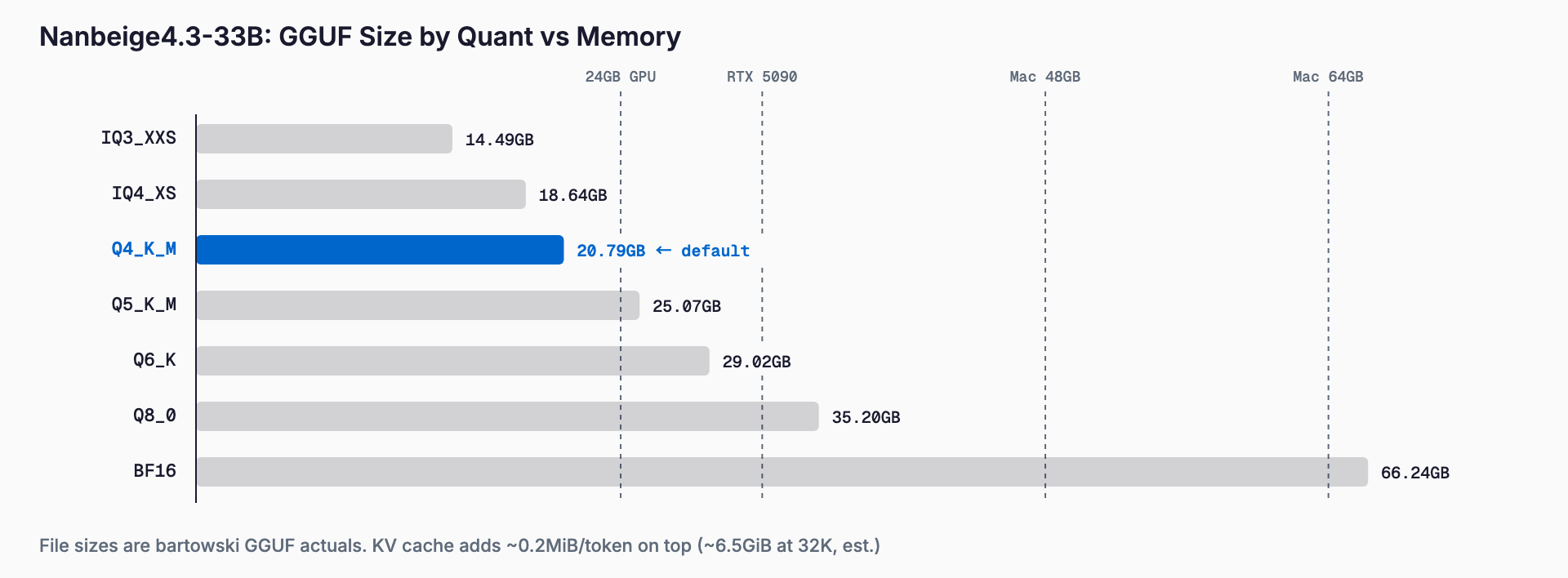
File sizes are from bartowski's GGUFs. The "memory needed" column is an estimate: file size plus KV cache (about 1.6GiB at 8K context) and runtime overhead. It is not a measurement, and it grows with context length, so treat it as close to a lower bound.
What Is Nanbeige4.3-33B?
It is the flagship "teacher" model of the Nanbeige4.3 series, released together with the base model Nanbeige4.3-33B-Base. Earlier releases centered on the 3B Nanbeige4.1-3B and 4.2-3B (a looped-transformer agent model); this one scales up to 33B. It is dense, not MoE, so every token uses all parameters. Expect slower generation than an MoE with a similar file size.
| Item | Details |
|---|---|
| Repository | Nanbeige/Nanbeige4.3-33B (Base also available) |
| License | Apache 2.0 (commercial use OK) |
| Architecture | Dense, LlamaForCausalLM |
| Parameters | ~33.1B (computed) |
| Layers / dims | 52 layers, hidden 7168, intermediate 22016 |
| Attention | 56 query heads / 8 KV heads (GQA), head_dim 128 |
| Vocabulary | 166,912 (untied embeddings) |
| Weight precision | BF16 |
| Context length | Up to 524,288 tokens (RoPE theta 1.2e8, no scaling) |
| Thinking mode | enable_thinking on by default (set False to disable) |
The parameter count is computed from the configuration. Because GQA limits KV heads to 8, the KV cache is relatively light for a dense 33B-class model.
Context Length and KV Cache
The KV cache can be computed from the configuration: 2 (K and V) x 52 layers x 8 heads x 128 dims x 2 bytes = 212,992 bytes, or about 0.2MiB per token in FP16. The figures below are estimates; implementations add overhead. A q8_0 KV cache roughly halves them.
| Context | KV cache (FP16) | KV cache (q8_0) |
|---|---|---|
| 8K | ~1.6GiB | ~0.8GiB |
| 32K | ~6.5GiB | ~3.3GiB |
| 64K | ~13GiB | ~6.5GiB |
| 128K | ~26GiB | ~13GiB |
| 512K | ~104GiB | ~52GiB |
Q4_K_M (20.8GB) plus an FP16 KV cache at 32K comes to about 27GB, which does not fit a 24GB GPU. On a 24GB card, keep to roughly 8-16K, or pair IQ4_XS with a q8_0 KV cache. Using the full 512K needs well over 100GB once weights are included. For how the KV cache works, see our KV cache and context length VRAM guide.
Hardware Guide by GPU and Apple Silicon
The following are estimates derived from the file sizes and KV cache above, not measurements.
| Environment | Suggested setup |
|---|---|
| 12GB GPU | About IQ2_XXS plus RAM offload. Heavy quality loss; hard to use in practice |
| 16GB GPU | IQ3_XXS or Q2_K with partial offload, or a short context. Quality drops |
| RTX 3090/4090 (24GB) | Q4_K_M with 8-16K context; IQ4_XS for more context |
| RTX 5090 (32GB) | Q5_K_M or Q6_K at 16-32K, or Q4_K_M with a q8_0 KV cache beyond 32K |
| 48GB-class GPU | Q8_0 fits, with room for long contexts |
| 80GB-class GPU | BF16 weights fit; long contexts need multiple cards |
| Mac 32GB | Q4 is tight (macOS reserves memory); suits smaller quants |
| Mac 48GB | Q4 and Q5 run comfortably |
| Mac 64GB | Q8_0 fits |
| Mac 96-128GB | BF16, or long contexts |
A dense 33B does more compute per token than an MoE of similar file size. We give no generation-speed numbers here because we have no measurements to back them. An MLX 4-bit build for Mac also appeared within a day of release.
Benchmarks
The numbers below are vendor-reported, and independent reproductions are still scarce. The comparison models are Qwen3.8-27B, Muse-Glimmer-30B, and Gemma4-31B.
| Benchmark | Nanbeige4.3-33B | Qwen3.8-27B | Muse-Glimmer-30B | Gemma4-31B |
|---|---|---|---|---|
| Terminal-Bench 2.1 | 80.9 | 73.0 | 61.8 | 47.2 |
| DeepSWE | 65.5 | 42.5 | 4.4 | 2.7 |
| SWE-Bench Pro | 60.3 | 61.7 | 36.9 | 51.2 |
| SkillsBench | 61.1 | 56.4 | 39.7 | 28.9 |
| Toolathlon-Verified | 70.4 | 68.5 | 47.2 | 27.8 |
| Claw-Eval (pass^3) | 78.3 | 75.2 | 57.3 | 44.2 |
| GDPval | 84.8 | 86.4 | 75.8 | 71.4 |
| GPQA Diamond | 89.5 | 89.2 | 83.5 | 91.3 |
| AIME 2026 | 95.2 | 94.5 | 94.7 | 89.2 |
| AA-LCR | 84.0 | 82.0 | 83.3 | 72.0 |
It leads on agentic measures such as terminal use and tool use, while Qwen3.8-27B is ahead on SWE-Bench Pro and GDPval and Gemma4-31B is ahead on GPQA Diamond. For the comparison models' requirements, see our articles on Qwen3.8-27B, Muse-Glimmer-30B, and Gemma 4.
How to Run It (llama.cpp, Ollama, vLLM)
The GGUF files require llama.cpp b11845 or newer; older builds may fail to load them. With llama.cpp you can pull and serve directly from Hugging Face.
llama-server -hf bartowski/Nanbeige_Nanbeige4.3-33B-GGUF:Q4_K_M -c 16384 -ngl 99With Ollama, point to the GGUF on hf.co.
ollama run hf.co/bartowski/Nanbeige_Nanbeige4.3-33B-GGUF:Q4_K_MThe official examples cover Transformers, SGLang, and vLLM. The vLLM example uses tensor parallel 4 with gpu-memory-utilization 0.8, which reads as a four-GPU recipe for BF16 with long contexts. It also runs in LM Studio and Docker Model Runner.
vllm serve Nanbeige/Nanbeige4.3-33B --tensor-parallel-size 4 --gpu-memory-utilization 0.8Recommended settings:
- Thinking mode: enable_thinking is on by default; set it to False to disable
- preserve_thinking: False for regular chat; True is recommended for multi-turn tool use, agents, and office tasks
- Tool calls: tool_call_format="xml" recommended (json is also supported)
- Agentic / tool use: temperature 1.0, top_p 0.95, max_new_tokens 65,536
- Reasoning / chat: temperature 0.6, top_p 0.95, max_new_tokens 262,144
Choosing a Quantization
Start with Q4_K_M (20.79GB). On a 24GB GPU where you want more context, use IQ4_XS (18.64GB); on a 32GB GPU or a 48GB Mac where quality matters more, go to Q5_K_M (25.07GB) or Q6_K (29.02GB). Q3 and below are ways out of a memory squeeze, and accuracy loss is more likely to show in long-reasoning agent work. For the differences between quant types, see the GGUF quantization guide; for choosing a runtime, see Ollama vs LM Studio.
Community quantizations such as FP8, NVFP4, EXL3, and AutoRound W4A16 appeared within a day (about 89 derivative repositories). Quality varies by publisher, so start with BF16 (closest to the official evaluation) or the widely used GGUFs.
Troubleshooting
- Out of memory (OOM): lower the context length, use a q8_0 KV cache, then drop one quantization level. You can lower -ngl to push layers to the CPU, at a speed cost
- Model fails to load: your llama.cpp is probably older than b11845. Update it
- Thinking runs too long: set enable_thinking=False or cap max_new_tokens. The 262,144 reasoning setting is a very high ceiling
- Unstable tool calls: use tool_call_format="xml", temperature 1.0 and top_p 0.95 for agent work, and preserve_thinking=True
- Context breaks down over multiple turns: match preserve_thinking to your use (False for chat, True for agents)
FAQ
Does Nanbeige4.3-33B run on a 24GB GPU?
Q4_K_M (20.79GB) should fit an RTX 3090 or 4090 with a short context (roughly 8-16K). IQ4_XS (18.64GB) leaves more context room. These are estimates from file sizes and vary by setup.
How much do I need for BF16?
About 66GB for weights alone, and 72GB or more with KV cache and overhead, so an 80GB-class GPU or a Mac with 96GB+. The official vLLM example uses tensor parallel 4, a setup meant for long contexts.
Can I use it with Ollama?
Yes, via the Hugging Face GGUF. For example: ollama run hf.co/bartowski/Nanbeige_Nanbeige4.3-33B-GGUF:Q4_K_M. The GGUF needs llama.cpp b11845 or newer, so also check that your Ollama bundles a recent enough llama.cpp.
Is commercial use allowed?
It is licensed under Apache 2.0, which allows commercial use. Check the current license text on the Hugging Face model card before you use it.
What is the maximum context, and how much does the KV cache grow?
Up to 524,288 tokens. The FP16 KV cache is about 0.2MiB per token: about 6.5GiB at 32K, 26GiB at 128K, and 104GiB at 512K (all estimates). A q8_0 cache roughly halves that.
Can I trust the benchmark results?
All figures here are vendor-reported and independent verification is still limited. Results are mixed: Qwen3.8-27B leads on SWE-Bench Pro and GDPval, and Gemma4-31B leads on GPQA Diamond. Testing on your own workload is the reliable way to decide.
Related free tools (no sign-up, instant results)
Feel free to contact us
Contact Us